How to write acceptance criteria (examples and template)

What’s in this article
- Key takeaways
- What are acceptance criteria in a user story?
- Acceptance criteria vs. definition of done: what’s the difference?
- What makes good acceptance criteria?
- Which acceptance criteria format should you use?
- How detailed should acceptance criteria be?
- How do you write acceptance criteria step by step?
- What do good acceptance criteria examples look like?
- What are the most common acceptance criteria mistakes?
- Is there an acceptance criteria template you can copy?
- How do you check finished work against acceptance criteria?
- FAQ
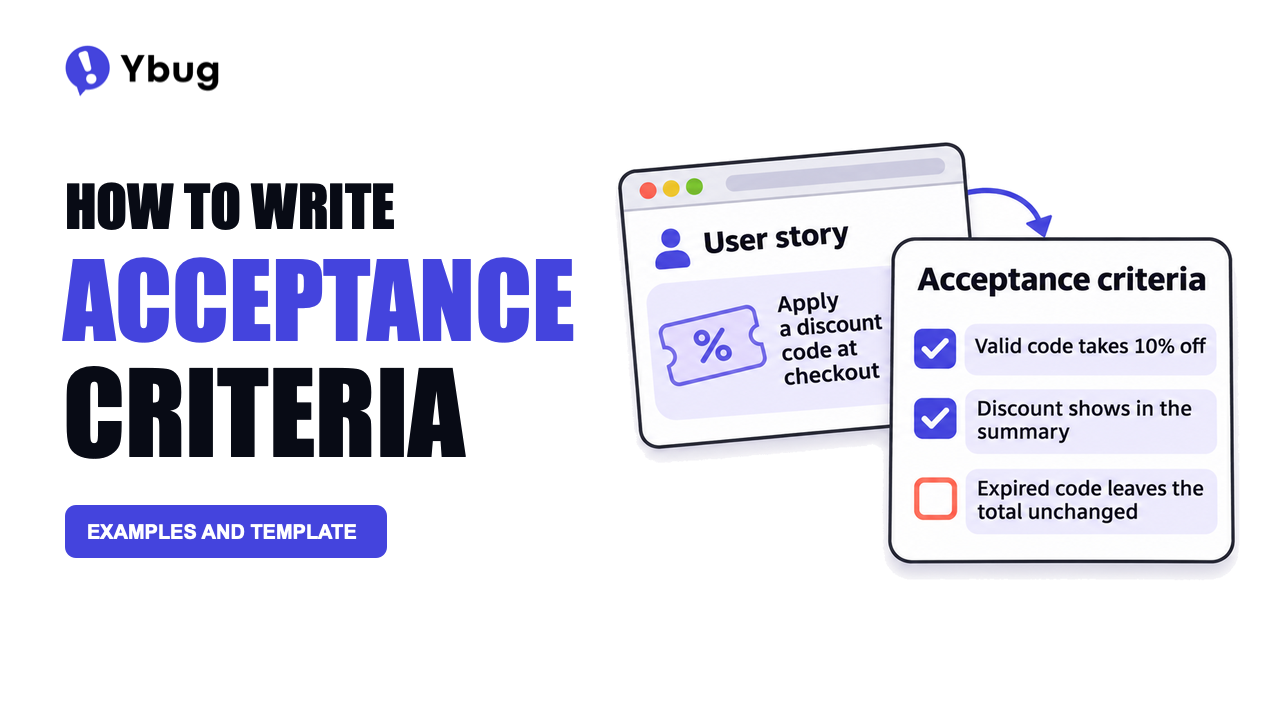
Acceptance criteria are the specific, testable conditions a user story or feature must meet before the team and the client accept it as complete, and their main advantage is that everyone agrees on what “done” means before the work starts.
Key takeaways
- What they are: pass-or-fail conditions attached to one user story, written from the user’s point of view.
- Who writes them: usually the product owner or a project manager drafts them, then a developer and a tester review them before development starts.
- Which format to use: Given/When/Then for flows with several outcomes, a simple checklist for rules, content, and UI details.
- What good looks like: each criterion is testable and describes what the user sees (not how to build it), and together they cover at least one thing that can go wrong.
- How to use them: the same criteria become the baseline checklist for QA and client sign-off, so feedback points to a specific condition instead of “this doesn’t work.”
What are acceptance criteria in a user story?
Acceptance criteria for user stories turn each story into something you can check. The story says who wants what and why. The criteria say exactly what must be true for the story to count as finished.
Take the story “As a shopper, I want to apply a discount code at checkout.” Without criteria, a developer has to guess. What happens with an expired code? Can you combine two codes? Where does the discount show up?
Each guess is a future bug report or a “that’s not what I asked for” email. Different roles lean on user story acceptance criteria for different reasons:
- Project managers and product owners use them to pin down scope and avoid surprise work mid-sprint.
- Developers use them to know when to stop building.
- Testers use them as the starting point for test cases.
- Freelancers and agencies use them as the agreed baseline for client approval, so “one more small thing” stays visible as new work.
Acceptance criteria vs. definition of done: what’s the difference?
Acceptance criteria apply to one story. The definition of done is the quality bar every story has to clear. As Scrum.org explains, the definition of done is applied to every backlog item, while acceptance criteria are tailored to a single one.
Test cases are the third piece people mix up. Here’s how the three compare:
| Acceptance criteria | Definition of done | Test cases | |
|---|---|---|---|
| Question it answers | What must this story do? | What quality bar does all our work meet? | How do we verify it? |
| Applies to | One user story | Every backlog item | One criterion |
| Written by | Product owner or PM, with the team | The whole team | Testers and QA |
| Example | An expired code shows the message “This code has expired” | Code reviewed, tested on staging, no new console errors | Enter an expired code, click Apply, check the message and the total |
Test cases describe how a tester verifies each criterion, step by step, and one criterion often needs several:
| Acceptance criterion | Test case | Expected result |
|---|---|---|
| A user can reset their password with a registered email address | Enter a registered email and submit the form | A confirmation message appears and the reset email arrives |
| (same criterion) | Open the link from the email and set a new password | The user can log in with the new password |
| Expired reset links can’t be used | Open a reset link after it has expired | An expiry message appears with a link to request a new one |
What makes good acceptance criteria?
Good acceptance criteria are testable, specific, and written from the user’s side of the screen. If two people can read a criterion and disagree on whether it passed, it isn’t finished.
The INVEST checklist for user stories lists Testable as one mark of a good user story. Clear criteria are one practical way to make that explicit. Check every criterion against these 5 rules:
- Pass or fail. Each criterion has a clear yes/no answer. If two testers could reach different verdicts, rewrite it.
- Outcome, not implementation. Describe what the user sees or can do. Leave the “how” to developers.
- Measurable where it matters. Swap “fast” for a number and a way to measure it.
- Unhappy paths included. Empty fields, wrong input, expired sessions, zero results.
- Plain language. A client or a new teammate should understand it without a glossary.
Which acceptance criteria format should you use?
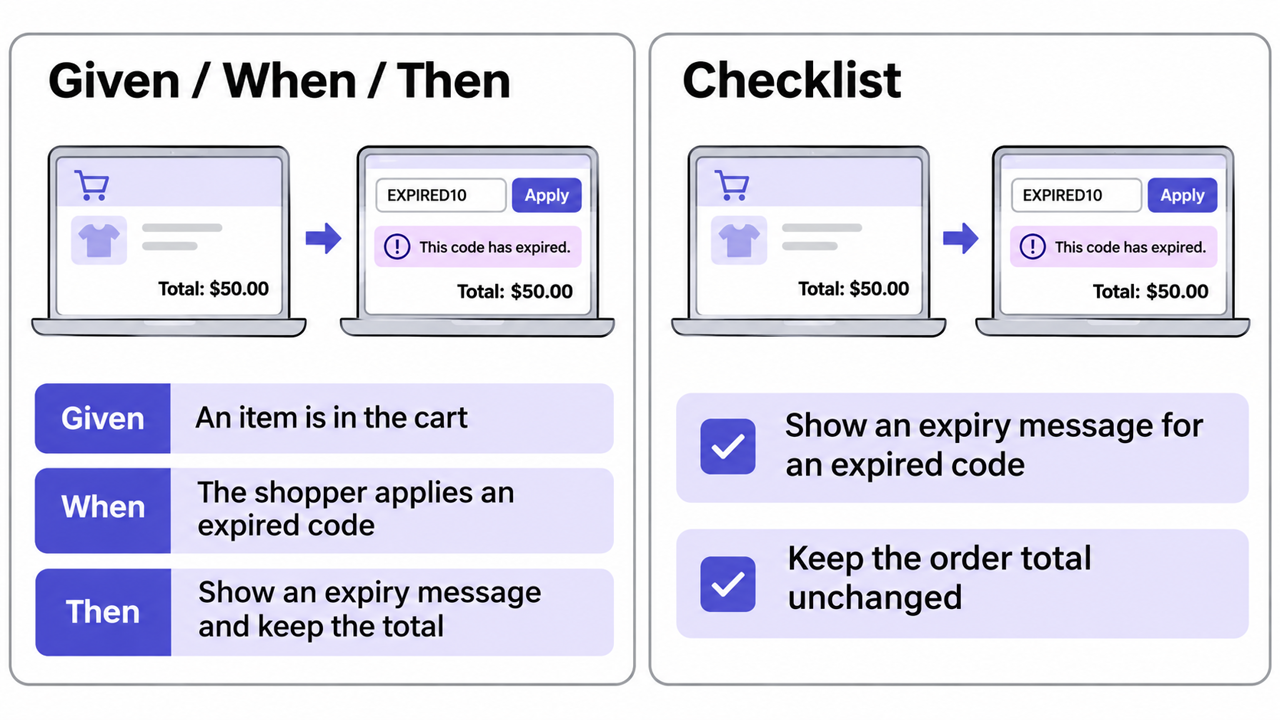
Agile acceptance criteria come in two common formats, and many teams use both. Given/When/Then suits behavior with several outcomes. A checklist suits rules and details.
The Given-When-Then structure comes from behavior-driven development. It splits a scenario into a starting context, an action, and an expected outcome. The official Gherkin reference recommends 3-5 steps per example. Cucumber’s syntax is called Gherkin, so you’ll also hear this format called Gherkin acceptance criteria. Tied to automated tests, the scenarios become executable specs, but the format works without automation.
| Format | Best for | Watch out for |
|---|---|---|
| Given/When/Then (scenario-based) | User flows, logic with several outcomes, teams that automate tests | Gets wordy for simple rules |
| Checklist (rule-based) | Validation rules, content, UI details, performance and browser requirements | Easy to slip into vague statements |
Don’t force one format on everything: “The footer shows the current year” doesn’t need three lines of Given/When/Then. It usually pays to stick to one format per story, because writing the same requirement twice is double work.
How detailed should acceptance criteria be?
Detailed enough that nobody can reinterpret “done,” and no more. The author owns the what and the why. The developer owns the how.
Two things justify more detail. The first is money. On client work, acceptance criteria often decide when a deliverable is complete and payable, so spell out exact button labels, required fields, and “matches the approved mockup.” The second is distance. The less you talk to the person building it, the more the ticket has to carry.
Keep test steps out, though: click-by-click detail belongs in a separate “QA notes” section.
A lot of the ‘bugs’ that come up in client reviews aren’t really bugs. They’re expectations nobody wrote down. Acceptance criteria put those expectations on the page before the work starts, and that saves everyone an awkward conversation later.
How do you write acceptance criteria step by step?
Start writing acceptance criteria before development starts, ideally during backlog refinement, and treat the first draft as a conversation starter. This 6-step process works for product teams and client projects alike:
- Start with the user story. Make sure the who, what, and why are clear.
- List the happy path. What does the user do and see when everything goes right?
- Ask “what if?” What if the field is empty, the code has expired, the connection drops, or the list has zero items? Add the cases that matter.
- Replace vague words. Hunt down “fast,” “easy,” “correctly,” and “user-friendly.” Rewrite each one as something you can observe or measure.
- Review with a developer and a tester. The developer spots technical limits. The tester asks “how would we test this?” and adds the invalid-input cases others miss. Teams often call this three-way review the “Three Amigos.”
- Agree before work starts, then keep changes visible. Criteria can still change when the team learns something new. Discuss the impact, update the ticket, and note what changed and why. A request that adds scope becomes a new story.
Who writes acceptance criteria? In Scrum, acceptance criteria usually start with the product owner. Elsewhere, a product manager or project manager writes the first draft, and in a small agency it may be the developer after a call with the client. There’s no single right owner, as long as nobody writes alone: agree on the criteria together, in writing, before you build.
Got a one-line ticket with no criteria? Draft them yourself and ask the author “is this what you mean?” Correcting a draft is faster than answering open questions.
Which edge cases should acceptance criteria cover?
Run through this list at step 3 and keep what applies:
| Edge case | Question to ask |
|---|---|
| Empty state | What does the user see with no saved items or zero results? |
| Invalid input | What happens with a malformed email, a letter in a number field, or a missing required field? |
| Boundary values | What happens at the maximum length, quantity, or file size, and one step past it? |
| Permissions | What does a user without the right role see? |
| Network failure | What happens if the connection drops while saving? |
| Duplicate action | What happens if the user clicks the button twice? |
| Session expiry | What happens if the session expires halfway through the form? |
What do good acceptance criteria examples look like?
Good examples are short, concrete, and include at least one failure case. Here are two user story examples with acceptance criteria you can adapt, one per format.
What does an acceptance criteria checklist look like?
User story: As a visitor, I want to send a message through the contact form so that I can ask for a quote without picking up the phone.
- The form has 4 fields: name, email, phone (optional), and message.
- Submitting with an empty required field shows an error next to that field and keeps the data already entered.
- An email address without a valid format gets the message “Please enter a valid email address.”
- After a successful submit, the visitor sees a confirmation message on the same page.
- The system sends a notification email to the site owner’s address within 1 minute of a successful submit.
- Criteria 1-5 pass in the latest two versions of Chrome, Safari, Firefox, and Edge, on desktop and mobile.
What does a Given When Then acceptance criteria example look like?
User story: As a shopper, I want to apply a discount code at checkout so that I pay the reduced price.
Scenario 1: valid code
Given a shopper has items worth $80 in the cart
When they enter the valid code WELCOME10 and click “Apply”
Then the order total drops by 10% to $72
And the discount appears as a separate line in the order summary
Scenario 2: expired code
Given a shopper has items in the cart
When they enter an expired code and click “Apply”
Then the order total stays the same
And the message “This code has expired” appears under the code field
Scenario 3: invalid code
Given a shopper has items in the cart
When they enter a code that doesn’t exist and click “Apply”
Then the order total stays the same
And the message “This code isn’t valid” appears under the code field
Stacking two codes, or discounting shipping and tax? Cover those in other criteria or list them as out of scope.
How do you fix vague acceptance criteria?
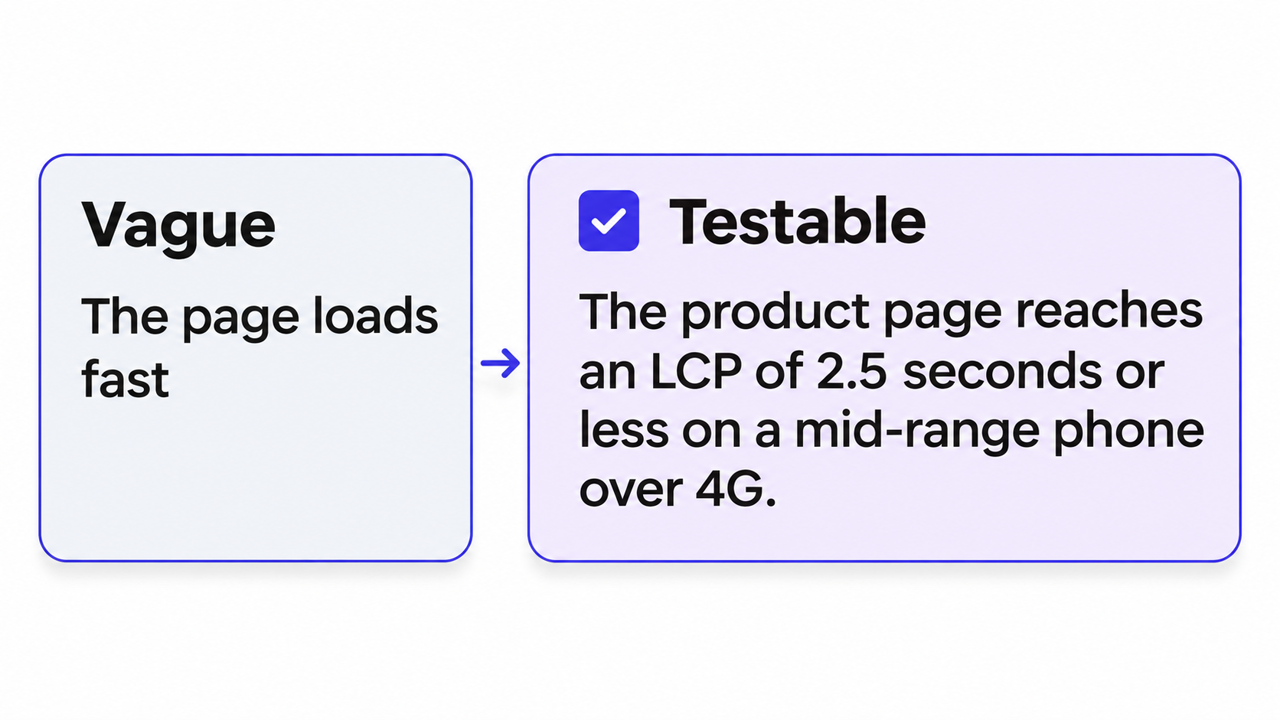
Rewrite each vague statement as something a tester can observe. Watch for 4 repeat offenders: subjective words, comparisons without a number, “as expected” with no definition, and references to something the team can’t see.
| Vague | Testable |
|---|---|
| The page loads fast | The product page reaches a Largest Contentful Paint (LCP) of 2.5 seconds or less on a mid-range phone over 4G |
| The form is user-friendly | Every field has a visible label, and each error appears next to the field it belongs to |
| Search works correctly | Searching for a product name returns every product whose name contains the search term. No match shows “No results found” with a link to all products |
| Works on mobile | At screen widths of 320 px and 375 px, the page has no horizontal scrolling and every button is tappable |
| Export is faster than before | A report with 5,000 rows exports in under 10 seconds |
| Saving works as expected | After saving, the profile page shows the new name and the message “Changes saved” |
| Pricing looks the same as on the old site | The pricing table shows the same 3 plans, prices, and feature rows as the attached screenshot |
The same goes for non-functional criteria, which say how well a feature must work, not what it does. If you can’t judge one objectively, agree on how you’ll verify it first: a named metric and test conditions for performance, specific WCAG success criteria for accessibility, set tasks and a pass rate for usability.
Vague criteria lead to vague bug reports. With Ybug, testers and clients can mark what failed on a screenshot, with technical details attached automatically.
(no credit card needed)
What are the most common acceptance criteria mistakes?
Before writing this guide, we read through discussions among developers, testers, and product managers on Reddit, Hacker News, and the Ministry of Testing community. Most of the 6 mistakes below come straight from those threads:
- Happy path only. Criteria that skip error states, edge cases, and “what if the connected service is down?” cause a lot of back-and-forth during QA testing.
- Writing them alone. A draft nobody reviewed misses technical limits and the cases a tester would catch.
- Changing them silently. Criteria can change, but developers lose trust fast when requirements shift after the build with no discussion. Criteria written after the fact only describe what got built.
- Dictating the solution. “Use a dropdown” or “the API returns 200” describes implementation. Say what the user needs instead.
- Stories that are really three stories. Count alone isn’t the test, since one form can need a dozen validation rules. Split a story when its criteria cover several independent user needs or it won’t fit in a sprint.
- Treating the list as the whole test. Criteria are the minimum, not a substitute for thinking. Testers still need to explore beyond them.
Is there an acceptance criteria template you can copy?
Yes. Copy the user story acceptance criteria template below into your ticket, doc, or Excel sheet and fill in the brackets. Keep the “Out of scope” and “Up to the developer” lines. They settle scope and ownership questions before they turn into arguments.
User story: As a [type of user], I want [goal] so that [benefit].

Acceptance criteria - checklist format

1. [User] can [action] and sees [result].
2. When [invalid input or error], the system shows [message] and [what stays unchanged].
3. [Measurable requirement: time, size, browser, device].

Acceptance criteria - scenario format

Scenario: [short name]

Given [starting context]
When [user action]
Then [observable result]
And [additional result]

Out of scope: [what this story does not cover]

Up to the developer: [decisions you are leaving open]

Open questions: [anything to resolve before development starts]

QA notes: [test data, access, or detailed steps the tester needs]

Reviewed by: [product owner / developer / tester]
Prefer a file? Download the acceptance criteria template: Excel (.xlsx) or Markdown (.md). The Excel version tracks pass/fail for each criterion.
Working in Jira? Acceptance criteria usually live in the issue description or a custom field, and the Jira integration turns Ybug reports into tickets in your Jira project.
If you run formal acceptance testing with a client, pair this with a UAT test case template so each criterion has a matching test.
How do you check finished work against acceptance criteria?
Walk through the criteria one by one in a staging environment and record a pass or fail for each. This is the heart of user acceptance testing. A quick demo mid-build catches drift while it’s still cheap to fix.
The weak spot is usually the feedback itself. Say a client tests the contact form from the checklist example and no confirmation appears. The email you get says “the form is broken,” and the developer has to work out which criterion failed, in which browser, on which page.
A visual feedback tool like Ybug closes that gap. The client clicks the widget on the page, marks the spot on the screenshot where the confirmation should be, and adds a comment. Ybug attaches the URL, browser, OS, and screen size automatically, plus the JavaScript console logs developers need. Reporters don’t need an account.
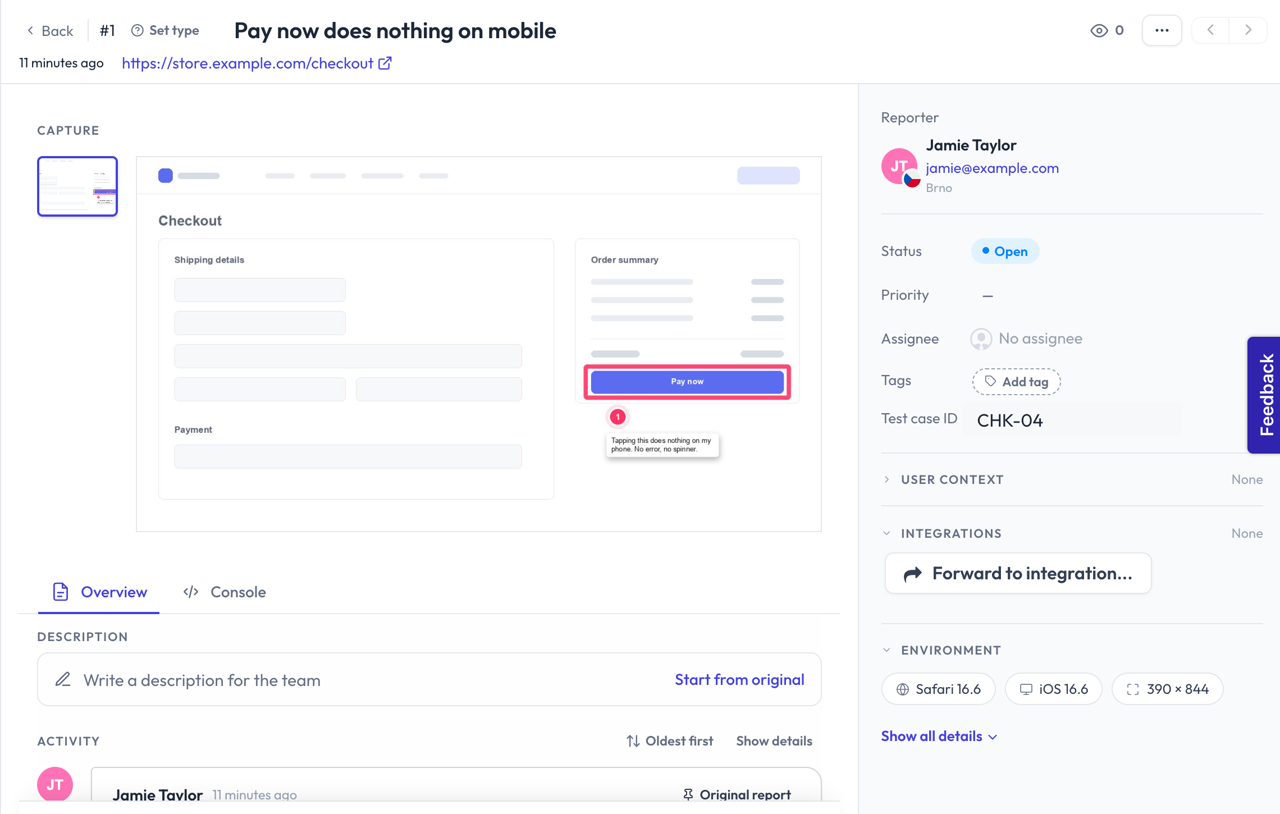
With custom form fields, you can also ask for a test case ID or the expected vs. actual result, so every report ties back to a specific criterion. And if your developers work with AI coding assistants, the Ybug MCP server lets the assistant read those reports directly, context included (from the BASIC plan up).
From there, the failed criteria become bug reports with clear steps to reproduce, ready for bug triage. The passed ones become your regression testing checklist for the next release. Product teams run the same loop to collect product development feedback on features in beta.
Collect annotated screenshots and technical context when testers report failed acceptance criteria.
(no credit card needed)


