Bug severity vs. priority: how to decide what to fix first

What’s in this article
- Key takeaways
- What is the difference between bug severity and priority?
- What are the bug severity levels?
- What are the bug priority levels?
- What do the four severity and priority combinations look like?
- Who decides severity and who decides priority?
- Why does bug classification go wrong?
- Do you need both fields, or is one enough?
- How do you classify a bug step by step?
- How does Ybug make severity and priority easier to assign?
- FAQ
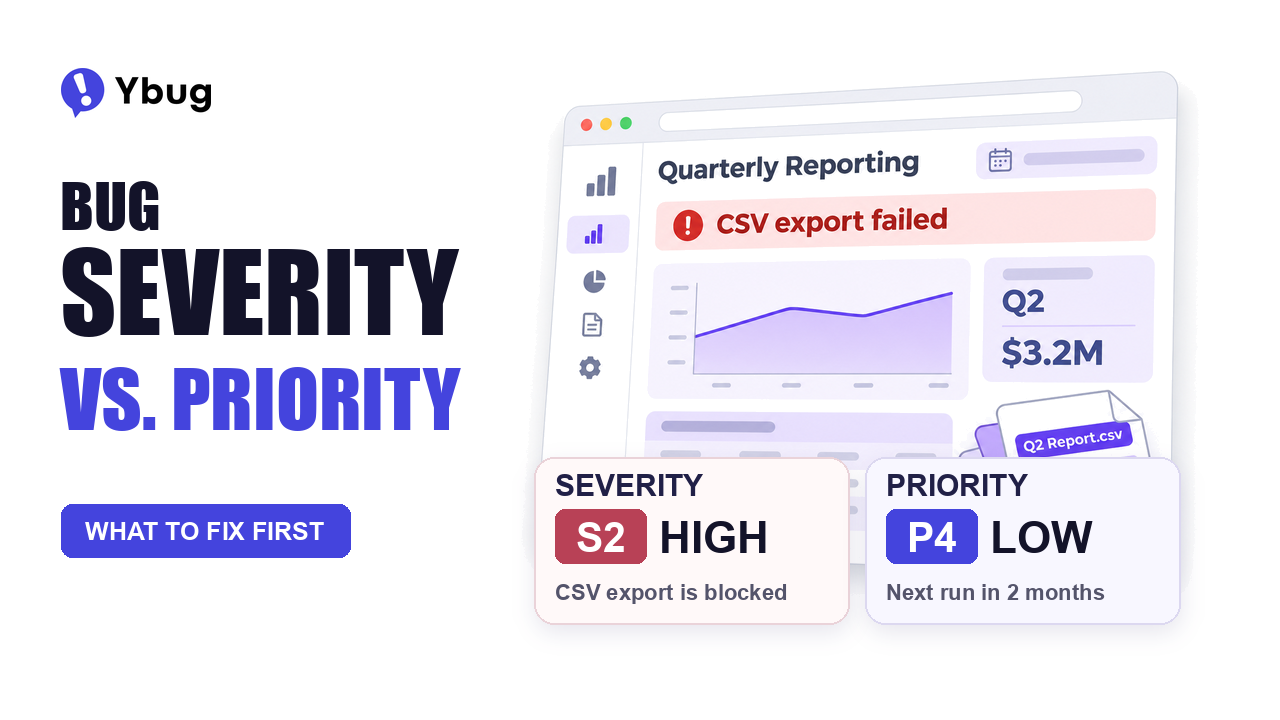
Bug severity vs. priority is the difference between how badly a bug breaks your product (severity) and how soon your team needs to fix it (priority), and its main advantage is that rating the two separately lets you fix the right bugs first instead of the loudest ones.
Key takeaways
- Severity measures impact. It describes how badly a bug breaks functionality or data, and it rarely changes unless you learn something new about the bug.
- Priority measures urgency. It sets the order of fixes based on business context, and it can change overnight.
- The two don’t always match. A crash in a rarely used export is high severity and low priority. A typo in a homepage headline is the opposite.
- Different people own each label. A tester or developer proposes severity, whoever owns the backlog sets priority, and triage confirms both.
- Written definitions beat debates. One page with 4 severity levels, 4 priority levels and an example for each settles a lot of arguments before they start.
What is the difference between bug severity and priority?
Bug severity describes how much damage a bug does to the product. Bug priority describes how soon the fix should happen compared with everything else on the team’s plate. Severity is a statement about the bug. Priority is a decision about your schedule.
That’s why the two labels behave differently over time. Severity usually stays stable once you understand the impact, and changes only when new evidence shows a different scope or consequence. Priority is more dynamic, because it also follows deadlines, business needs and the team’s capacity.
| Factor | Severity | Priority |
|---|---|---|
| Question it answers | How bad is it? | How soon do we fix it? |
| Based on | Impact on functionality, data and users | Business value, deadlines, reach and effort |
| Who sets it | Tester or developer, confirmed in triage | Product owner, project manager or team lead |
| How often it changes | Rarely, only with new information | Often, as the context shifts |
| Typical scale | S1 to S4 (critical to low) | P1 to P4 (urgent to low) |
This is how severity and priority in testing are usually taught, and long-established bug trackers work the same way. Mozilla’s Bugzilla field guide, for example, treats severity as a measure of a bug’s impact and priority as a guide to the order of fixes.
What are the bug severity levels?
Four bug severity levels are a common setup, and Mozilla’s Bugzilla uses the same number (S1 to S4). Treat the scale below as a starting point to adapt to your product, not as a universal standard.
| Level | What it means | Web project example |
|---|---|---|
| S1 - Critical | A core flow is blocked for all or most users, or data is lost or exposed. No workaround. | Checkout fails for every customer, or order details are visible to other users |
| S2 - High | A feature outside the core flows is completely broken, with no acceptable workaround. | The product review form returns an error on every submit |
| S3 - Medium | A feature is degraded or partly broken, but users can get around it. | Search filters reset after a page refresh |
| S4 - Low | Cosmetic issue with little or no effect on use. | A footer button sits a few pixels out of line |
Rate severity on evidence, not on how the report sounds. The same “the page looks broken” complaint can be an S4 styling glitch or a script error that stops a feature from working (S2). You can only tell which with a screenshot, the URL, the browser details and the console output.
Core flows are what your site exists for: buying, signing in, booking, sending an inquiry. When a bug sits between S1 and S2, that question usually settles it.
Security vulnerabilities are a special case. Dedicated scoring systems such as CVSS exist for them, so don’t rely on a four-level scale alone.
Setting up levels for the first time? Our guide to bug triage shows how they fit into a regular triage session.
What are the bug priority levels?
Bug priority levels tell the team when a fix should happen. A four-step scale covers most web projects:
| Level | Meaning | Typical target |
|---|---|---|
| P1 - Urgent | Drop current work and fix it now | Hotfix the same day |
| P2 - High | Fix in the current sprint or before the next release | Within days |
| P3 - Medium | Schedule it for an upcoming sprint | Within weeks |
| P4 - Low | Fix when someone’s already working in that area, or accept it | Backlog or won’t fix |
Naming varies. Jira ships with five default priorities from Highest to Lowest, and Google’s issue tracker documentation defines priorities from P0 to P4, with P2 as the default. The label matters less than the agreement: everyone on the project should read “P2” the same way.
Agree on what each target means, too. Starting work, having a fix ready and deploying it are three different moments, and “P1” should say which one you’re promising.
What do the four severity and priority combinations look like?
Severity and priority often move together, which is exactly why the exceptions cause confusion. This simple severity and priority matrix shows all four combinations on a typical website project:
| Combination | Example | What to do |
|---|---|---|
| High severity, high priority | Payment fails for all customers on the live store | Fix now |
| High severity, low priority | The CSV export in an admin report crashes every time. One person runs it once a quarter, and the next run is two months away | Backlog, with a reminder before the next run |
| Low severity, high priority | The client’s company name is misspelled in the homepage headline the day before launch | Fix today |
| Low severity, low priority | A tooltip is cut off on one settings page in landscape mode | Backlog |
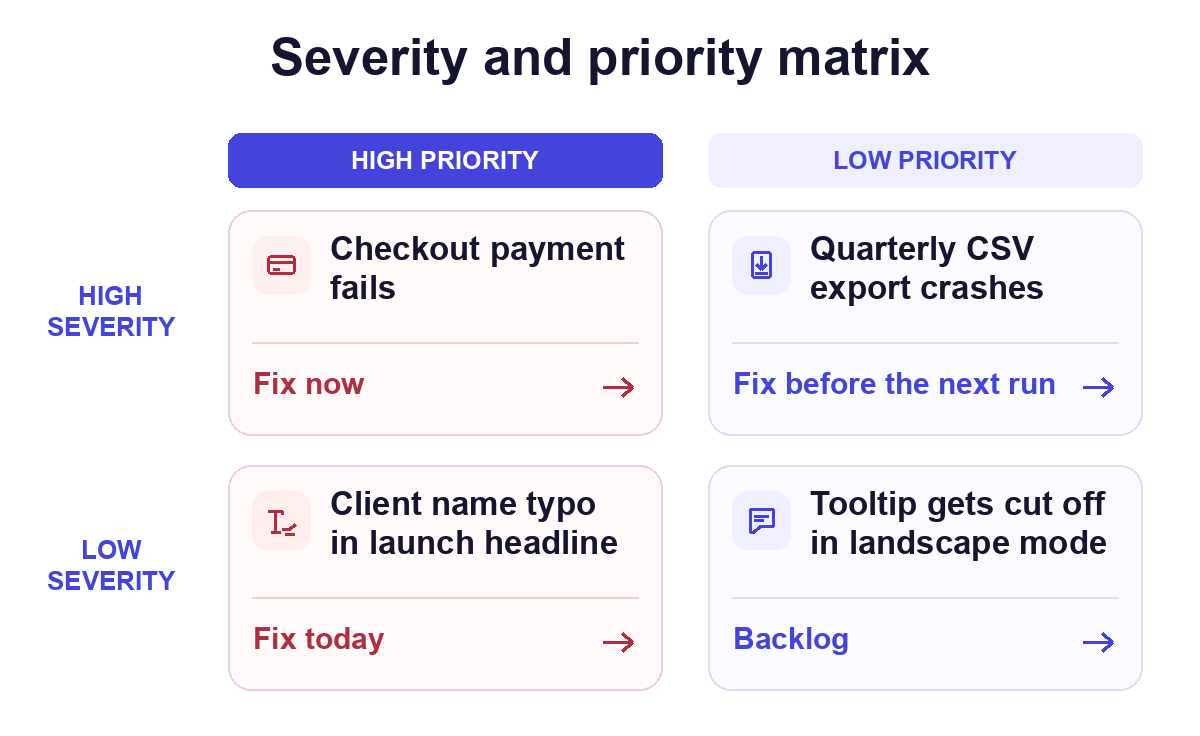
The high severity, low priority example is the one teams struggle with most. A crash feels like it must be urgent. But if it affects one internal user four times a year and the next run is two months away, fixing it this week means not fixing something your visitors run into every day.
Who decides severity and who decides priority?
The person closest to the technical impact proposes severity. The person who owns the backlog decides priority. In practice, a tester or developer rates severity when the bug is logged, and a product owner, project manager or team lead sets priority during triage.
- Testers and QA engineers see what’s broken and how reproducible it is. They’re well placed to describe impact, less so to know about contracts and deadlines.
- Developers see the cause and the cost. They can tell you a “small” bug is a symptom of something bigger, or that a scary one is a five-minute fix.
- Project managers and product owners see the launch plan, the client and the budget. That context turns severity into priority.
- Freelancers wear every hat at once. Rating severity first and priority second still helps, because it keeps “the client is upset” separate from “the site is broken.”
- Clients and customers report what they experience. Treat their urgency as input for priority, not as the priority itself.
Practitioners disagree on how much testers should rate at all. Some argue testers should only describe impact, others that whoever found the bug is best placed to give a first rating. A workable middle ground: the reporter proposes, triage confirms, and nobody treats the first value as final.
Testing consultant Michael Bolton adds a useful warning about severity: testers see symptoms, not causes, so a minor-looking symptom can hide a serious fault. Treat a first severity rating as an informed guess, and lean high when you’re unsure.
Why does bug classification go wrong?
Most teams don’t fail at defining the terms. They fail at using them under pressure. These are the problems developers and testers describe again and again:
- Priority inflation. Reporters learn that anything below the top level never gets looked at, so every ticket arrives as P1. When everything is urgent, the label carries no information, and some teams respond by adding ever-higher levels on top.
- Severity as a protest. With only one field, a tester’s only way to say “this is seriously broken” is to inflate priority. Then every bug becomes a fight over the word “critical.”
- No re-triage. An S2, P3 bug in a rarely used report should jump to P1 the day that report is needed for a client presentation. The severity hasn’t changed, the context has, and nobody updates the ticket.
- Rating without evidence. A vague report gets a vague rating, and the triage debate is really about missing information.
A handy heuristic from testing practice: a severity debate that drags on often means a fact is missing. Get more evidence before you keep arguing.
Missing facts are the easiest part to fix, because a tool can collect them for you.
Give your team the screenshot, browser details and page URL to assess the bug.
(no credit card needed)
Do you need both fields, or is one enough?
It depends on whether the person who assesses a bug is also the person who schedules the fix. If one developer or a small team does both, a single priority field is usually enough. Jira, for example, comes with a Priority field out of the box and no severity field, so teams that want severity add it as a custom field.
Two fields earn their place when assessing and scheduling are done by different people: a QA testing team feeding a product owner, or an agency where developers rate client-reported issues and a project manager plans the fixes. Severity then preserves the technical assessment, and priority records the business decision.
If your reports flow into a tracker through a Jira integration, agree on which field holds which label so it means the same thing everywhere.
How do you classify a bug step by step?
Here’s a five-step routine that works for a solo freelancer and a ten-person team alike.
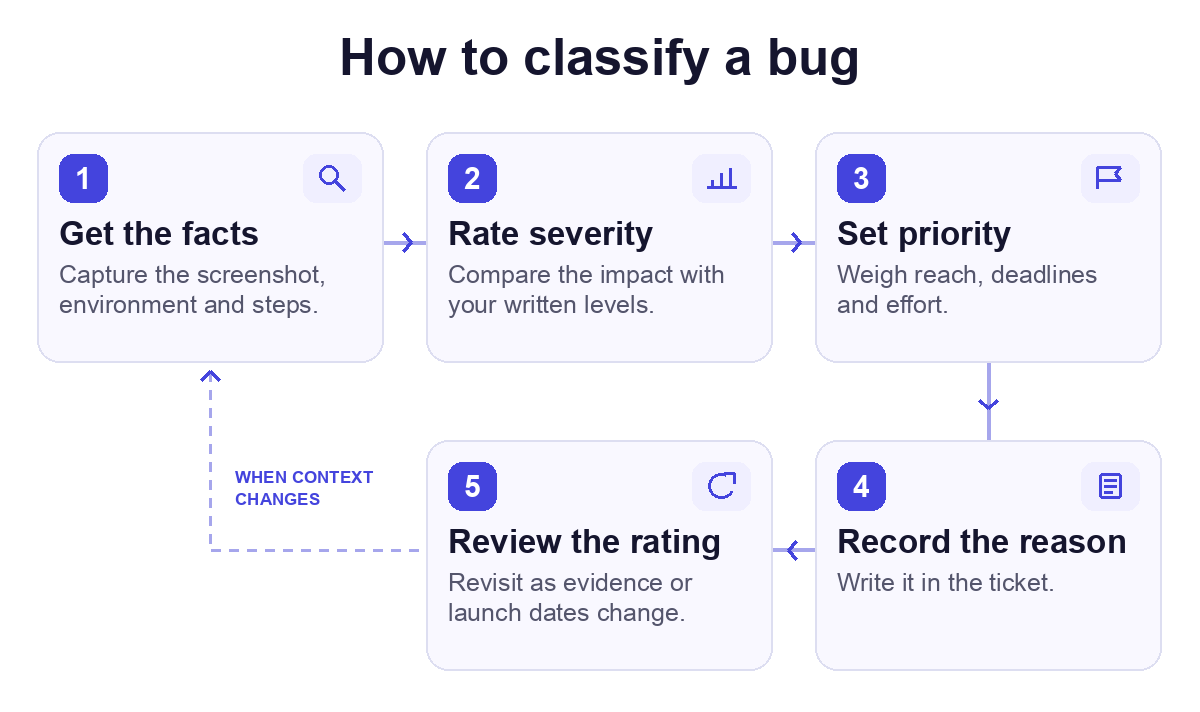
- Get the facts. Collect a screenshot, the URL, the environment and steps to reproduce. If the evidence is incomplete or the bug can’t be reproduced yet, mark the rating as provisional and ask for more. If reports keep arriving incomplete, share a short guide on how to write a bug report with everyone who files them.
- Rate severity against your written definitions. The first three questions in the table below do most of the work. When you’re torn between two levels, pick the higher one and note why.
- Set priority as a separate decision. Look at reach, visibility, deadlines, revenue and the effort of the fix. Don’t assume a high-severity bug is automatically the team’s top priority, or that a cosmetic one can always wait.
- Record the reason in the ticket. One line is enough. It saves the next person from reopening the debate.
- Review when the context changes. More affected users, a new launch date, a new workaround or new facts about the impact: revisit the open bugs in that area.
| Question | Helps you set |
|---|---|
| Does the bug block a core flow such as checkout, login or booking? | Severity |
| Can it lose, corrupt or expose data? | Severity |
| Is there an acceptable workaround? | Severity |
| How many users does it affect? | Severity and priority |
| Does it hit revenue, a contract or the brand right now? | Priority |
| Is a launch, demo or campaign coming up? | Priority |
| How much effort does the fix take, and does the bug block other work? | Priority |
A real-world example: an agency is running user acceptance testing on a new online store. Two days before launch, the client reports two issues:
“The discount code field does nothing when I click Apply.”
“Our slogan on the homepage says ‘qaulity’.”
The first is S2: a feature is completely broken with no workaround. But the client isn’t running any promotions in the first month, so, with the client’s agreement, the team hides the field for launch, sets the bug to P3 and schedules it for the first sprint after go-live. The second is S4, purely cosmetic, yet it sits on the page every visitor will see on day one. It goes to P1 and gets fixed within the hour.
A one-line note in each ticket explains why:
Severity: S2 - discount code can’t be applied, no workaround. Priority: P3 - no promotions planned in the launch month, field hidden for now, fix in the first post-launch sprint.
How does Ybug make severity and priority easier to assign?
Ybug is a visual feedback tool that lets clients, testers and teammates report issues straight from the page they’re looking at. Each report arrives with a screenshot the reporter can annotate, the URL and browser and screen details. Depending on your plan, console logs capture adds the console errors and warnings from the page.
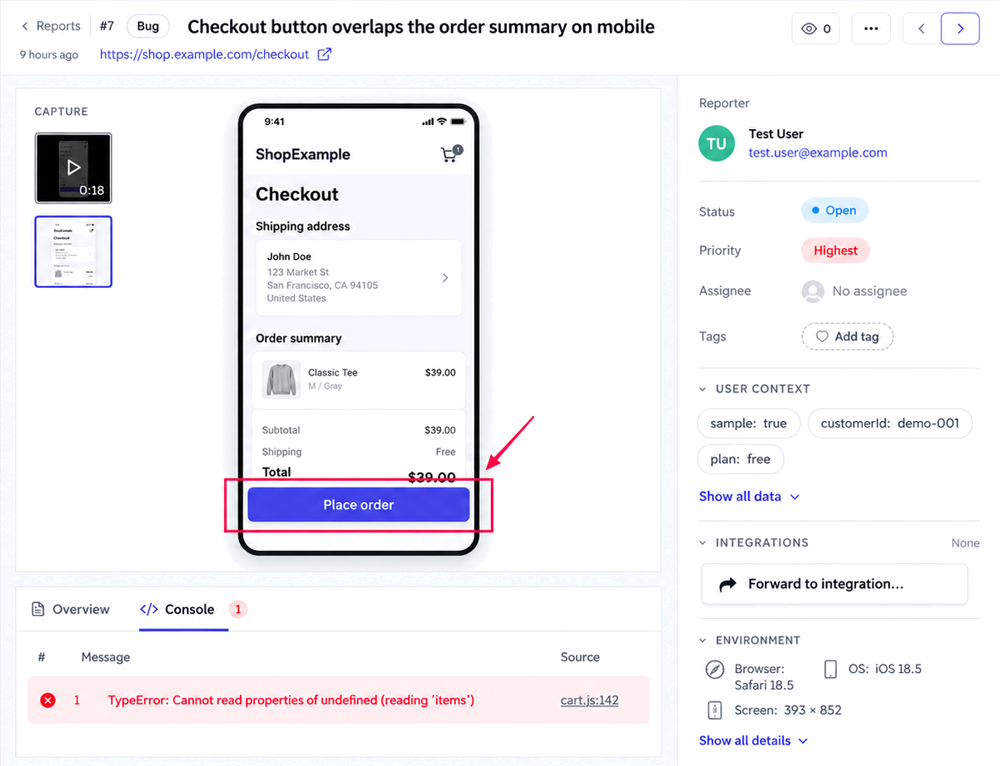
That changes the triage conversation. When reports include the same technical context, teams can use that evidence to decide what to do next. Each report also has built-in status and priority fields, so the decision lives right next to the evidence. On the COMPANY plan, QA teams can add custom fields to the widget, such as a severity dropdown, so the tester’s first rating arrives with the report.
That’s the idea behind Ybug’s approach to bug reporting: the reporter clicks and comments, and the tool collects the technical details.
Most arguments about priority are really arguments about missing information. When a report shows exactly what the user saw and what the browser logged, the severity is usually obvious, and the team can spend its energy on the only real question: what to fix first.
Give your team the evidence to decide what to fix first.
(no credit card needed)


