Bug triage: how to prioritize your bug backlog effectively

What’s in this article
- Key takeaways
- What does bug triage mean?
- What’s the difference between bug severity and priority?
- What are the common bug severity levels?
- How do you prioritize bugs?
- How do you run a bug triage session?
- How does bug triage work with client and customer feedback?
- What makes bug triage fail?
- Which tools help with bug triage?
- FAQ
Bug triage is the process of reviewing incoming bug reports to decide which ones get fixed, when, and by whom, and its main advantage is that your team always works on the bugs that matter most instead of the ones that arrived last.
Key takeaways
- Bug triage turns a pile of reports into an ordered queue: every bug leaves the session with a severity, a priority, an owner, and a target sprint.
- Severity and priority are different things. Severity measures technical impact, priority measures business urgency — a typo on your checkout page can outrank a crash in a feature almost nobody uses.
- A short, regular cadence works best: most teams triage new reports two or three times a week and review the full backlog once a week.
- Incomplete reports are the biggest time sink. Without steps to reproduce, browser, OS, and console errors, someone has to chase the reporter before any decision can be made.
- Triage fails without an owner. One person or a rotation must run the process, enforce severity definitions, and feed the results into sprint planning.
Without bug triage, a backlog slowly turns into noise. The newest reports get fixed first, critical issues get buried under cosmetic ones, and developers spend their afternoons on whatever shouted loudest. Here’s how to set up a triage process your whole team — developers, testers, and project managers — can actually keep up with.
What does bug triage mean?
The bug triage meaning comes from emergency medicine, where triage is the quick assessment that decides which patient gets treated first. Software teams borrowed the idea: when you triage bugs, you run a short, time-boxed review of new issues to decide urgency, assign ownership, and route each report to the right place in your workflow.
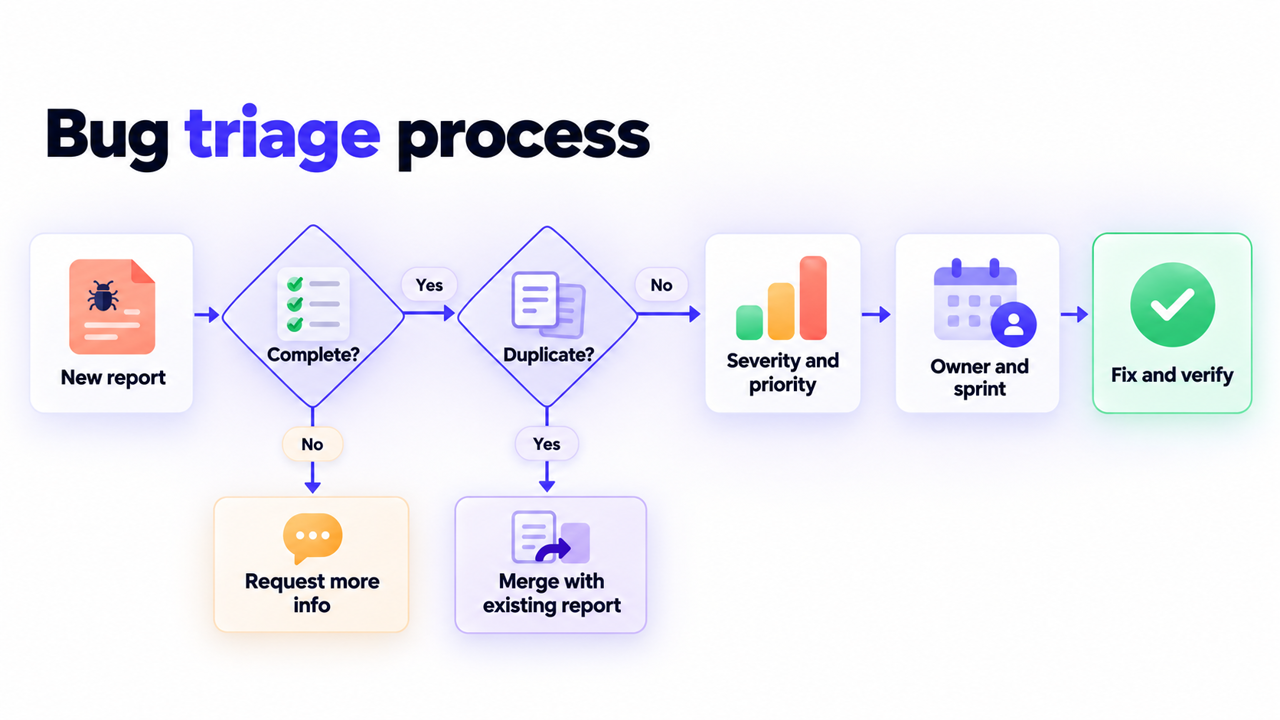
A typical triage session covers six things:
- Reviewing bug reports submitted since the last session
- Checking that each report is complete and reproducible
- Merging duplicates into a single report
- Setting a severity level (how bad is it?) and a priority level (how soon do we fix it?)
- Assigning an owner and a target sprint or milestone
- Sending reports that lack information back to the reporter
Triage doesn’t fix bugs. It makes sure every fix your team starts is the right one. Large open-source projects take this seriously: the Firefox triage guidelines ask teams to assess new bugs daily and fully triage them within one week of filing.
What’s the difference between bug severity and priority?
Severity describes technical impact — how badly the bug breaks functionality or data. Priority describes business urgency — how soon the fix needs to happen compared to everything else on the list. They’re the two most important labels in triage, and the two most often confused.
| Attribute | What it measures | Who usually sets it | Example |
|---|---|---|---|
| Severity | Technical impact: how badly the bug breaks functionality or data | QA tester or developer reviewing the report | A bug that corrupts user data is Critical severity |
| Priority | Business urgency: how soon the fix is needed relative to other work | Product manager or team lead during triage | A cosmetic issue on a high-traffic landing page gets High priority despite Low severity |
A bug can be high severity, low priority: a complete failure in an admin export that one internal user runs once a quarter. Or low severity, high priority: a misspelled headline on the homepage that every visitor sees. When a team mixes up the two, triage decisions stop reflecting what the business actually needs.
A practical rule from the GitLab issue triage handbook: if a bug seems to sit between two severity levels, pick the higher one, and add a short note explaining why so the next person understands the decision.
What are the common bug severity levels?
Most teams work with four severity levels. Treat the definitions and response times below as a starting point and adapt them to your product, your risk tolerance, and your release cycle.
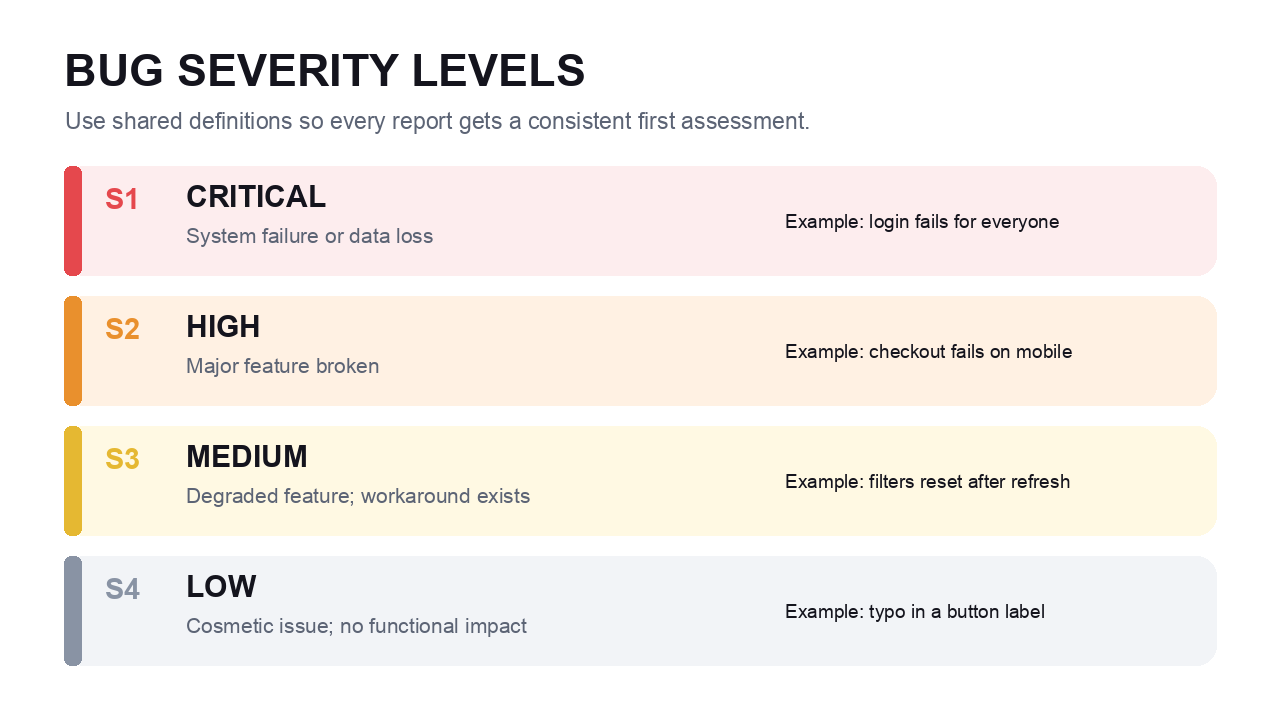
| Level | Definition | Example | Typical response |
|---|---|---|---|
| Critical (S1) | System failure or data loss, the product is unusable | Login doesn’t work for any user | Fix immediately, same day |
| High (S2) | Major feature broken for a significant share of users | Checkout fails on mobile | Fix in the current sprint |
| Medium (S3) | Minor feature broken or degraded, a workaround exists | Search filters reset on page refresh | Fix in the next sprint |
| Low (S4) | Cosmetic or minor UX issue with no functional impact | Typo in a button label | Fix when there’s capacity |
Whatever levels you choose, write them down and share them with everyone who reports bugs. Clients, support agents, and testers can only label bugs consistently if they know what “Critical” means on your project.
How do you prioritize bugs?
To prioritize bugs, start from severity and then add business context. Four questions do most of the work:
- How many users does the bug affect?
- Is there a workaround?
- What’s the impact on revenue, reputation, or compliance?
- Is it blocking a release or a key user flow like signup or checkout?
Combining severity with reach gives you a simple bug prioritization matrix:
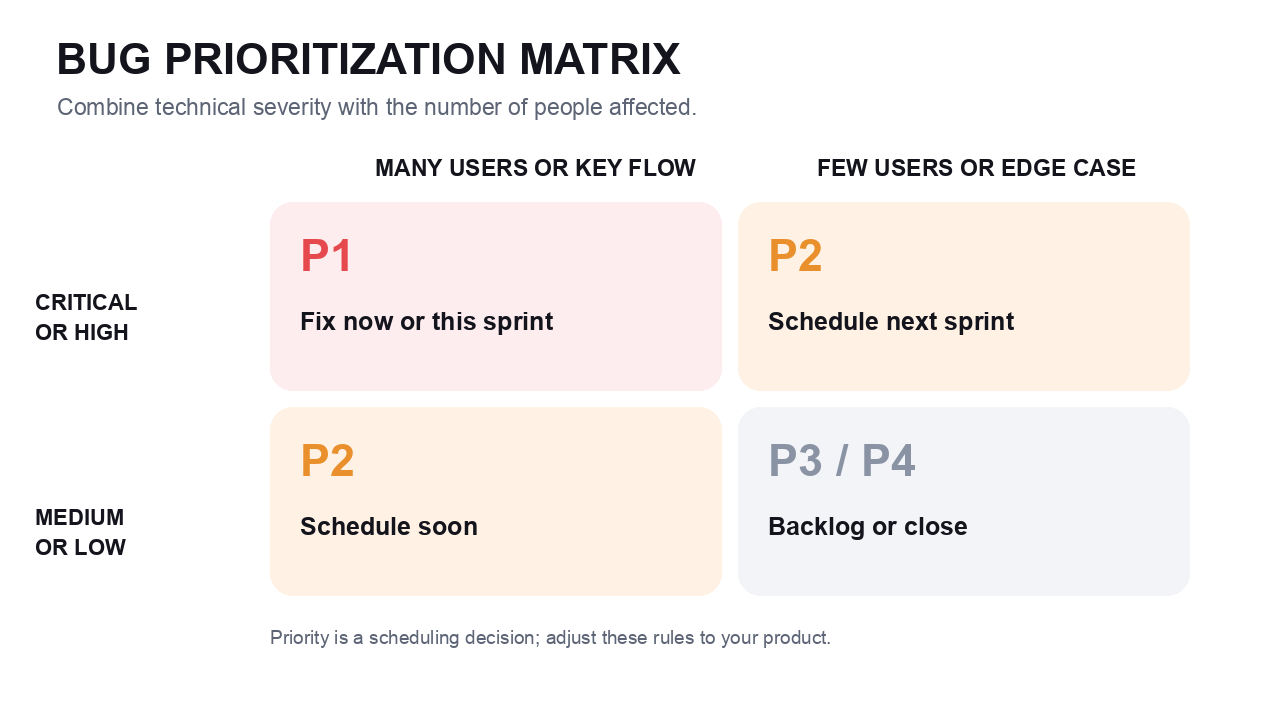
| Affects many users or a key flow | Affects few users or an edge case | |
|---|---|---|
| Critical or High severity | P1: fix now or in the current sprint | P2: schedule for the next sprint |
| Medium or Low severity | P2: schedule soon, many people see it | P3/P4: backlog, or close as “won’t fix” |
This mirrors how larger vendors handle it. Atlassian’s cloud bug fix policy, for example, explains that most bugs start at low priority until triage assesses their real impact, and low-priority bugs typically get fixed only when developers are already working in that area of the product. That’s a healthy mindset: not every bug deserves a slot in the sprint.
How do you run a bug triage session?
Step 1: Set a regular cadence and a clear owner
Bug triage works best as a recurring, time-boxed meeting, not an ad-hoc reaction to complaints. Pick a rhythm that matches your volume:
- Daily (around 15 minutes): new Critical and High reports only. Good for teams shipping daily or running an active beta.
- Two to three times a week (around 30 minutes): all new reports since the last session. Works for most product teams.
- Weekly backlog review (45-60 minutes): new reports plus a status check on everything still open.
Name a triage owner, usually the product manager, tech lead, or QA lead. On developer-heavy teams, a weekly rotation spreads the load so nobody burns out on it. To keep short sessions short, let the reporter or QA suggest an initial severity; triage then confirms or corrects it.
Step 2: Check that the report is complete and not a duplicate
Before you discuss a bug, confirm the report gives a developer everything needed to reproduce it:
- Numbered steps to reproduce
- Expected result vs. actual result
- Environment: browser, OS, screen size, app version, page URL
- Visual evidence: an annotated screenshot or screen recording
- Console errors, if there are any
Anything missing gets labeled “needs more info” and goes back to the reporter, because triaging half a report wastes the whole meeting. Search for duplicates too: the same bug reported by three people should become one report with three confirmations, which is also a useful signal for priority. For a full breakdown of what a good report contains, see our guide on how to write a bug report.
This is where your collection method makes or breaks triage. The reports that stall are rarely the hard bugs; they’re the ones without a URL or a browser version. When reporters use a visual feedback tool like Ybug on your staging or live site, browser, OS, screen resolution, page URL, and console logs capture happen automatically with every submission, so reports reach triage complete.
Most bug reports we get come through the Ybug widget in our own app, so I rarely have to ask which page or which browser. The screenshot, the URL, and the console errors are already there, and I can go straight to deciding whether it’s a real bug and how urgent it is.
Step 3: Assign severity and priority
Confirm the severity against your written definitions, then set priority using the matrix above. Watch the words reporters use: a client or colleague writing “urgent” in the title is input, not a priority decision. If you change a severity someone else set, leave a one-line comment explaining why.
Ybug captures a screenshot and technical context with every report, so your team can spend triage time deciding what to fix.
(no credit card needed)
Step 4: Assign an owner and a milestone
Every triaged bug needs a named owner and a target sprint or milestone before the session ends. A bug with a severity, a priority, and no owner isn’t triaged. It’s just labeled.
Step 5: Keep the backlog clean
Good bug backlog management doesn’t stop at new reports. Part of every weekly review is cleaning up what’s already there:
- Close bugs that are fixed and verified
- Mark consciously deprioritized issues as “won’t fix” with a one-sentence reason, and agree up front who has the final word on that call
- Retest bugs marked as fixed but not yet verified
- Close or escalate “needs more info” reports that have waited too long without a reply; a two-week limit is a common rule of thumb
A backlog you can’t scan in a few minutes is a backlog nobody trusts. Closing stale items is part of the job, not a sign of failure.
How does bug triage work with client and customer feedback?
Triage gets harder when reports come from people outside the dev team. Clients, stakeholders, and customers don’t know your severity scale, and to them almost everything feels urgent.
Here’s a workflow that works well for agencies and freelancers during a website launch:
- Collect feedback in one channel. Install a feedback widget on the staging environment instead of accepting emails, chat messages, and PDFs full of scribbles.
- Separate bugs from change requests. “The contact form doesn’t send” is a bug. “Can we make the logo bigger?” is a change request with its own budget and timeline.
- Agree on severity definitions at kickoff. When the client knows what Critical means, “everything is urgent” becomes a conversation you can actually have.
- Report triage decisions back. A short weekly summary of what’s fixed, what’s scheduled, and what’s deferred stops the client from re-reporting the same issues.
A feedback tool for agencies makes this easier because every client report lands in your tracker with a screenshot and technical context, so the PM triages real issues instead of decoding vague emails. The same logic applies to customer support: when support escalates a ticket, triage should receive the customer’s environment details along with it, not just a summary of the complaint.
What makes bug triage fail?
No defined owner. If triage is everyone’s job, it’s nobody’s. One person or a rotation owns the cadence, the process, and backlog health.
Triaging incomplete reports. Investigating whether a bug is real during the meeting turns a short session into a long one. Send the report back and move on.
Severity creep. When every bug is “urgent,” none of them are. Enforce your written definitions, especially for bugs reported by senior stakeholders or big customers.
Ignoring duplicates. Five copies of the same bug scatter the discussion and make the backlog look bigger than it is.
No link to sprint planning. A prioritized list that nobody checks when planning the next sprint is just a neatly sorted archive.
Which tools help with bug triage?
Most teams run triage inside the tracker they already use, such as Jira, Linear, GitHub Issues, or Trello. The specific tool matters less than three capabilities: a clear view of incoming reports, fields for severity and priority, and a connection to sprint planning.
The weak spot is usually the input, not the tracker. For QA testing and client reviews, pairing your tracker with a visual feedback widget means reports arrive with the technical context triage needs. With Ybug’s Jira integration, for example, each report becomes a Jira issue with the annotated screenshot, environment data, and console logs already attached, ready for your next triage session. Ybug has a built-in priority field, and you can add severity as a custom dropdown field in the widget, so reporters suggest an initial level and it travels to Jira with the rest of the report.
Triage itself can get faster too. With the Ybug MCP server, you connect Claude, Cursor, ChatGPT or another AI assistant to your Ybug project and ask it to prepare the session: go through new reports with their console logs, flag likely duplicates, and propose a priority for each one. Once the team agrees, the assistant sets the priority, status, assignee, and tags, and leaves a comment explaining the decision.