What is regression testing and how to run it on a website

What’s in this article
- Key takeaways
- What does regression mean in software testing?
- Why do regressions happen on websites?
- What should a regression test suite cover?
- How do you choose which regression tests to run?
- Should regression testing be manual or automated?
- What is visual regression testing?
- How do you run regression testing on a web project?
- Who is responsible for regression testing?
- FAQ
Regression testing is the practice of re-running existing tests after a code change to confirm that nothing that worked before is broken, and its main advantage is that it catches side effects of a change before your users find them.
Key takeaways
- Regression testing checks old features, not new ones. It confirms that what worked before a change still works after it.
- Every change is a regression risk: bug fixes, new features, refactoring, dependency updates, and CMS or plugin updates.
- Run it before every production release, on staging or in your CI pipeline, starting with the flows that matter most to the business.
- Start manual, automate what repeats. A structured checklist beats ad-hoc clicking, and automation pays off once the same checks run every week.
- Visual regressions still need human eyes. Screenshot comparisons flag pixel changes, but a person has to judge them and report real issues with full context.
In web development, regressions happen all the time. A CSS fix for the mobile menu shifts the desktop header. A JavaScript update for a new feature quietly breaks a form three pages away. A plugin update changes checkout behavior without anyone touching your code. Regression testing is the systematic check that catches these side effects before your users do.
What does regression mean in software testing?
In software, a regression is a bug introduced by a change: something that used to work stops working. The word comes from “going backward,” and that’s exactly what users experience when a feature they relied on suddenly breaks.
Regression testing in software testing answers one question: “Does everything that worked before this change still work now?” It sits alongside several other testing types that teams often mix up:
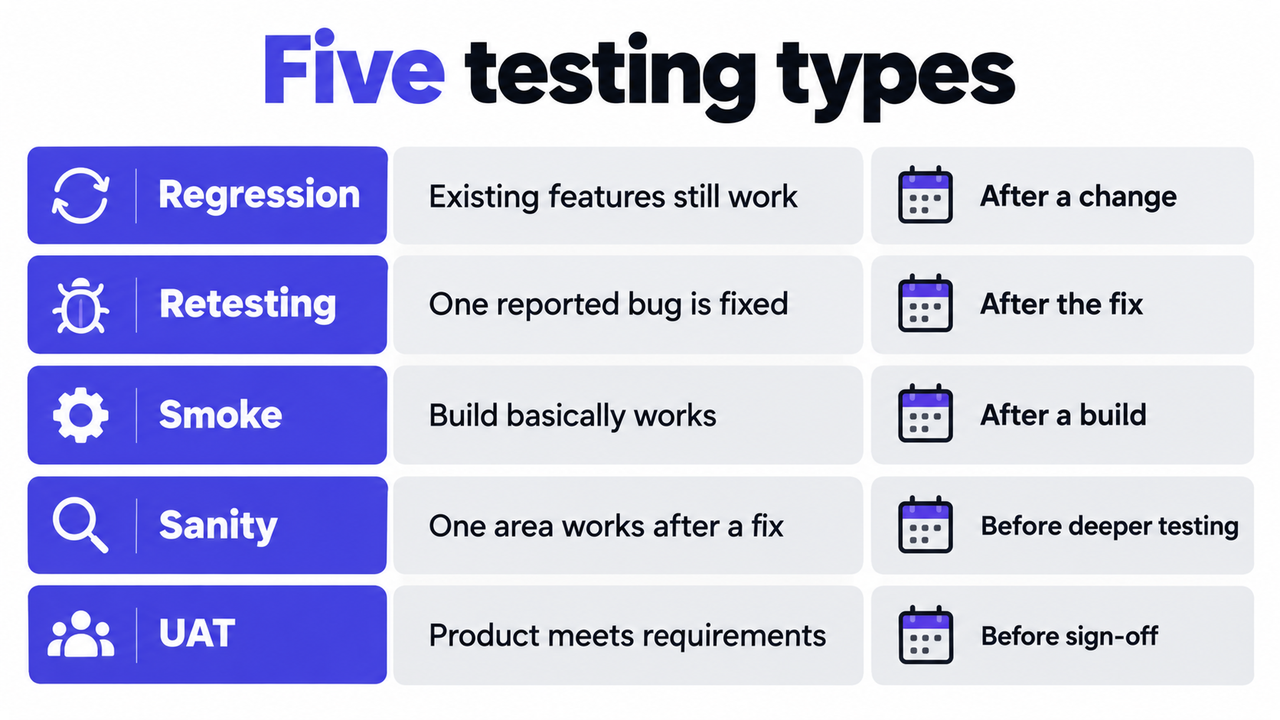
| Testing type | Purpose | When it runs |
|---|---|---|
| Regression testing | Verify existing features still work after a change | After every significant change, before deployment |
| Smoke testing | Quick check that the build basically works | Right after a build or deployment |
| Sanity testing | Narrow check of one area after a targeted fix | After a specific fix, before deeper testing |
| Retesting | Confirm a specific reported bug is fixed | After the fix is deployed to staging |
| User acceptance testing (UAT) | Stakeholders confirm the product meets requirements | Before final sign-off and launch |
Terminology varies between teams and sources, especially around smoke and sanity testing, so agree on your own definitions inside the team. For the stakeholder stage, our guide on what is UAT covers the full process.
What is the difference between regression testing and retesting?
Retesting confirms one specific fix; regression testing checks everything around it. When a developer fixes a broken login button, the tester retests the button to confirm the fix works. Regression testing then checks whether the fix changed anything else, for example the password reset flow that shares the same form component.
Both usually happen on staging after a fix is deployed. Retesting closes the ticket. Regression testing protects the release.
Smoke testing vs. regression testing: what’s the difference?
Smoke testing is fast and shallow; regression testing is slower and deeper. A smoke test takes a few minutes and answers “Does the build basically work?” The homepage loads, login works, the checkout opens. Regression testing goes through the full list of important flows and previously fixed bugs. A common setup is to run the smoke test first and start the longer regression run only once the build passes it.
Why do regressions happen on websites?
Regressions happen because modern websites are interconnected. A change in one place can affect something that looks completely unrelated. The most common triggers:
- Bug fixes in shared code: fixing a function used by several features can break the others that depend on it.
- New features: new code touches existing components, styles, and data flows.
- Refactoring: the intended behavior stays the same, but the implementation changes, and edge cases slip through.
- Dependency updates: a new version of a library, framework, or third-party script can change behavior your code relies on.
- CMS, theme, and plugin updates: on WordPress, Shopify, or Webflow, an update can break working functionality without any change to your custom code.
What does a regression look like in practice?
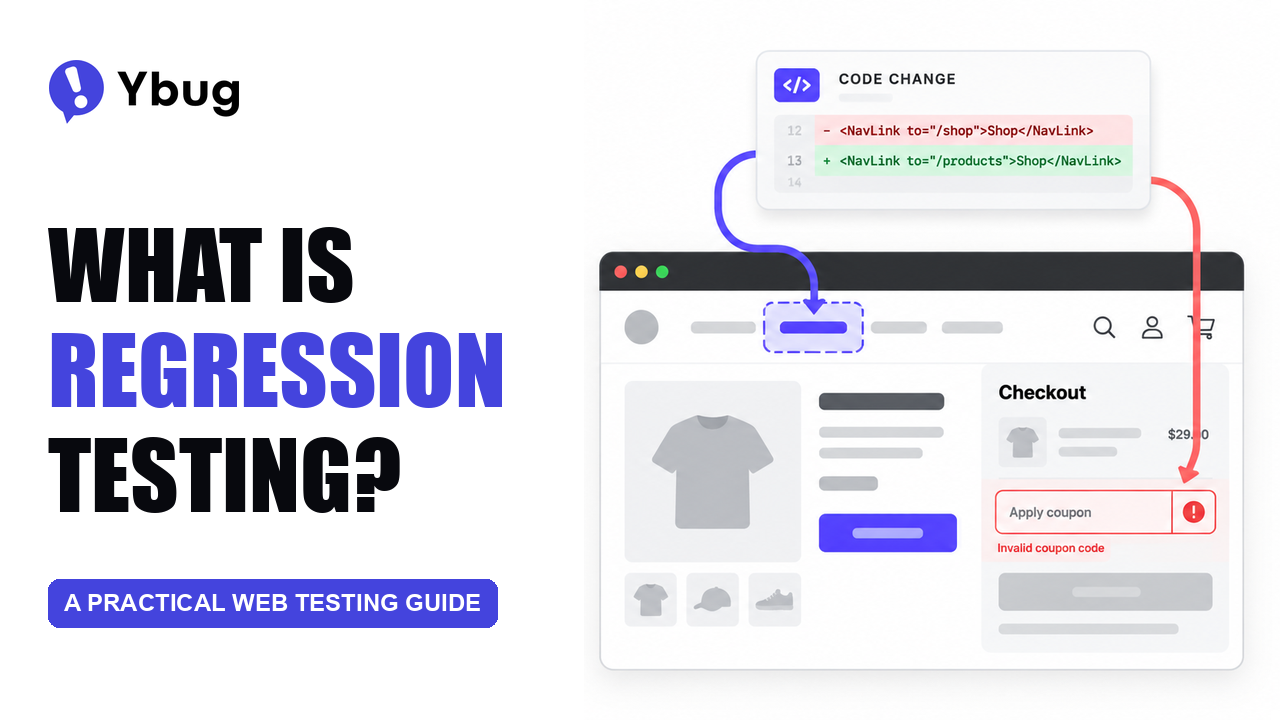
Picture a freelancer who maintains a dozen WooCommerce stores for clients. A routine plugin update goes out on Tuesday. On one store, the coupon field in the checkout stops applying discounts. Nothing looks broken at first glance, and the client only finds out when customers start complaining.
A 10-minute regression check of the checkout flow after the update would have caught it on staging. That’s the whole point: the most expensive regressions are usually the ones nobody thought to check.
What should a regression test suite cover?
A good regression test suite for a web project focuses on four areas:
- Core user flows: signup, login, checkout, form submissions, and search. These get checked after every change.
- Previously fixed bugs: every verified fix becomes a test case, because bugs that happened once tend to come back.
- High-risk areas: code that changes often, is heavily shared, or has a history of breaking.
- Browsers and devices: the same coverage you used for the original testing. A fix that works in Chrome might still fail in Safari.
Not everything belongs in the suite. Low-traffic pages and rarely used features can be checked less often. Focus coverage where a failure would hurt the business most.
Most regressions I’ve had to chase weren’t hard bugs. They were small changes that broke a page nobody opened before the release. A ten-minute checklist of the flows customers use every day catches most of them.
How do you choose which regression tests to run?
A regression suite grows with every feature and every fixed bug. Sooner or later, running all of it after every change takes too long, and teams start skipping it under deadline pressure. The answer isn’t to test less, but to test smarter. Three common approaches:
| Approach | What it means | When to use it |
|---|---|---|
| Retest all | Run the full regression suite | Major releases, big refactors, framework upgrades |
| Selective regression | Run only tests connected to the changed area | Small, well-isolated changes |
| Risk-based prioritization | Run tests in order of business impact and likelihood of failure | Limited time before a release |
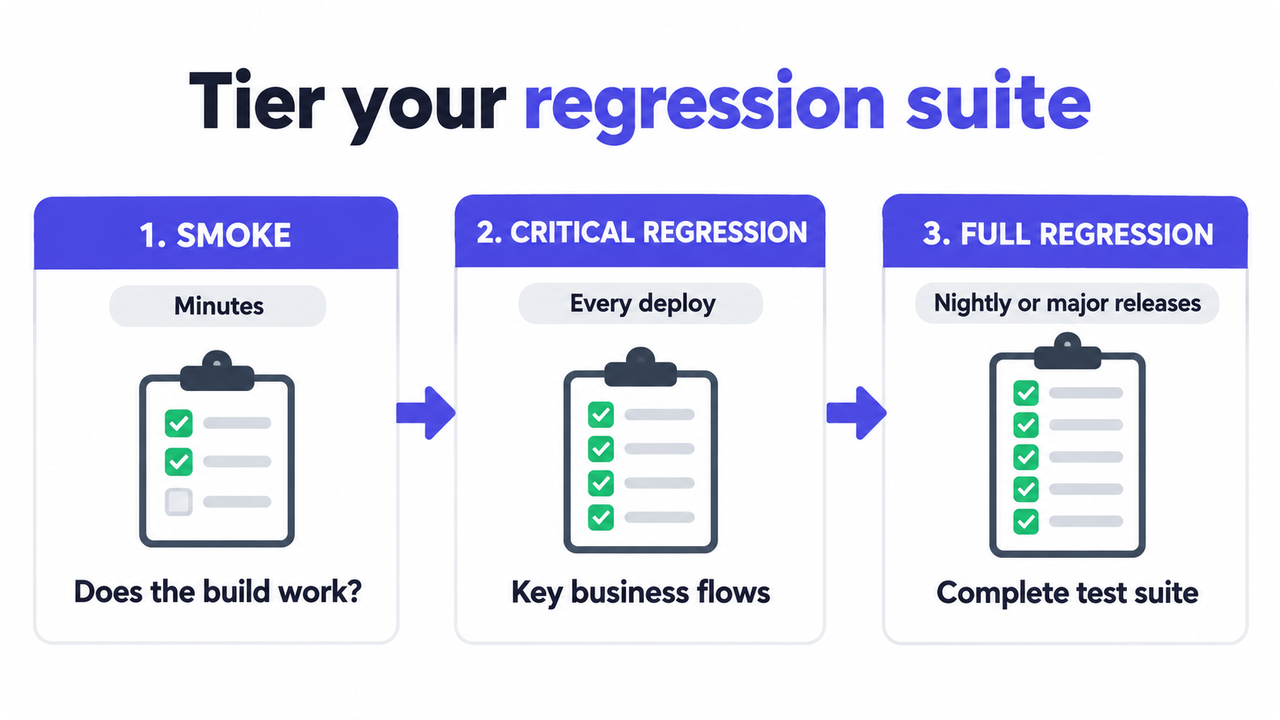
Many teams also tier their suites: a smoke test that takes minutes, a critical regression run for key flows on every deploy, and a full regression run on a schedule, such as nightly or before a major release. That way no change ships untested, and the full suite still runs regularly.
Should regression testing be manual or automated?
When does manual regression testing make sense?
A tester follows a predefined checklist after each change. It needs no setup, and human testers notice things scripts don’t: awkward UX, odd layouts, confusing copy. The downside is time. As the site grows, manual regression takes longer with every release, and it becomes the step that delays deployments.
What is automated regression testing?
Automated regression testing uses scripts to click through flows, fill in forms, and check results without a person doing it. Popular regression testing tools for web projects include Playwright, Cypress, and Selenium. Automated tests run fast, can be triggered on every deployment, and never get tired of repeating the same checks.
The catch is maintenance. Tests that rely on fragile selectors break when the markup changes, even if the feature still works. Worse, flaky tests that fail at random teach the team to ignore red builds. Martin Fowler covers this in his article on eradicating non-determinism in tests and recommends quarantining unreliable tests quickly so they don’t destroy trust in the whole suite.
What works for most web teams?
Most teams combine both. They automate the highest-priority flows and keep manual regression for things that are hard to script, like visual details and cross-browser quirks. Start with a structured manual checklist: it’s faster to set up, and it becomes the test case library you’ll automate later. The practical test pyramid is a useful model for deciding which checks belong at which level.
What is visual regression testing?
Visual regression testing compares screenshots of your pages before and after a change and flags pixel differences. It targets exactly the bugs web teams fight most often: a shifted button, a broken breakpoint, a font that didn’t load. Functional tests often miss these, because the page still “works.”
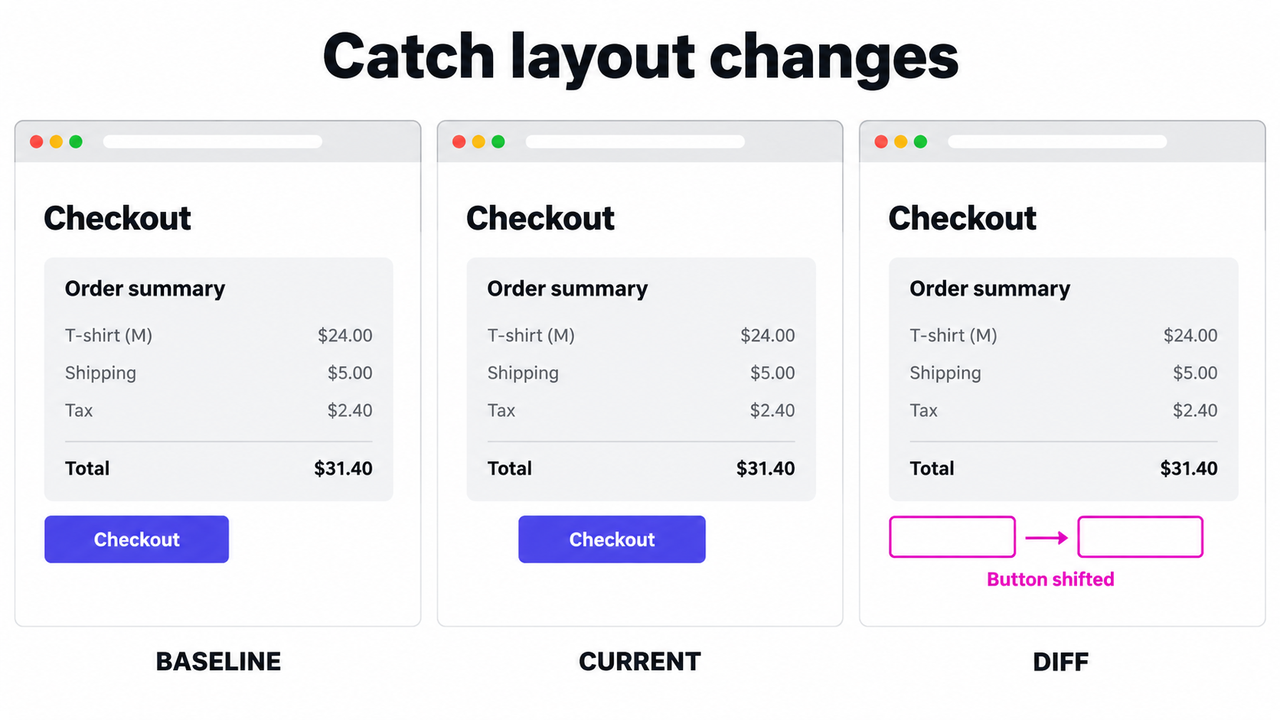
Playwright, for example, offers built-in screenshot comparisons that save a baseline image and compare every later run against it. The limitation is judgment. Dynamic content, animations, and rendering differences between operating systems trigger false alarms, so someone still has to review each difference and decide whether it’s a real bug.
That’s where a human tester and a smooth reporting workflow come back into the picture. If your testers spend more time documenting regressions than finding them, Ybug captures the screenshot and technical details for them.
See how Ybug captures regressions on staging.
(no credit card needed)
How do you run regression testing on a web project?
A practical regression testing process for a website has five steps.
Step 1: Build a regression test case list
Start with your core user flows and the list of previously fixed bugs. For each test case, write down the feature, the steps, and the expected result. A bug report template helps standardize what your team records when a regression turns up.
Example test case: Checkout > Apply coupon code “SAVE10” > Expected: the order total drops by 10% and the discount line appears in the summary.
Step 2: Run regression testing on staging
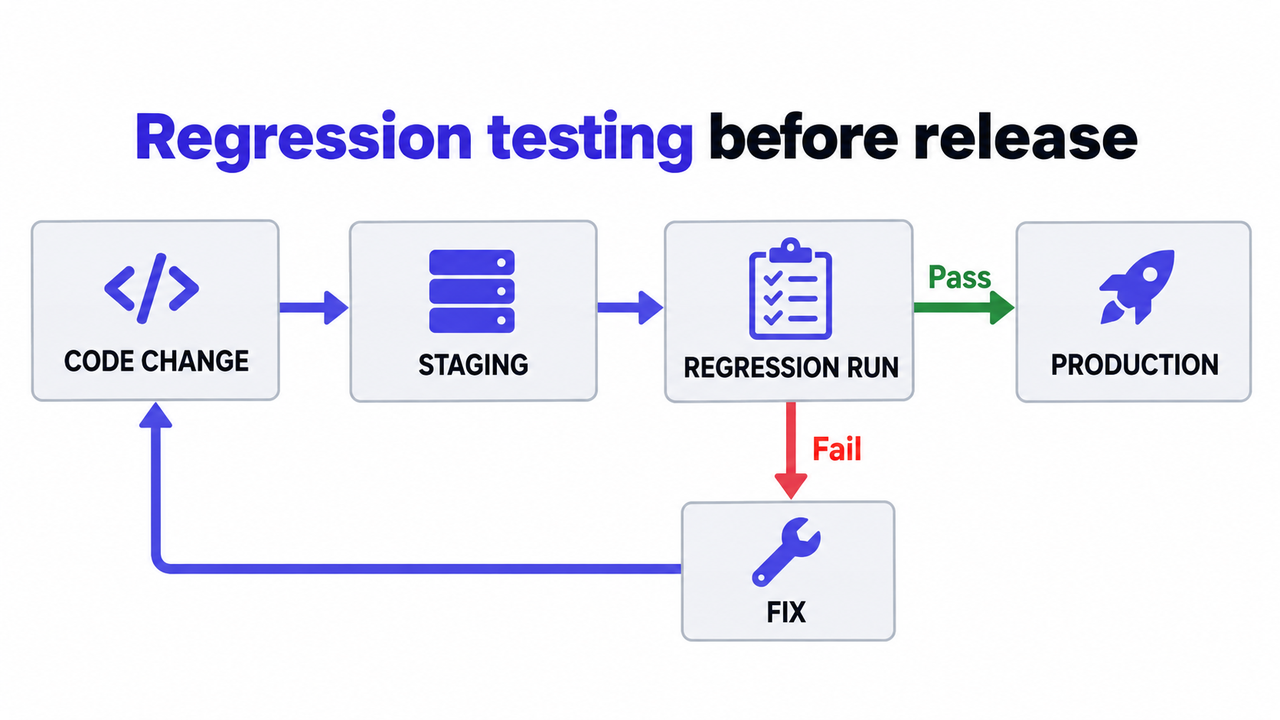
Regression testing belongs on a staging environment, not in production. Every significant change goes to staging first, gets regression-tested there, and only then moves to production. If you run automated tests in CI, they can also run on every pull request, before a change even reaches staging.
Step 3: Report regressions with full context
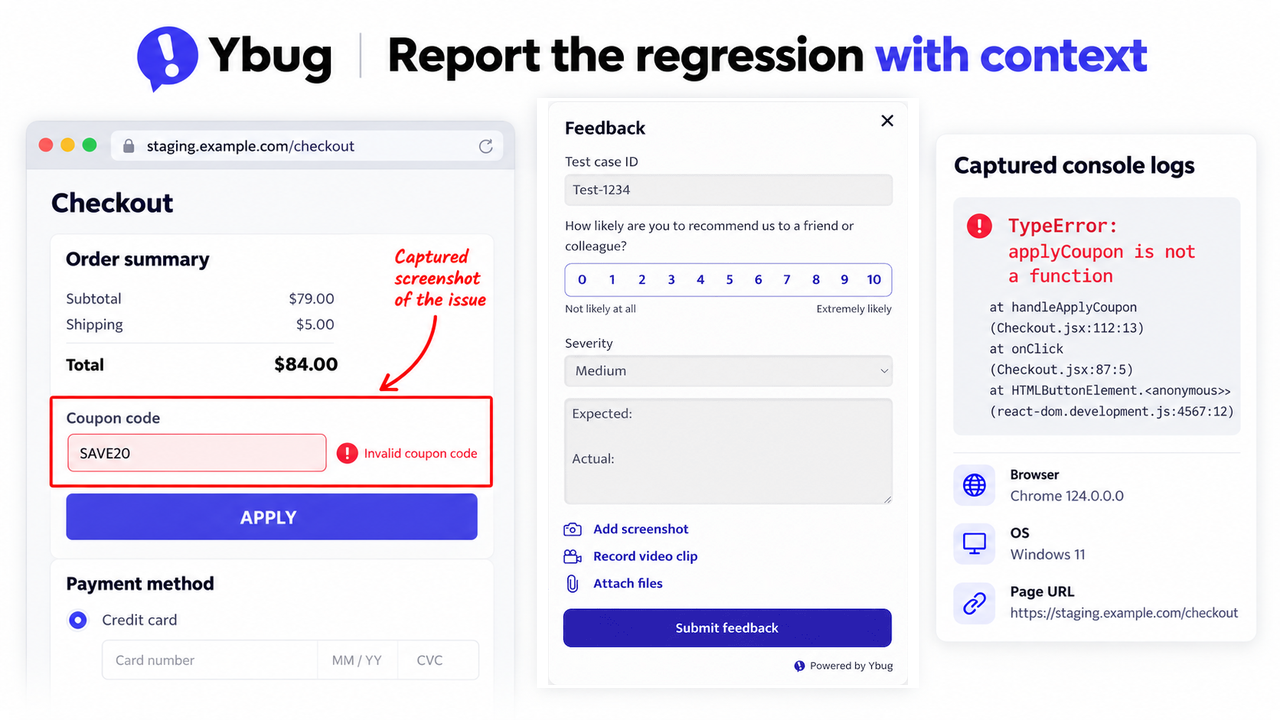
When a tester finds a regression, the bug report needs to reach the developer with everything required to reproduce it. With a visual feedback tool installed on your staging site, testers click a button, annotate a screenshot, and submit. Browser, OS, page URL, and console logs are captured automatically. The report then lands in your team’s bug reporting workflow through integrations with tools like Jira, GitHub, or Trello.
The slowest part of fixing a regression is rarely the fix itself. It’s figuring out how to reproduce it. Automatic technical context removes most of that back-and-forth.
Step 4: Track regression results over time
Keep a simple record of which test cases pass and fail after each release. Patterns tell you where to invest: if the same area breaks again and again, it needs better automated coverage or a closer look at the code.
Step 5: Make regression testing a release gate
Regression testing should be a formal step before every production deployment, not an optional one. For teams with QA testing sign-off in their release process, the regression run is the final checkpoint before the QA lead approves the release.
Who is responsible for regression testing?
Regression testing works best as a shared responsibility, with each role owning a different piece:
- Developers write and maintain automated tests and check the areas their change touches before handing it over.
- QA testers own the regression checklist, run manual passes, and review visual differences.
- Project managers plan time for regression in every sprint and treat a failed run as a release blocker, not a nice-to-have.
- Freelancers and agencies run a short regression check after every CMS, theme, or plugin update on client sites.
- Customer support spots regressions that slipped through, so it helps when customers can report issues directly from the live site.