Web design workflow: a step-by-step guide for agencies and freelancers

What’s in this article
- Key takeaways
- What is a web design workflow?
- How does a web design workflow differ from a web development workflow?
- What are the seven website design process steps?
- How does the web design workflow differ for freelancers and agencies?
- Where do web design workflows break down?
- How do you document and improve your web design workflow?
- FAQ
A web design workflow is the documented sequence of phases, tasks, and handoffs that takes a web project from initial client contact to a live, tested, and approved website. Its main advantage is predictability: every project follows the same structure, so quality is consistent and surprises are rare.
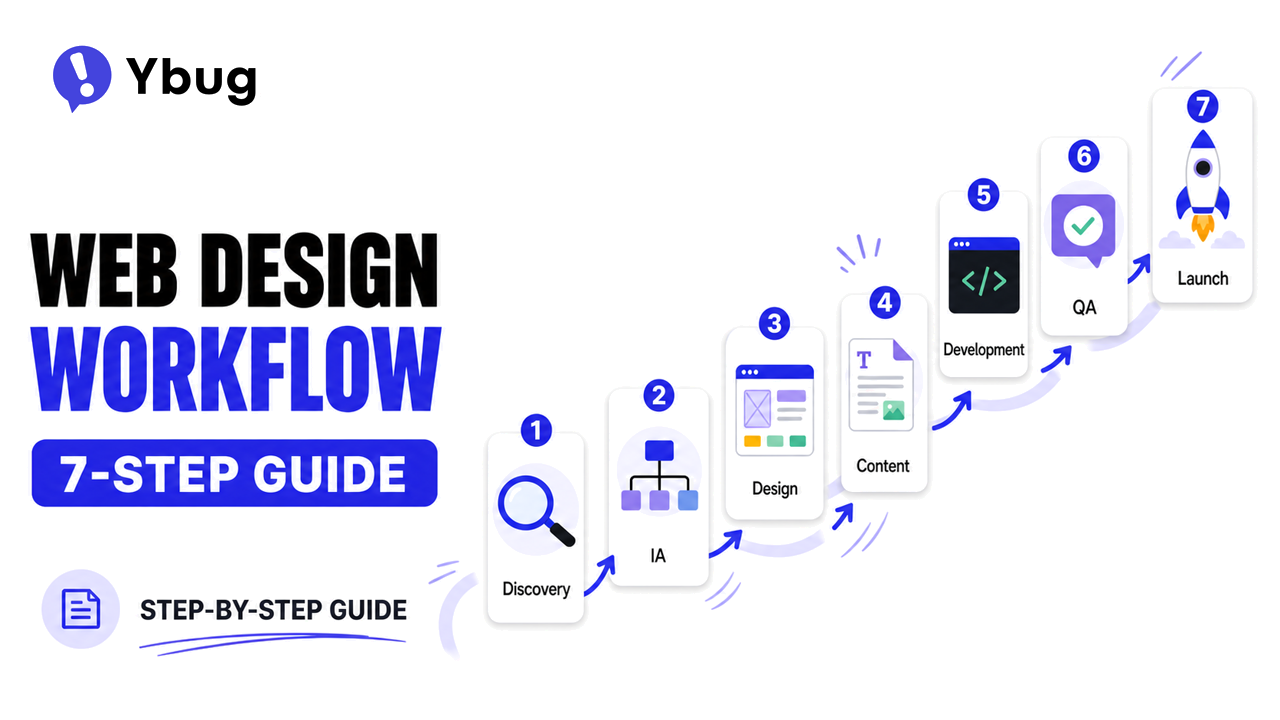
Without a defined workflow, every project becomes a custom web design process. Teams make different decisions each time, clients have inconsistent experiences, and small things fall through the cracks. With a repeatable website workflow in place, the quality ceiling rises and the chaos floor disappears. Whether you are a solo web designer or part of a 20-person agency, the same principles apply.
Key takeaways
- A web design workflow has seven phases: discovery, information architecture, design, content production, development, QA and client review, and launch.
- The most expensive workflow failure is starting development on unapproved designs. Changes become much more costly once implementation has started.
- Content is almost always the bottleneck. Start content collection during discovery, not after design approval.
- A visual feedback tool on the staging URL replaces scattered email threads with structured reports that include useful technical context.
- Freelancers and agencies follow the same phases but face different bottlenecks: bandwidth for freelancers and coordination for agencies.
What is a web design workflow?
A web design workflow is the repeatable process that defines every step of a web project, from the first client conversation through discovery, design, development, testing, and post-launch support. It documents who does what, in what order, and what each phase needs to deliver before the next one begins.
A workflow is not a project plan for a specific project. It is the web design process template that individual project plans are built from. It answers: What are the phases? What are the deliverables? What needs to happen before the team moves forward?
The value of a documented workflow compounds over time. The first project can feel like overhead. By the fifth project, it is saving hours per client and reducing the back-and-forth that consumes much of the invisible time in web work.
How does a web design workflow differ from a web development workflow?
| Area | Web design workflow | Web development workflow |
|---|---|---|
| Scope | Full project lifecycle, from client onboarding to post-launch | Technical build, from design handoff to deployed code |
| Phases | Discovery, strategy, design, content, development, QA, launch | Environment setup, coding, testing, deployment, version control |
| Audience | Agencies, freelancers, project managers | Developers, DevOps, engineering teams |
| Key tools | Project management, feedback collection, client communication | Git, CI/CD, testing frameworks |
A complete web development workflow is a subset of the broader web design workflow: it governs what happens during the build phase. A website development workflow covers technical implementation, while the full web design process for clients includes everything before and after it.
This guide covers the full scope: the end-to-end website design process steps from the first client conversation to the live site.
What are the seven website design process steps?
Phase 1: Discovery and scoping
Every project starts with understanding what the client needs, what they already have, what success looks like, and what constraints the team must work within.
Key activities:
- Send and review a web design client questionnaire.
- Run a discovery call or kickoff meeting.
- Audit the existing website for redesign projects.
- Define goals and measurable success criteria.
- Assess technical requirements and integrations.
- Identify stakeholders and the decision-making process.
Output: A clear project brief and signed proposal with defined scope, timeline, and payment terms.
Most scope creep, late-stage surprises, and client disputes originate in an underdeveloped discovery phase. Time invested here saves multiples later.
Phase 2: Information architecture and content strategy
- Create a sitemap that shows all pages and their relationships.
- Define the content hierarchy for key page templates.
- Plan who writes each piece of content and on what timeline.
- Identify SEO requirements, including target keywords, URL structure, and metadata.
- Confirm the CMS choice and content model.
Output: An approved sitemap and content production plan.
Phase 3: Design
- Create wireframes for key page templates on desktop and mobile.
- Apply brand guidelines during visual design.
- Build an interactive prototype for key user flows where appropriate.
- Run client design review with structured feedback. Clients can annotate a website screenshot while reviewing wireframes or prototypes.
- Get formal, written design sign-off before development begins.
Output: Approved design files, a design system or component library, and written sign-off.
Critical rule: Never start development on unapproved designs. Design changes made during implementation are the most expensive kind.
Phase 4: Content production
Content production should run in parallel with design where possible, but it must be complete before development finishes.
- Write copy for all pages.
- Source images or schedule photography.
- Produce video where applicable.
- Review and approve all content.
- Deliver final copy in a CMS-ready format.
The timeline reality: Content is almost always the bottleneck. Start content collection during Phase 1. Do not wait until the design is approved.
Phase 5: Development
With approved designs and final content, development builds the site in a staging environment.
- Front-end development translates the designs into working code.
- Back-end development covers CMS setup, databases, server-side logic, and integrations.
- Third-party integrations are tested.
- The site is tested across browsers and devices.
- Performance is optimized using practices such as those in our guide to increasing website speed.
- Accessibility is reviewed.
Output: A functional staging site ready for QA and client review.
How does web development team structure affect the workflow?
For agencies, front-end, back-end, and QA are often separate roles. Adobe’s guide to designer-developer handoffs identifies communication and alignment on the expected result as a central challenge. Clear handoff documentation between roles prevents rework.
Create a definition-of-done checklist for design files before they enter development: responsive breakpoints defined, all states accounted for, assets exported, and spacing and typography documented.
For smaller agencies and freelancers, one or two people may cover all three roles, but the handoff points still matter even when they happen within one person’s workflow. The web development team structure determines where coordination overhead lives.
Phase 6: QA testing and client review
Quality assurance happens in two tracks: technical QA internally and client review externally. Both take place on the staging environment before any DNS changes.
Technical QA includes:
- Functional testing to confirm every feature works as specified.
- Cross-browser and device testing.
- End-to-end form submission testing.
- Performance and security checks.
- SEO tag verification, including confirming that production pages are not set to noindex.
Client review: Install a visual feedback tool on the staging environment before sharing it with the client. Instead of collecting feedback through email, clients open the widget on the page, annotate a captured screenshot, add a description, and submit it.
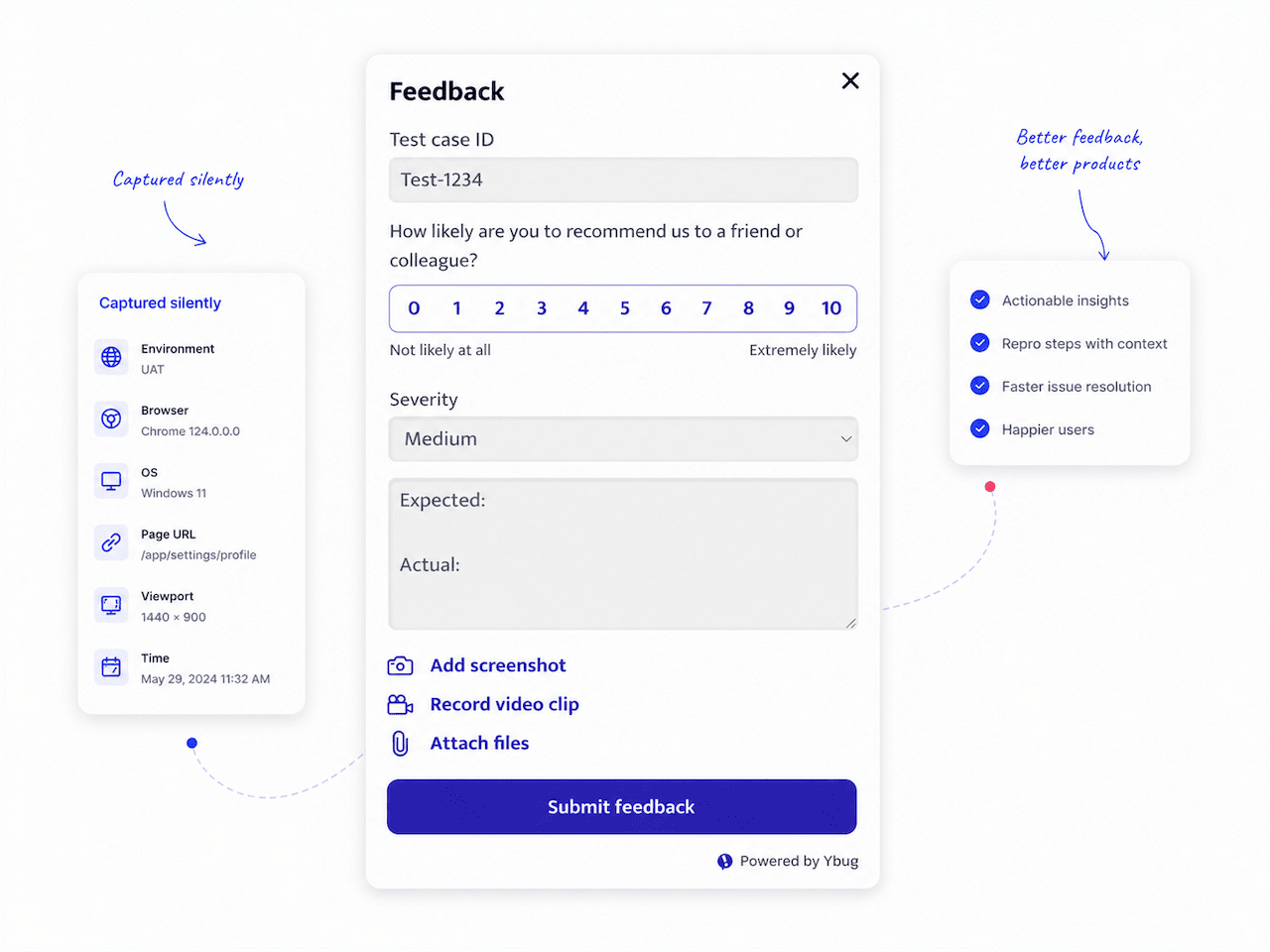
Every report can capture useful context such as the browser, operating system, screen resolution, page URL, and console logs. Reports can then route to your project management tool through integrations as structured tickets.
For agencies managing multiple client projects, this turns review cycles from scattered email threads into manageable queues. Set up a clear content approval workflow so everyone knows who reviews what, when, and in what order.
The QA and review phase is where projects either land cleanly or fall apart. The difference is almost never the number of issues found. It is whether those issues arrive in a format developers can act on immediately or require three follow-up conversations to understand.
For freelancers, a feedback widget on the staging URL is a professional differentiator that clients notice and remember.
Output: QA sign-off, client sign-off, and a list of resolved and consciously deferred issues.
Give clients one clear place to report visual issues on staging, with the context your team needs to act.
(no credit card needed)
Phase 7: Launch and post-launch
With all sign-offs in place, the site goes live. Use a comprehensive website launch checklist to make sure nothing is missed during DNS cutover.
- Complete DNS cutover and verify propagation.
- Run post-launch checks for forms, HTTPS, analytics, and staging access.
- Set up Google Search Console for a new domain.
- Configure performance and uptime monitoring.
- Train the client on the CMS where applicable.
- Deliver formal project handoff documentation.
- Schedule a 30-day post-launch review.
How does the web design workflow differ for freelancers and agencies?
The phases stay the same, but the people, handoffs, and most common constraints differ.
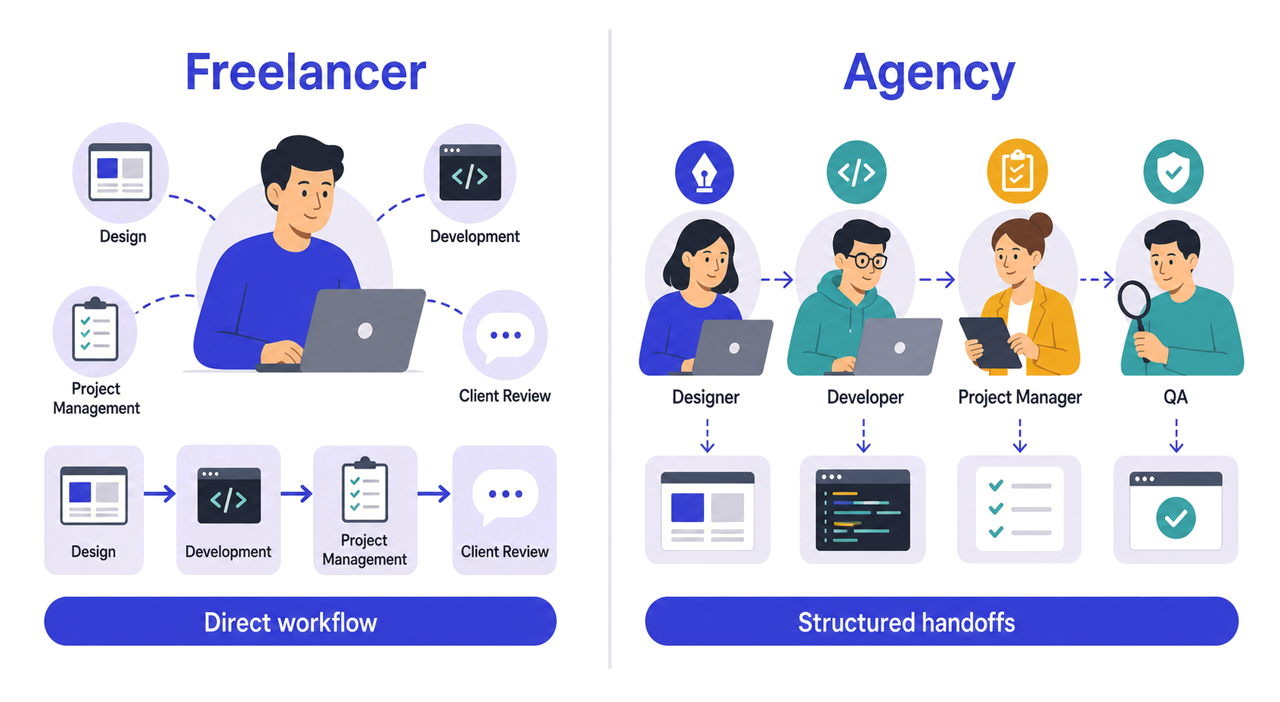
| Aspect | Freelancer | Agency |
|---|---|---|
| Roles | One person covers design, development, project management, and client communication | Separate specialists cover each role |
| Communication | Direct with the client, often faster and more personal | Usually coordinated by a project manager with more handoffs |
| Tool stack | Lean, with one or two tools covering most needs | Broader, with dedicated tools for different functions |
| Review process | Informal or semi-structured | Formal, with documented sign-off at each stage |
| Bottleneck | Bandwidth: one person can only move so fast | Coordination: more people create more handoffs |
For freelancers, the biggest process gap is often the client review stage: feedback arrives through email, chat, and calls with no central record. A feedback widget closes that gap. For agencies, the bottleneck is more often the design-to-development handoff.
For both, learning how to collect user feedback efficiently during staging review is one of the highest-impact process improvements available.
Where do web design workflows break down?
Scope is agreed verbally, not in writing. The proposal said five pages. The client heard five pages plus a blog, a shop, and an events calendar. Get the scope in writing and signed before work begins.
Content is treated as the client’s problem until it becomes the project’s problem. Content delays extend every downstream phase. Build deadlines into the project plan from day one, with clear consequences for missed dates.
Design sign-off is not formal. “It looks good” in a meeting is not sign-off. Get written confirmation before development starts.
QA and client review happen through separate, unsynchronized channels. When internal QA and client review generate separate issue lists, developers can fix the same area multiple times as new feedback arrives. Run reviews through one channel and use QA testing sign-off to separate internal QA from client review.
There is no documented handoff between phases. Without clear entry and exit criteria, work bleeds across stages: design continues after development starts, content arrives mid-build, and reviews happen on an incomplete site.
The design-to-development handoff lacks a definition of done. A file that is complete to the designer may still be missing responsive breakpoints, hover, error, loading, and empty states, or exported assets. Figma’s guide to developer handoff recommends agreeing on a pre-handoff checklist before files move into the build phase.
How do you document and improve your web design workflow?
Start with what you actually do, not what you think you should do. Document the process as it exists rather than writing an ideal version that nobody follows.
Walk through the last three completed projects. For each one, ask: What phases were there? Where did delays occur? Where did client disputes start? Where did the team spend unexpected time?
The gaps between the documented ideal and the actual project experience are where the workflow needs work. Fix one gap at a time. Review the workflow after every project; a 15-minute retrospective with the relevant team members can be enough. Atlassian’s retrospective guide provides a simple framework for these sessions.
A web design workflow is never finished. It evolves with your tools, team, and client base. The goal is not perfection. The goal is a process that is consistently better than starting from scratch each time.
Keep client review inside the workflow with visual reports from the staging site.
(no credit card needed)


