Website design questionnaire: 32 questions to ask your client before you start

What’s in this article
- Key takeaways
- Why does a web design questionnaire matter?
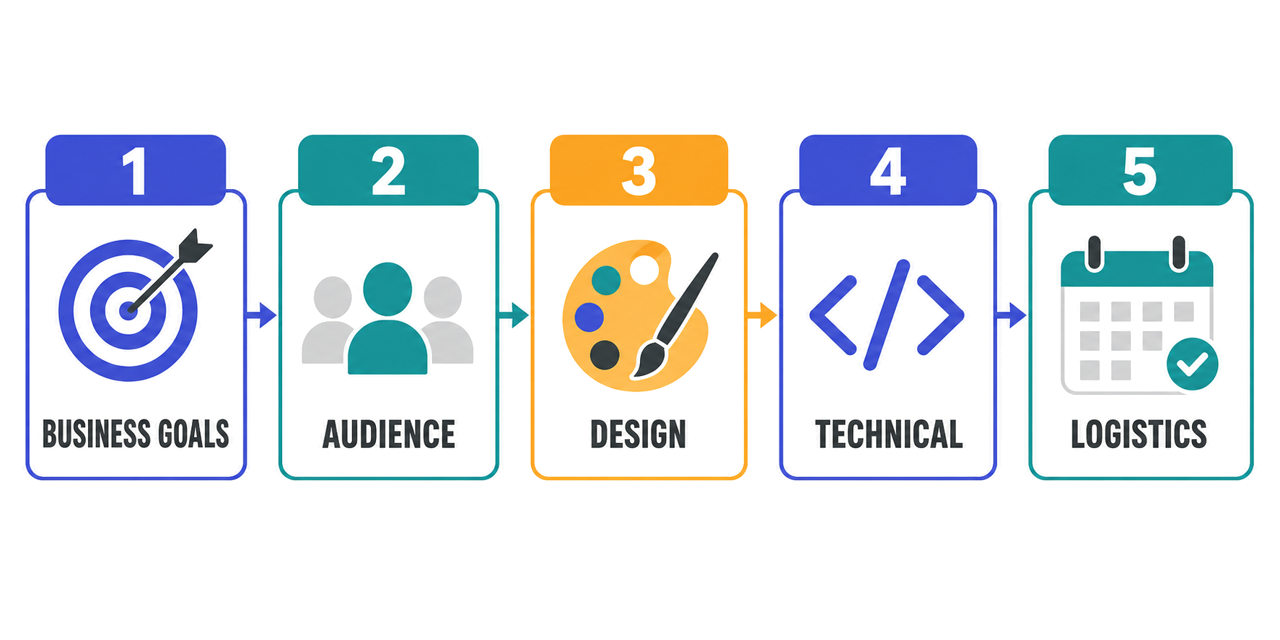
- What questions should you ask clients about business and project goals?
- What should you ask about the target audience and competitors?
- How do you ask about design preferences and brand?
- What technical requirements and content questions should you include?
- What project logistics questions close out the questionnaire?
- Free website design questionnaire template
- What should you do with the questionnaire answers?
- FAQ
A web design client questionnaire is a structured set of questions sent to a client at the start of a project to gather everything you need before opening a design tool. It replaces the scattered back-and-forth of early client conversations with a single document that captures goals, audience, brand preferences, technical requirements, and timelines in one place.
For agencies and freelancers, a solid website design questionnaire is not just an admin step. It is the tool that prevents scope creep, reduces revision rounds, and gives you the confidence to write an accurate proposal. For clients, it helps clarify their own thinking before the project begins.

Key takeaways
- A thorough questionnaire at the start reduces revision rounds by catching misalignment before design begins, not at review round three.
- The most important questions cover business goals and success metrics, not design preferences. Goals drive every design decision that follows.
- Always ask who has final approval authority. The answer determines whether your review cycles take days or weeks.
- Include questions about SEO targets, post-launch maintenance, and content delivery timelines, the three scope items clients often forget to mention upfront.
- Use the completed questionnaire as your project brief and proposal foundation. It replaces the need for a separate brief document.
Why does a web design questionnaire matter?
A web project without a proper brief is a project without a map. Designers make assumptions. Clients have unstated expectations. The gap between them shows up in revision round three.
A web design questionnaire closes that gap before it opens. It gives you:
A scoped brief to write proposals from. You cannot price a project accurately if you do not know how many pages, which integrations, what content, or what timeline the client needs. The questionnaire answers all of that.
Client alignment before design begins. Clients who have answered detailed questions about their audience, goals, and preferences are more informed reviewers. They give better feedback because they have already articulated what matters to them.
Protection against scope creep. “We will also need a blog” is easier to address when you have a completed questionnaire that did not include one. As Adobe’s guide to scope creep explains, uncontrolled growth in project scope causes budget overruns and missed deadlines. The questionnaire creates a shared record of what was agreed.
Fewer revision rounds. Most revisions happen because the brief was vague, not because the design was bad. A thorough questionnaire at the start translates directly into fewer surprises at the review stage.
What questions should you ask clients about business and project goals?
These questions establish why the project exists and what success looks like. They are the most important questions in the entire questionnaire, and the ones clients most often answer vaguely if you do not push for specifics.
- What is the primary goal of this website? Ask whether the priority is lead generation, e-commerce sales, brand awareness, a portfolio, customer support, investor information, or something else specific.
- What action do you most want visitors to take when they arrive? Book a call, request a quote, make a purchase, download a resource, or subscribe. Ask the client to name one primary action.
- What does success look like six months after launch? Ask for metrics where possible, such as an increase in inquiries, monthly orders, or fewer support tickets.
- Why are you building or redesigning the website now? The trigger reveals urgency, budget context, and what has not worked before.
- What is not working about your current website? For redesigns, specific pain points are more useful than general dissatisfaction. “Visitors cannot find the pricing page” is more actionable than “It looks outdated.”
- What do you want visitors to know about your business that they would never guess from the current site? This surfaces the competitive advantage and key messages the design needs to communicate.
- Are there any pages, features, or sections that are non-negotiable? These are scope anchors. Knowing what must be included prevents later surprises.
What should you ask about the target audience and competitors?
Typography, color palette, content hierarchy, and imagery are only right or wrong relative to the audience they are meant to serve. These questions give you that context.
- Who is the primary audience for this website? Ask for demographics, job roles, or customer types. “Everyone” is not an answer.
- What problems is your audience trying to solve when they visit the site? Audience intent shapes content and navigation more than any other factor.
- Are there secondary audiences? If so, how different are their needs? Many sites serve distinct audiences, such as customers and investors or buyers and sellers. Knowing this early affects information architecture.
- List three to five competitor websites you admire. The goal is not to copy them, but to understand the client’s market and what looks normal in their industry.
- List two or three competitor websites you dislike, and explain why. Specific objections often provide more useful design constraints than a list of admired sites.
- Are there any websites outside your industry that you would like yours to feel similar to? This can reveal the clearest design direction.
How do you ask about design preferences and brand?
- Do you have existing brand guidelines? Ask for logo, color, typography, and tone-of-voice files. If none exist, clarify whether brand development is in scope.
- Which three words describe how you want the website to feel? Words such as modern, trustworthy, bold, friendly, minimal, or premium become useful design decision filters.
- Are there any colors, styles, or design elements you absolutely want to avoid? Constraints are as useful as preferences and can save entire revision rounds.
- What imagery style fits your brand? Clarify photography versus illustration, real people versus product shots, abstract versus literal, and corporate versus candid.
- Do you have existing photography, video, or other visual assets? If not, sourcing or producing imagery is an additional scope item.
- How would you describe the tone of voice for content on the site? Establish whether it should be professional, conversational, technical, friendly, or something else.
- Are there existing marketing materials the website should match? Brochures, ads, and presentations can keep the site consistent with the brand’s other touchpoints.
What technical requirements and content questions should you include?
- What CMS do you currently use, or do you prefer for the new site? WordPress, Webflow, Shopify, Squarespace, or a custom system will affect the development approach. Also ask whether the client needs training after launch.
- What third-party tools or integrations are required? CRM, email marketing, booking systems, payment gateways, live chat, analytics, and membership platforms can be among the most complex parts of a build.
- How many pages does the site need? Ask for a rough sitemap. “A few pages” can mean five or fifty, so push for specifics.
- Who will provide the written content, and by when? Clarify whether copy comes from the client or a copywriter and set a delivery deadline. Content delays are a common cause of missed launch dates.
- Will the site need to be multilingual? Multi-language support is a significant technical scope item that needs to be identified at the start.
- What are the performance and accessibility requirements? Ask whether the site must meet WCAG accessibility standards or specific Core Web Vitals and load-time targets.
- Do you have SEO goals or target keywords? Ask about existing rankings to protect, target keywords, and access to Google Analytics and Search Console. SEO should inform the architecture from the start.
- Who owns the domain and hosting, and should that change? Clarifying ownership early prevents surprises at launch. Managing hosting is a separate scope item.
What project logistics questions close out the questionnaire?
- What is your target launch date? Ask whether it is tied to a product launch, event, or seasonal campaign, or whether it is a flexible preference.
- What is your budget range for this project? Budget determines scope. Without it, you are proposing in the dark.
- Who is the primary point of contact, and who has final approval authority? Knowing who makes decisions prevents late-stage surprises. A clear content approval workflow before design begins saves everyone time.
- Do you need ongoing support after launch? Clarify maintenance, security updates, content changes, and SEO monitoring. This prevents uncomfortable conversations later and can open the door to a retainer.
Free website design questionnaire template
Send this website design questionnaire template as a Google Form, Typeform, Notion page, or plain PDF, whichever fits your workflow.
Web design client questionnaire
Project / client name:
Date:
Completed by:
Business and goals
- Primary goal of the website:
- Most important visitor action:
- Success metrics at six months:
- Reason for this project now:
- What is not working about the current site? [redesigns only]
- Key messages the current site does not communicate:
- Non-negotiable pages or features:
Audience and competitors
- Primary audience:
- Main problems the audience needs solved:
- Secondary audiences, if any:
- Three to five competitor sites you admire:
- Two or three competitor sites you dislike, and why:
- Non-industry site you would like yours to feel like:
Design and brand
- Existing brand guidelines? [yes / no, attach if yes]
- Three words describing how the site should feel:
- Design elements to avoid:
- Preferred imagery style:
- Existing visual assets available? [yes / no]
- Tone of voice for content:
- Existing marketing materials to match:
Technical and content
- CMS preference, and do you need training to update it?
- Required third-party integrations:
- Estimated number of pages, with a rough sitemap if available:
- Who provides written content, and by when?
- Multilingual requirements? [yes / no]
- Performance and accessibility requirements:
- SEO goals or target keywords:
- Domain and hosting ownership:
Logistics
- Target launch date:
- Budget range:
- Primary contact and final approver:
- Ongoing support or maintenance needs? [yes / no]
Turn the answers into a clear web workflow: scope, design, review, and sign-off, each with a named owner.
What should you do with the questionnaire answers?
A completed questionnaire is a brief, not a final specification. Use it to move the project through a clear sequence from proposal to review.
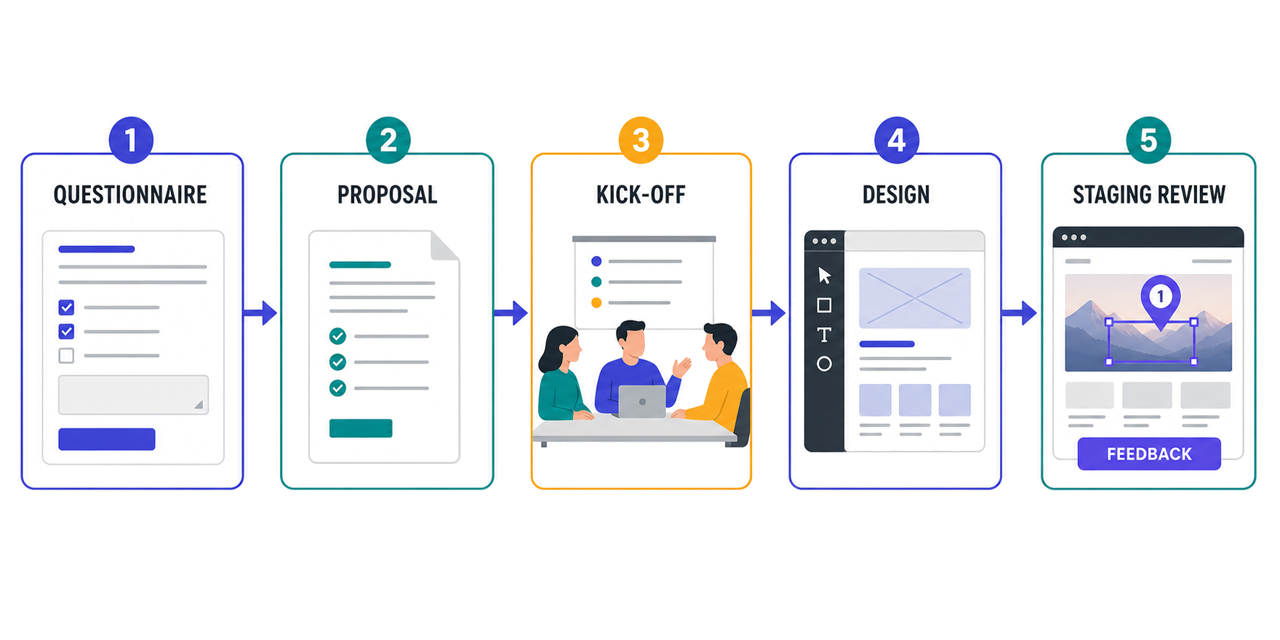
Write a scoped proposal. Use the answers to define what is in and out of scope, estimate hours accurately, and price the project with confidence. The questionnaire reduces the guesswork that makes proposals inaccurate and uncomfortable.
Run a kick-off call. The questionnaire surfaces questions; the kick-off meeting resolves them. Review the answers together, clarify ambiguities, and align on priorities.
Set up a structured review process before design begins. Agree on how feedback will be collected and approvals will happen. For website projects, install a visual feedback tool on the staging environment before client review. Clients can then annotate a screenshot of the website instead of emailing disconnected screenshots, which saves time across revision rounds.
Once scope is agreed, an online review and approval step keeps sign-off from sliding back into email.
Elementor’s guide to website design questionnaires also recommends using the answers to identify ongoing needs. Maintenance, SEO, and content marketing questions naturally open the door to work beyond the initial build.
The questionnaire is the contract before the contract. When a client has written down what they want, what success looks like, and who makes decisions, you have created a shared reference point for every conversation that follows, including the difficult ones.
Use it as a brief template. Share a sanitized version of the completed questionnaire with your design and development team. It gives them context without requiring a separate brief document and fits naturally into the discovery phase of a structured web design workflow.
Collect visual client feedback directly on your staging site and keep every revision tied to the right screenshot and technical context.
(no credit card needed)


