How to do a UX audit of your website (step-by-step guide)

What’s in this article
- Key takeaways
- What does a website UX audit involve?
- When should you do a UX audit?
- How do you do a UX audit step by step?
- What should a UX audit checklist include?
- Who gets what from a UX audit?
- How is a UX audit different from usability testing?
- How long does a UX audit take?
- Which tools do you need for a UX audit?
- FAQ
A UX audit is a structured, evidence-based review of your website that shows where users get stuck and why, and its main advantage is that you fix what actually blocks users instead of guessing.
Key takeaways
- Run a UX audit before a redesign, after a major launch, or when a key metric like signups or checkout completion drops.
- Seven steps get you there: define the scope, review analytics, collect behavioral data, run a heuristic and accessibility review, read user feedback, document findings, and present a prioritized plan.
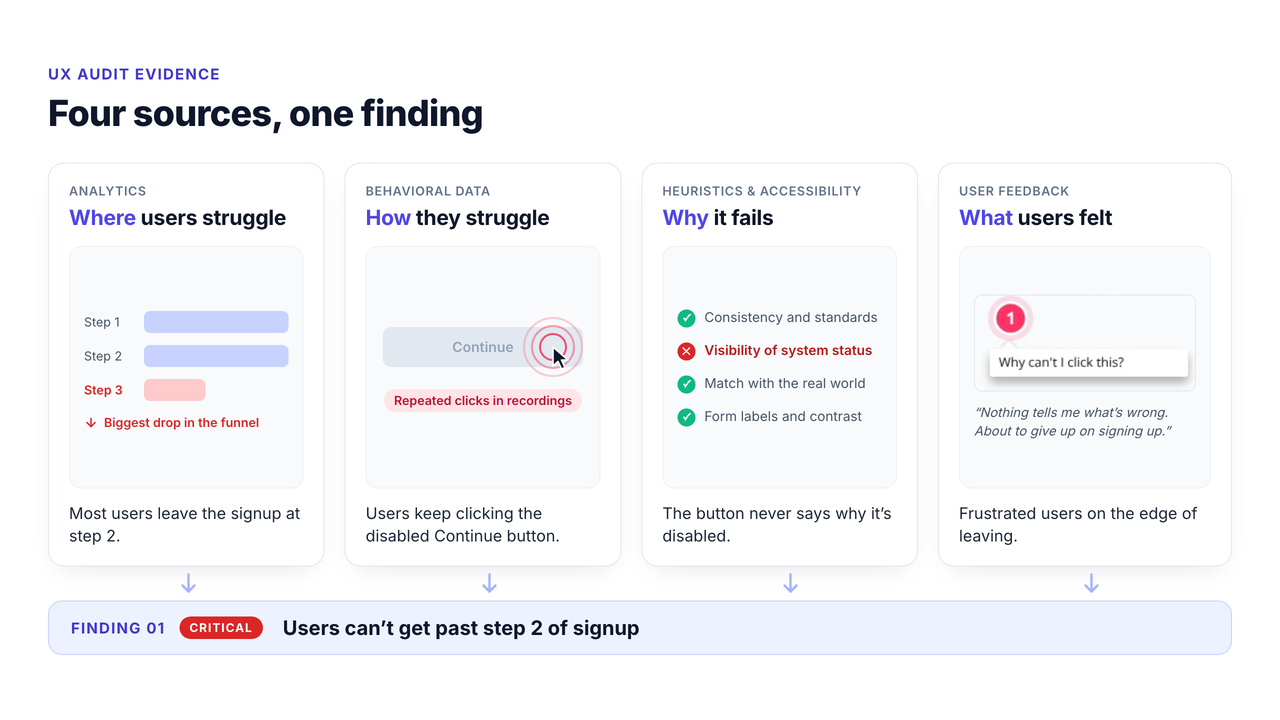
- Combine four types of evidence: analytics shows where users struggle, behavioral data shows how, heuristics explain why, and user feedback tells you what users actually felt.
- Every finding needs proof: a page URL, a screenshot, a severity rating, and a specific recommendation.
- Free tools cover most of the work: Google Analytics, Microsoft Clarity, Lighthouse, WAVE, and a feedback widget on the pages you audit.
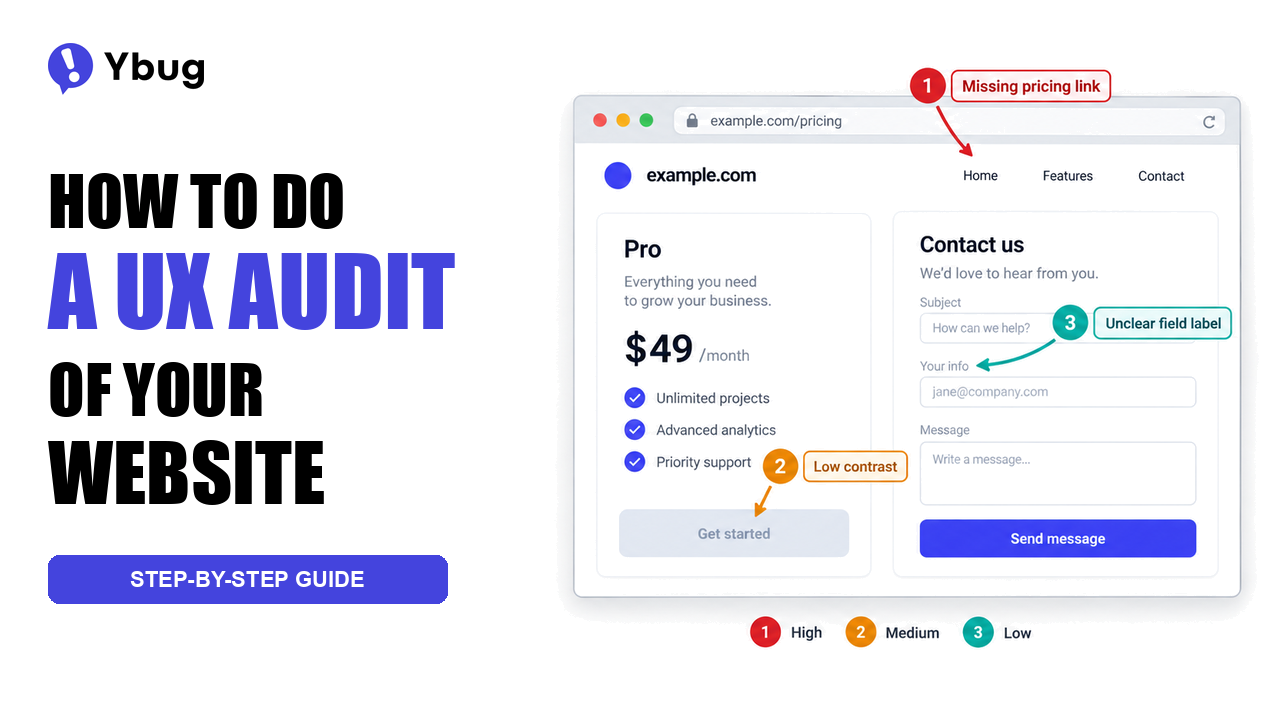
Your analytics say users are leaving. A UX audit tells you why. Instead of opinions like “the navigation feels off,” you get findings like this one:
“The main menu doesn’t include the pricing page, even though it’s one of the most visited pages, so users have to hunt for it in the footer.”
That difference matters most right before a redesign. If you’re putting together a website redesign project plan, an audit tells you what’s broken and, just as important, what already works and shouldn’t be rebuilt.
What does a website UX audit involve?
A website UX audit pulls evidence from four sources. Each one answers a different question, and together they turn hunches into findings you can defend.
| Evidence type | What it tells you | Typical tools |
|---|---|---|
| Analytics review | Where users drop off, bounce, or exit | Google Analytics, Plausible, Mixpanel |
| Behavioral data | How users click, scroll, and hesitate | Microsoft Clarity, Hotjar, FullStory |
| Heuristic and accessibility review | Why a design breaks usability principles or accessibility standards | Expert review, Lighthouse, WAVE |
| User feedback | What users say about the experience | Support tickets, surveys, a feedback widget |
Not every audit needs all four. A quick audit of one signup flow can run on analytics and a heuristic review. A full audit before a relaunch should use all four and may add usability testing sessions.
When should you do a UX audit?
The best time is when you need to make a decision and don’t have enough evidence to make it. Typical triggers:
- Before a redesign, so you know what to keep and what to change.
- After a major launch or feature release, to catch friction you didn’t see in staging.
- When a metric drops, such as trial signups, checkout completion, or form submissions.
- When support keeps answering the same question, which usually points to a design problem, not a user problem.
Agencies also run audits as a paid first step with new clients. It gives both sides a shared, evidence-based starting point before anyone starts arguing about colors.
How do you do a UX audit step by step?
Here’s how to do a UX audit in seven steps. Treat them as a working checklist: you can compress them into a day for a single flow or spread them over several weeks for a full product.
Step 1: Define the scope and goals
Start by deciding what you’re auditing and why. Answer four questions before you open any tool:
- Which pages or flows are in scope: the whole site, the checkout, or one feature?
- What should the site achieve: leads, sales, or trial signups?
- What data do you already have: analytics access, support tickets, past research?
- Who will use the output: your dev team, a client, or leadership?
A tight scope wins. A focused audit of the signup flow beats a report with 80 findings nobody reads.
Step 2: Review analytics to find problem areas
Analytics shows you where to look. Check these four things:
- Pages with high bounce rates: do visitors land and leave because the page doesn’t match what they expected?
- Drop-off points in key flows: at which step of signup or checkout do most users give up?
- High traffic, low conversion pages: a big gap between visits and conversions often hides a UX problem.
- Exit pages mid-flow: where do users leave the site before finishing a task?
If you use GA4, bounce rate is simply the share of sessions that weren’t engaged, so read it together with engagement rate. Analytics tells you where problems are, but not why. That’s what the next steps are for.
Step 3: Collect behavioral data
Heatmaps, scroll maps, and session recordings show how users actually behave on the pages analytics flagged.
- Heatmaps: are users clicking elements that aren’t clickable? That’s a sign they expect interaction.
- Scroll maps: does key content sit below the point where most users stop scrolling?
- Session recordings: watch for rage clicks, hesitation, back-and-forth navigation, and abandoned forms.
Watch recordings in batches tied to one question, like “why do users leave step 2 of signup?” Random watching eats hours and rarely produces findings.
Step 4: Run a heuristic evaluation and accessibility check
Now review the pages against established principles. The most widely used framework is Jakob Nielsen’s 10 usability heuristics:
- Visibility of system status: does the site show what’s happening?
- Match between the system and the real world: does it speak the users’ language?
- User control and freedom: can users undo actions and back out easily?
- Consistency and standards: does it follow familiar conventions?
- Error prevention: does the design stop mistakes before they happen?
- Recognition rather than recall: are options visible instead of memorized?
- Flexibility and efficiency of use: can experienced users move faster?
- Aesthetic and minimalist design: is anything competing with the essentials?
- Help users recognize, diagnose, and recover from errors: are error messages clear and helpful?
- Help and documentation: is help available where users need it?
Don’t do it alone. Nielsen Norman Group recommends having three to five people evaluate the same interface independently, because every evaluator misses something. At minimum, pair up with someone who didn’t design the pages you’re reviewing.
Add a quick accessibility and performance pass too. Run Lighthouse and WAVE on your key pages and check the results against the Web Content Accessibility Guidelines. Low contrast, missing form labels, and slow pages are UX problems, not just technical ones.
Step 5: Review user feedback and support data
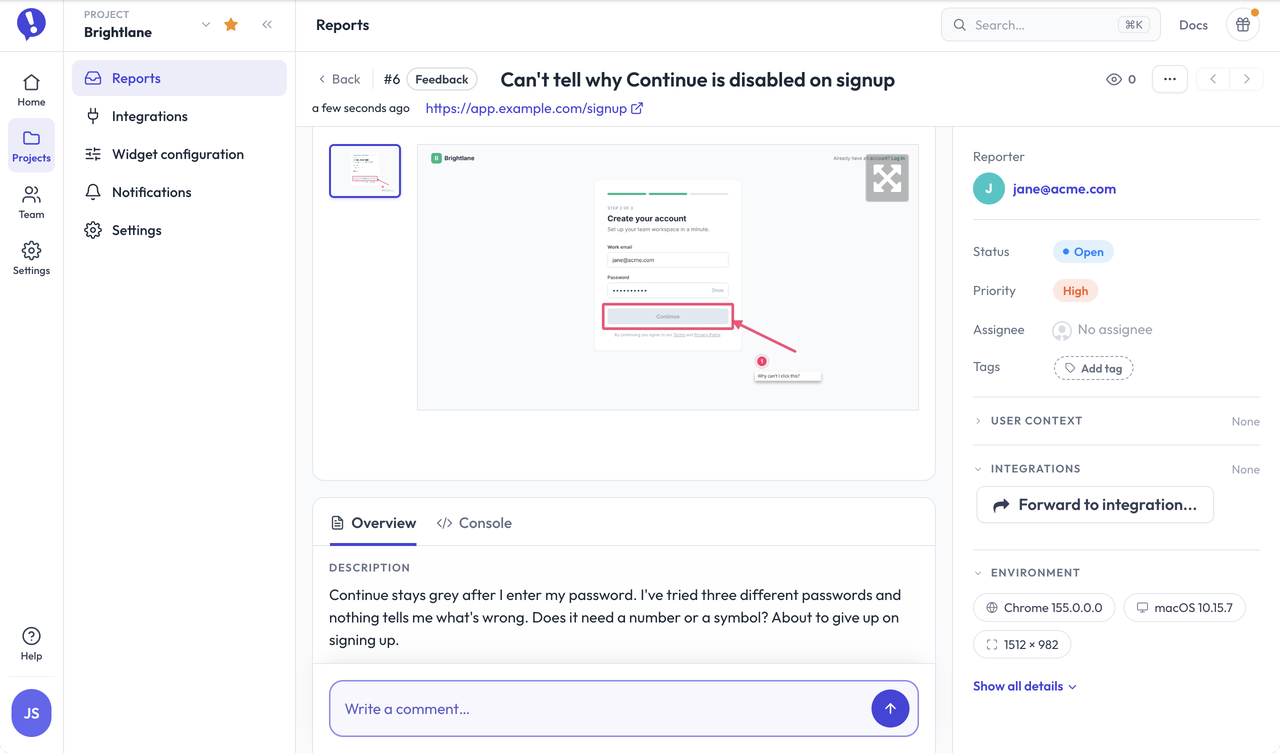
User feedback is the most direct evidence you’ll get: users telling you exactly what confused or frustrated them.
Look at:
- the topics users contact support about most often,
- issues reported through in-product feedback,
- open-text answers in NPS and satisfaction surveys.
No structured feedback yet? Add a feedback widget to the pages you’re auditing and let users flag problems with a screenshot while they’re still on the page.
Want that kind of evidence for your own audit? Let users report problems right on the page, with a screenshot and technical details attached.
(no credit card needed)
Step 6: Document and prioritize findings
Document every finding in the same format, so anyone can act on it:
- Description: the issue in plain language
- Location: page URL and the specific element
- Evidence: screenshot, analytics data, or recording
- Principle broken: which heuristic or WCAG criterion, if any
- Severity: critical (blocks users), high, medium, or low
- Recommendation: the specific change that fixes it
Then prioritize. A simple rule works: impact on user goals multiplied by how often it happens. A critical issue on a high-traffic page always beats a cosmetic issue on a page few people visit.
Here’s what a finding can look like for a SaaS signup flow:
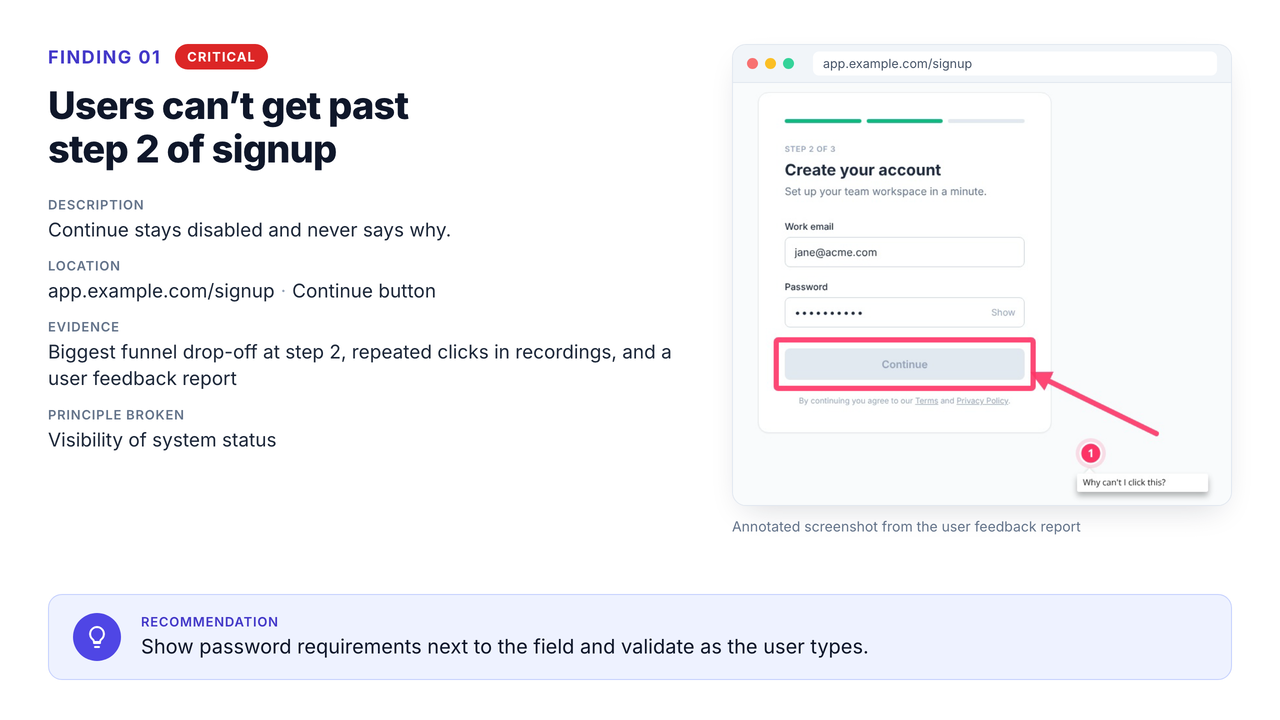
Finding: users can’t get past step 2 of signup. Location: /signup, “Continue” button. Evidence: analytics shows the biggest drop-off at this step, and recordings show repeated clicks on the disabled button. Principle broken: visibility of system status, because the button stays disabled without saying why, and the password rules are hidden until the user leaves the field. Severity: critical. Recommendation: show password requirements next to the field and validate as the user types.
Step 7: Present findings and recommendations
An audit only matters if it changes decisions. A report sent only by email tends to get skimmed and forgotten. Walk your team or client through the findings in a short meeting, and send the document afterwards.
- Open with the 3 to 5 findings that matter most and their business impact.
- Group the rest by theme: navigation, forms, conversion path, mobile, accessibility.
- Pair every problem with a specific recommendation.
- Close with a prioritized plan that feeds into your UX roadmap.
Stick to evidence, not taste. “The button is ugly” starts a debate. “Users click it repeatedly and give up” starts a fix.
A UX audit isn’t about finding everything that could be better. It’s about finding what stops users today and proving it. One screenshot of a real user stuck in your checkout moves a meeting faster than sixty pages of opinions.
What should a UX audit checklist include?
Use this UX audit checklist as a quick first pass over any page or flow, then dig deeper where you find problems.
| Area | What to check | Where the evidence comes from |
|---|---|---|
| Navigation | Can users reach key pages (pricing, contact, signup) in one or two clicks? | Analytics paths, heuristic review |
| Content | Does each page answer the question that brought the visitor there? | Bounce and engagement data |
| Forms | Are labels clear, errors helpful, and fields kept to a minimum? | Recordings, form drop-off |
| Calls to action | Is the next step obvious and consistent across pages? | Heatmaps |
| Mobile | Do layouts, tap targets, and forms work on small screens? | Device reports, recordings |
| Accessibility | Contrast, alt text, keyboard navigation, form labels | Lighthouse, WAVE, WCAG |
| Performance | Do key pages load fast enough to keep users around? | Lighthouse |
| Trust | Are pricing, policies, and contact details easy to find? | Heuristic review, user feedback |
| Error states | Do error messages and 404 pages help users recover? | Heuristic review, support tickets |
Who gets what from a UX audit?
One audit, different wins depending on your role:
- Project managers get a prioritized list they can turn straight into sprint tasks, instead of a vague “improve UX” epic.
- Developers get reproducible findings with URLs, screenshots, and browser details, so they fix issues instead of guessing.
- Testers and QA engineers see where functional bugs end and usability problems begin. Plenty of “works as designed” tickets turn out to be design issues.
- Freelancers and agencies get a clear scope for the next project. With a feedback tool for agencies, clients can keep reporting issues after the audit, so the work continues instead of ending with a PDF.
How is a UX audit different from usability testing?
A UX audit is an expert review of evidence you already have or can collect quickly. Usability testing puts real users in front of real tasks while you watch.
The audit is faster and cheaper, and it catches the obvious problems. Testing gives you direct proof of how people behave, including issues experts miss. They work best together: audit first to find likely problems, then test the ones you’re unsure about.
How long does a UX audit take?
It depends on scope. A focused audit of one flow, like signup or checkout, can take a few days when the data is already there. A full audit of a large site with several user groups and research methods usually takes several weeks.
What slows audits down most is missing access: no analytics permissions, no feedback data, or nobody who can say what the site is supposed to achieve. Sort that out in step 1.
Which tools do you need for a UX audit?
| Tool | What you use it for | Free option |
|---|---|---|
| Google Analytics | Traffic, funnels, engagement | ✅ Free |
| Microsoft Clarity | Heatmaps, scroll maps, session recordings | ✅ Free |
| Hotjar | Heatmaps, recordings, surveys | ✅ Limited free plan |
| Lighthouse (Chrome DevTools) | Performance, accessibility, and SEO checks | ✅ Free |
| WAVE (WebAIM) | Accessibility evaluation | ✅ Free |
| Ybug | Visual user feedback and bug reports on live pages | ✅ FREE plan; console logs from BASIC |
For a website review or a pre-redesign audit, pair behavioral analytics with a visual feedback tool on the live site. You get the numbers (where users drop off) and the words (what they say when they do). To set it up before your audit starts, see our guide on how to collect user feedback.
Collect annotated screenshots and user feedback from the pages you’re auditing.
(no credit card needed)