Website planning template and redesign project plan

What’s in this article
A website planning template is a pre-structured document that maps out every phase, task, owner, and deadline of a website project. Its main advantage is that it keeps your whole team aligned from the first audit through launch instead of reconstructing who agreed to what.
Key takeaways
- A website redesign project plan defines phases, deliverables, roles, timelines, and the feedback process. It is the document every stakeholder works from, not just a Gantt chart.
- Content is consistently the biggest bottleneck in any redesign, so start collecting it in phase one, not phase four.
- Written sign-off at each phase, especially design sign-off before development starts, prevents the most expensive category of rework.
- Protect your SEO before launch. Skipping 301 redirects is the single most costly redesign mistake and can wipe out a large share of your organic traffic overnight.
- Timelines: a small site typically runs 9–14 working weeks and a medium site 18–27 weeks. Elapsed time is always longer than working time because of review cycles.
What is a website redesign project plan?
A website redesign project plan, also called a website development plan, is a structured document outlining every phase, task, owner, and deadline involved in rebuilding or significantly updating a website. It defines what is in scope, what success looks like, who is responsible for each deliverable, and how decisions get made and communicated throughout.
A complete website development project plan template covers:
- Goals and success metrics — what does a successful redesign deliver?
- Scope — which pages, features, and integrations are in?
- Phases and milestones — what happens when?
- Roles and responsibilities — who owns each deliverable?
- Timeline — realistic delivery dates with buffer for review cycles.
- Feedback process — how will stakeholders review and sign off at each phase?
- Risk register — what could delay the project and how will you handle it?
A website project plan is not just a Gantt chart. The timeline is one tool within the plan. The plan itself is the strategic document that keeps everyone working from the same shared understanding of the project. We have seen this first-hand across hundreds of redesign reviews run through Ybug: the projects that ship on time are almost always the ones where this document existed before design started.
What are the 6 phases of a website redesign project?
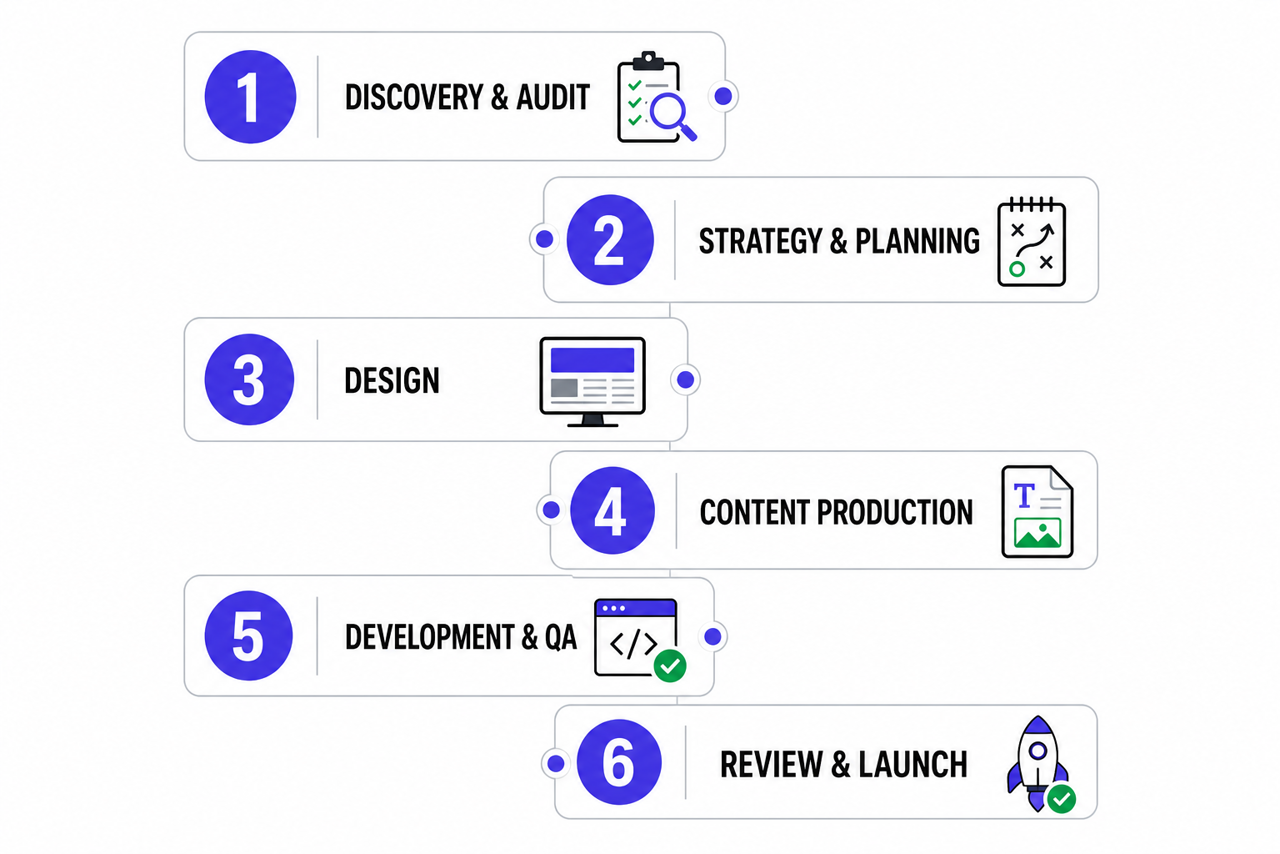
A reliable redesign moves through six distinct phases. Each phase has its own deliverables and approval point, while content work runs in parallel from the beginning.
Phase 1: Discovery and audit
Before anything is designed or built, the team needs a clear picture of where the current site stands and what the new one needs to achieve.
Key deliverables: current site audit (content inventory, performance data, SEO baseline), stakeholder interviews, competitive analysis, goals and KPIs, and target audience review.
This phase takes longer than most clients expect. Time invested in discovery prevents scope disputes and direction changes later.
Phase 2: Strategy and planning
Key deliverables: sitemap, content strategy (what stays, what is rewritten, and what is new), technical requirements (CMS, integrations, accessibility), project plan and website redesign timeline template, plus the feedback and approval process.
This is where your website planning template is finalized and shared with all stakeholders. Good website project planning means everyone agrees on the process before design work begins.
Phase 3: Design
Key deliverables: wireframes for key page templates, high-fidelity visual design mockups for desktop and mobile, a design system or component library, stakeholder review, and written design sign-off. Moving from low-fidelity wireframes to high-fidelity prototypes only after the structure is approved saves expensive rework.
Critical rule: never start development on unapproved designs. Design changes during development are the most expensive kind, both in time and in client trust.
Phase 4: Content production
Content production runs in parallel with design where possible, but must be complete before development finishes.
Key deliverables: final copy for all pages, image and media assets, SEO optimization (meta titles, descriptions, and header structure), and a content migration plan that maps where every existing page moves to.
The timeline reality: content is almost always the bottleneck. Start content collection in Phase 1. Do not wait until design is approved.
Phase 5: Development and QA
Key deliverables: functional staging site ready for QA and client review, cross-browser and device testing, form submission testing, performance and security checks, and SEO tag verification.
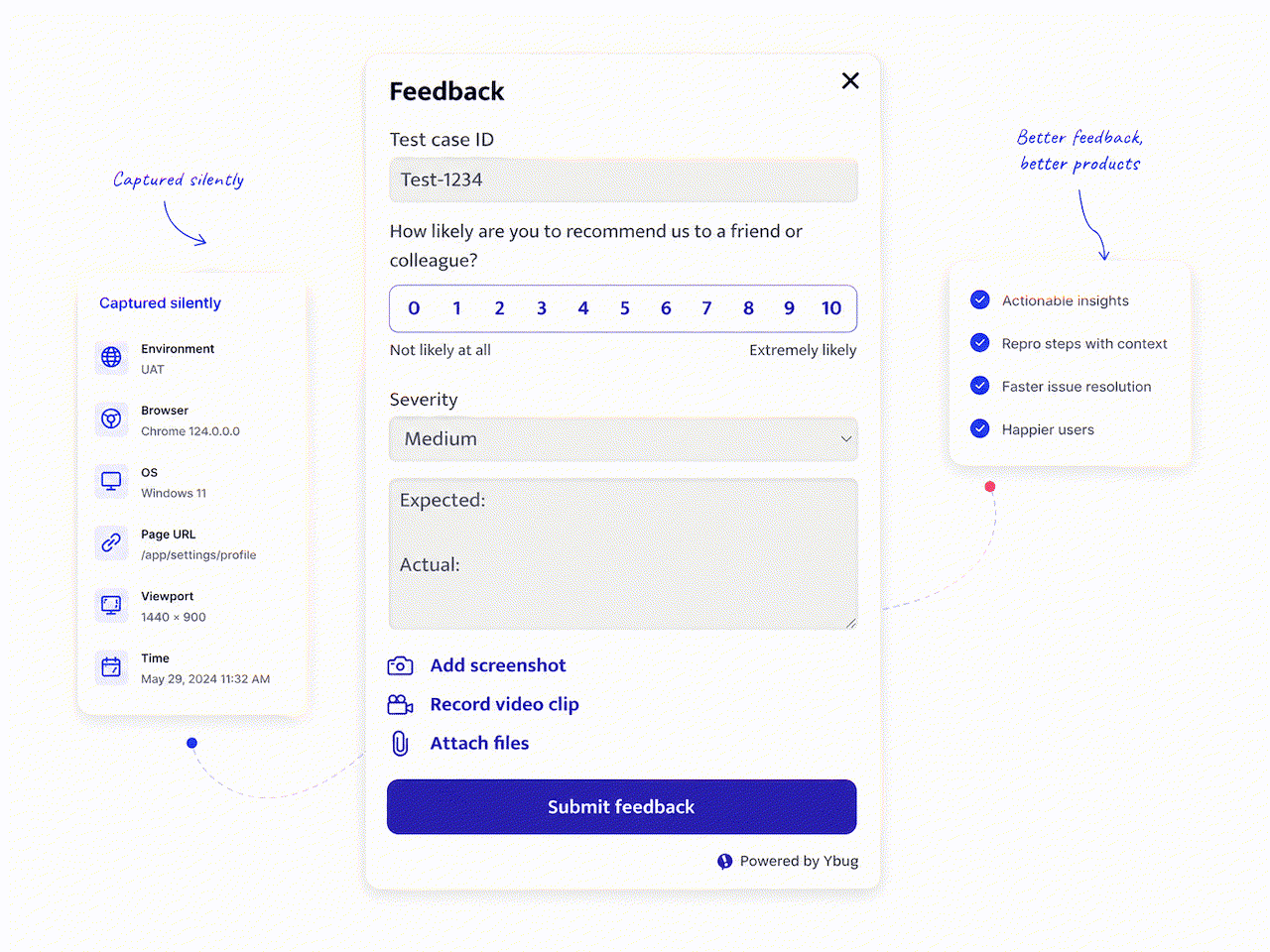
For teams integrating third-party tools, this is where integration testing matters most. A visual feedback tool installed on the staging URL before client review means technical and design issues from any reviewer arrive as structured, complete tickets, not scattered emails. Reports route directly to your project management tool through integrations.
What this feedback loop looks like on staging:
The client captures and annotates the issue on the page → a ticket is created in Jira, Linear, or Trello with the screenshot, URL, browser, and console logs attached → the developer fixes it → the client gets a notification. No follow-up questions and no “which blue button?”
Phase 6: Review, launch, and post-launch
Key deliverables: staging review with all stakeholders, user acceptance testing sign-off, launch plan (DNS cutover, redirects, and analytics verification), and post-launch monitoring.
Before going live, run pre-launch testing against the full website launch checklist covering SEO, performance, security, and stakeholder sign-off. Give the UAT period real space in the plan instead of squeezing it into the final days. After launch, keep the feedback widget active for 48–72 hours to catch any post-launch issues from real users.
How do you redesign a website without losing SEO?
You protect SEO during a redesign by mapping every old URL to its new one with a 301 redirect, keeping high-ranking content, and submitting a fresh sitemap after launch. Skipping this is the most common and most damaging redesign mistake, and it is entirely preventable.
When teams change the URL structure without redirects, search engines treat the new pages as brand new and the authority built up over years does not carry over. The result is a sharp drop in organic traffic right when the new site should be winning.
Build these into Phase 6 of your plan:
- Map and 301 redirect every old URL to its new counterpart before launch. Do not leave this to launch day.
- Keep your best-performing pages. Audit organic traffic first so you do not quietly delete pages that bring in visitors.
- Submit an updated sitemap.xml in Google Search Console and keep the old sitemap temporarily accessible so Google can discover and follow the redirects.
- Do not change title tags at launch. Many SEO practitioners prefer to adjust them a couple of weeks later, in a controlled way that is easy to roll back.
- Monitor indexing daily for the first two weeks after launch, then weekly. Ranking fluctuations in the first days are normal.
Google recommends a permanent server-side redirect whenever a page’s URL changes, precisely so search and users land on the right page. Treat redirects as a non-negotiable line item in your plan, not a nice-to-have.
Skipping redirects can undo months of ranking work in a single launch. A structured plan is what stops that from happening.
Collect complete, contextual staging feedback without chasing screenshots and technical details across email and chat.
(no credit card needed)
How long does a website redesign take?
A small site redesign typically runs 9–14 working weeks, a medium site 18–27 weeks, and a large site 29–50 weeks. Use this website redesign timeline template as your starting point and adjust it for your own review cadence.
| Project type | Discovery & strategy | Design | Content | Dev & QA | Review & launch | Total |
|---|---|---|---|---|---|---|
| Small (5–15 pages) | 1–2 weeks | 2–3 weeks | 2–3 weeks | 3–4 weeks | 1–2 weeks | 9–14 weeks |
| Medium (15–50 pages) | 2–4 weeks | 4–6 weeks | 4–6 weeks | 6–8 weeks | 2–3 weeks | 18–27 weeks |
| Large (50+ pages) | 4–8 weeks | 6–10 weeks | 6–12 weeks | 10–16 weeks | 3–4 weeks | 29–50 weeks |
These are working timelines. Client review cycles, content delays, and stakeholder availability extend elapsed time beyond these estimates. Build buffer into every milestone.
Why do website redesigns go wrong?
Most redesign failures trace back to five recurring risks. The matrix below shows what causes each one, what it costs, and where your plan should prevent it.
| Risk | Why it happens | Impact | Mitigation in your plan |
|---|---|---|---|
| Lost SEO ranking | URL structure changed without 301 redirects | Immediate drop in organic traffic | Map every URL and add its 301 redirect in Phase 6 |
| Bugs in production | QA rushed right before launch | Poor UX and lost revenue | A dedicated Phase 5 with a UAT period and a feedback tool |
| Content delays | Copy started only after design | Launch slips by weeks | Move content collection into Phases 1 and 2 |
| Scattered feedback | Comments arrive by email, chat, and calls | Frustration and missed fixes | Require visual bug reporting on staging |
| Scope creep | Scope agreed verbally, not signed | Budget and timeline blow out | Written, signed scope before work begins |
A few of these deserve extra emphasis because they cause the most damage in practice:
Content underestimated. Content is always late. Plan for twice as long as estimated and start in Phase 1.
Scope creep from verbal agreements. “5 pages” can mean 50 depending on the client. Get scope in writing and signed before work begins.
No feedback structure on staging. When clients give feedback through email, chat, and verbal calls at the same time, consolidating it is slow and error-prone. Installing a visual bug reporting tool on the staging URL before sharing it structures the review from the first submission.
SEO left until launch day. Industry analyses of common website redesign mistakes consistently name lost rankings as the number one redesign failure. Bake redirects and a content audit into the plan from Phase 1.
The feedback phase is where most redesign projects lose weeks. It is not the building, it is the back-and-forth on vague comments. When everyone gives feedback on the same staging URL with context captured automatically, the review cycle compresses dramatically.
For agencies running multiple client redesigns at once, a consistent feedback process across all projects keeps review cycles from becoming the bottleneck. Structured staging feedback is often the difference between hitting a launch date and slipping it.
Ready to make staging review the fastest part of your next redesign?
Capture screenshots, technical context, and client comments in one structured feedback workflow.
(no credit card needed)