Customer feedback management for SaaS: who owns what

What’s in this article
- Key takeaways
- Why does customer feedback often fail to turn into action?
- What are the steps of a customer feedback management process?
- Who owns each step of the customer feedback workflow?
- Why does customer success need feedback next to account health?
- Which customer feedback tools do you need for each step?
- What are the most common customer feedback management mistakes?
- Which metrics show your customer feedback management process works?
- FAQ
Customer feedback management is the process of collecting, organizing, prioritizing, and responding to customer input across support, product, engineering, and customer success, and its main advantage is that every piece of feedback ends in a decision the customer actually hears about.
Key takeaways
- Four steps: collect, centralize and tag, prioritize and decide, and respond. Processes often break between steps, not inside them.
- Every step needs one owner and a clear handoff. Feedback gets lost where one team assumes another will follow up.
- Feedback needs account context. Account value is one prioritization signal next to severity and frequency, so customer success should see feedback next to health score, usage, and churn risk.
- Responding is a task, not a courtesy. Tell the reporter what happened, including “not now” and “no” decisions.
- Measure outcomes, not volume: time to resolution, the share of reporters who hear back, and retention of accounts that reported problems.
Why does customer feedback often fail to turn into action?
Feedback often gets lost between collecting it and acting on it, especially when ownership and handoffs are unclear. It lands in an inbox, a Slack channel, or a spreadsheet, and each team assumes the next one will handle it.
Customer feedback is the input itself. Customer feedback management is the process around it, and the hard part isn’t collecting feedback: it’s making sure every item has an owner, reaches a decision, and gets a response.
In the SaaS founder and customer success discussions we went through while researching this guide, three patterns kept coming up:
- Feedback travels by word of mouth. A founder or CSM relays it in a meeting, details get lost, and months later nobody can trace a decision back to the customer who asked.
- One request becomes a dozen tickets. The same request arrives as separate conversations, so when it ships, nobody knows who to tell.
- “I’ll pass that to the product team.” For many customers, that’s the last thing they ever hear about their request.
None of these is a tooling problem first. It’s a missing process. This guide covers the operating model, meaning who does what and when. For the concept behind it, read what is a feedback loop.
What are the steps of a customer feedback management process?
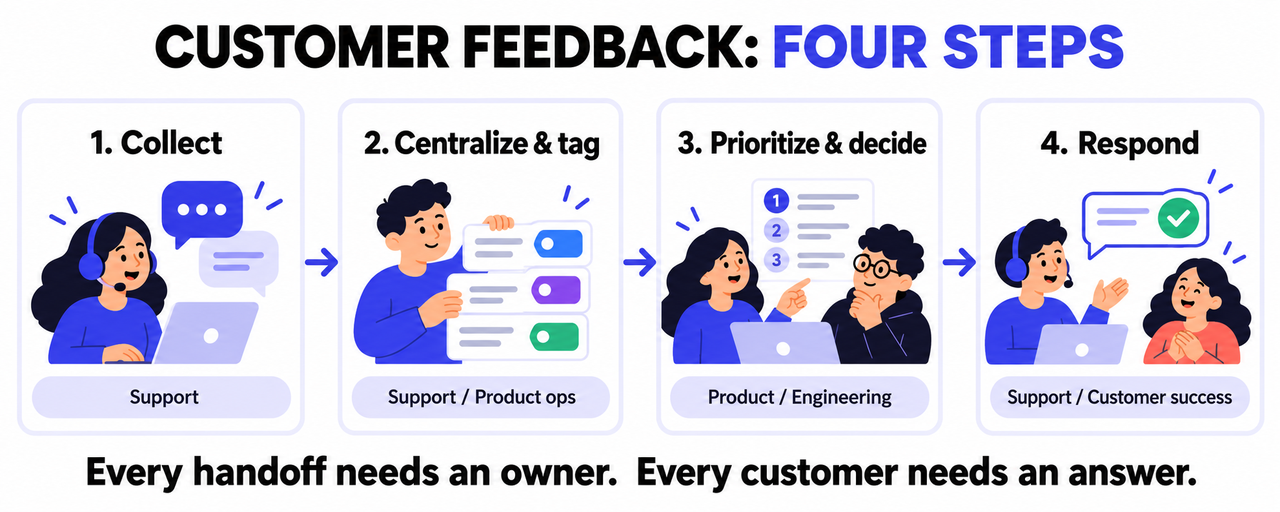
A customer feedback management process has four steps: collect, centralize and tag, prioritize and decide, and respond. Each step has a clear exit point, and the process only works when every item reaches the last one.
Step 1: How do you collect feedback with enough context?
Collect feedback where it happens: in your app, on your website, in support conversations, surveys, and sales or CS calls. These are your main sources of customer feedback.
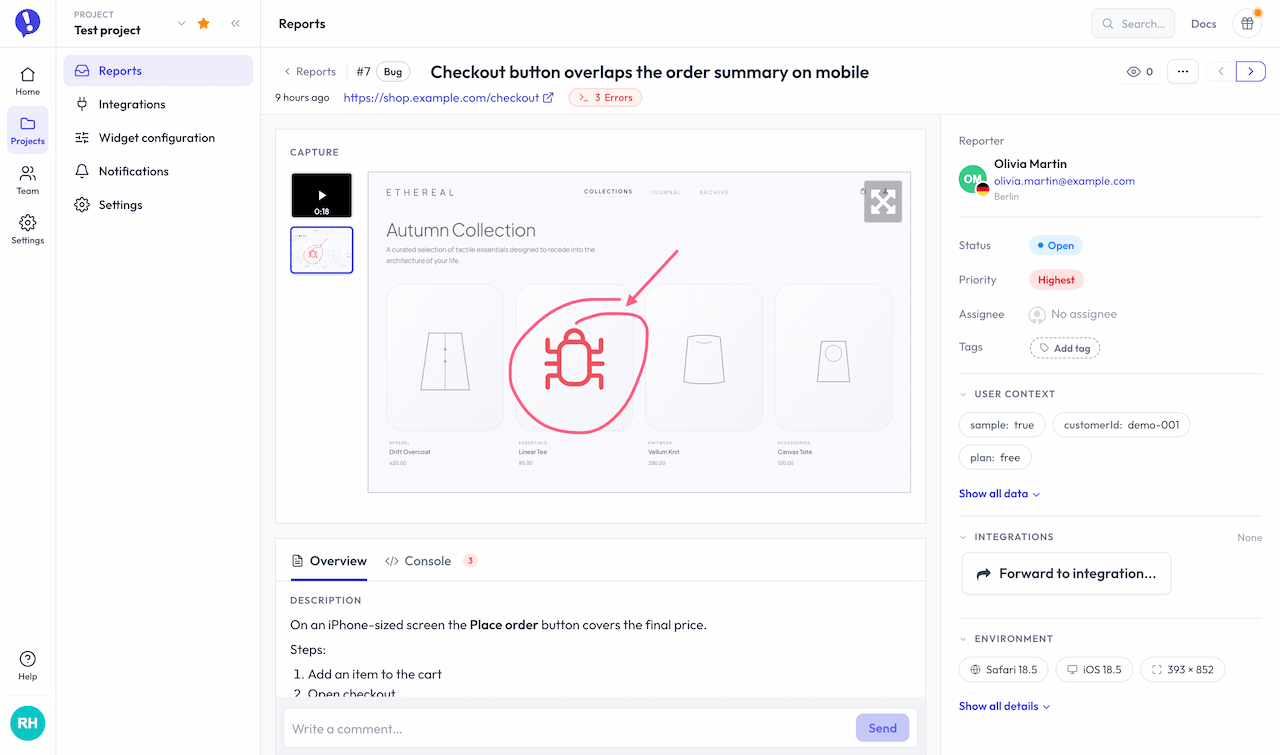
A report that says “the dashboard is broken” costs a round trip before anyone can act. A report with a screenshot, URL, browser details, and the user’s account doesn’t. For a channel-by-channel breakdown, see how to collect user feedback.
Exit point: every item says who reported it, where it happened, and what they expected.
Step 2: How do you centralize and tag feedback?
Move everything into one place and tag it consistently: type (bug, feature request, question), product area, and account or plan. Merge duplicates and attach every requester to the same item, so that when you ship the fix, you can notify all of them, not just the first one.
Exit point: the item is tagged, deduplicated, and linked to an account.
Step 3: How do you prioritize and decide what to do?
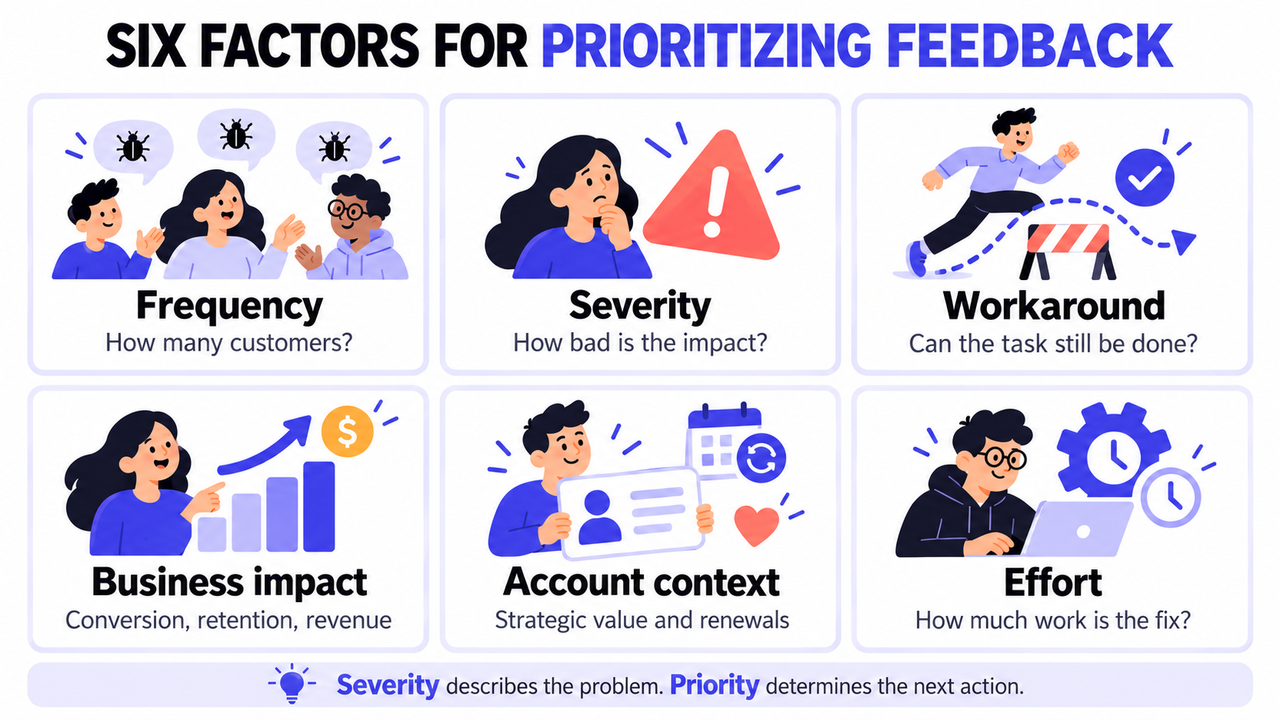
Review new items on a fixed cadence that fits your team. Weekly is a practical starting point for many SaaS teams, while support-heavy products may need a daily check. Before you decide, run each item through the same questions:
| Factor | Question to ask |
|---|---|
| Frequency | How many customers report it? |
| Severity | How badly does it affect them? |
| Workaround | Can they still get the task done? |
| Business impact | Does it affect conversion, retention, or revenue? |
| Account context | Are affected accounts strategically important or close to renewal? |
| Effort | How much work is the fix? |
Severity tells you how bad a problem is. Priority tells you what the team will do about it and when. A severe bug that hits one internal admin page may wait, while a minor glitch in checkout may not.
Then give every item a decision: fix now, schedule, monitor, or decline with a reason. This is where customer feedback meets product management, and where items often stall. A decision that lives only in a meeting doesn’t count.
Exit point: the decision and the reason are recorded on the item.
Step 4: How do you respond to the customer who reported it?
Tell the person who gave feedback what happened to it, including a clear “no.” Two examples:
“Thanks for flagging the export bug on the reports page. It’s fixed in today’s release, so your CSV should download correctly now.”
“We looked at your request for multi-currency invoices. It’s not on this year’s roadmap because [reason]. We’ll let you know if that changes.”
The response shouldn’t depend on someone remembering an email. In Ybug, for example, reporters can get an automatic confirmation, replies sent from the report detail, and an update when the report is resolved or closed.
Exit point: the customer knows the outcome.
Who owns each step of the customer feedback workflow?
Support usually owns collection and first response, product owns prioritization, engineering owns the fix, and customer success owns the account-level follow-up. The customer feedback workflow breaks at the handoffs, so each handoff needs a named owner and a trigger.
| Step | Typical owner | Where the handoff breaks | Fix |
|---|---|---|---|
| Collect | Support | Ticket closed as “passed to product” with no linked item | Link every ticket to a feedback item before closing it |
| Feedback inbox | Support or product ops | Duplicates never merged | Weekly merge, attach all requesters |
| Prioritize and decide | Product and engineering | Decision made in a meeting, never written down | Record the decision and reason on the item |
| Respond | Support for individuals, CS for key accounts | Fix ships, nobody tells the reporter | Status change triggers a notification and a list of affected accounts for CS |
Each role sees the process differently. Product managers need patterns, not single tickets. Developers need reports they can reproduce without a follow-up call. Your customer support team needs to answer “any update?” without chasing three people. CSMs need to know when a fix affects their accounts.
Running a five-person SaaS team? You don’t need a dedicated feedback manager. One person can own the whole process:
- Capture feedback with context.
- Tag and merge duplicates once a week.
- Review priorities in your regular product meeting.
- Record the decision on each item.
- Notify the customer when the status changes.
Teams rarely lose feedback because they don’t care. They lose it at the handoff, when support thinks product will reply and product thinks support already did. Give the last step a name and a trigger, and the rest of the process starts working on its own,
Why does customer success need feedback next to account health?
Because the same feedback can carry different risk depending on the account behind it. Account value is an important prioritization signal, especially around renewals, but it should be weighed alongside severity, frequency, product impact, and how many customers are affected.
Product teams tend to see feedback by volume, customer success sees it by account, and the process works best when both views meet. GitLab’s public handbook shows one way to do it: its customer issues prioritization framework lets customer-facing teams label issues as Blocker (a deal can’t close without it), Retention (a customer can’t stay on their plan without it), or Fast Follow (delivery was promised). Product teams treat the labels as planning input, not a strict ordering.
To make this work, attach account data at the moment of collection. Ybug’s JavaScript API lets you pass the logged-in user’s ID, email, plan, or other attributes with every report, so each piece of feedback already knows which account it belongs to.
That account context usually lives in a customer success tool like Custify. Custify is a customer success platform for B2B SaaS that pulls account data into one view, including product usage, health scores, and churn risk signals, and turns it into alerts, tasks, and automated playbooks for the CS team. That’s where a CSM can see the account behind a new bug report is already trending down and call now instead of waiting for the fix. The fair limitation: Custify isn’t built to capture in-context bug reports or visual feedback from your website or app, it depends on data flowing in from your product and other tools, and it fits best for B2B SaaS teams with an account-based customer success model.
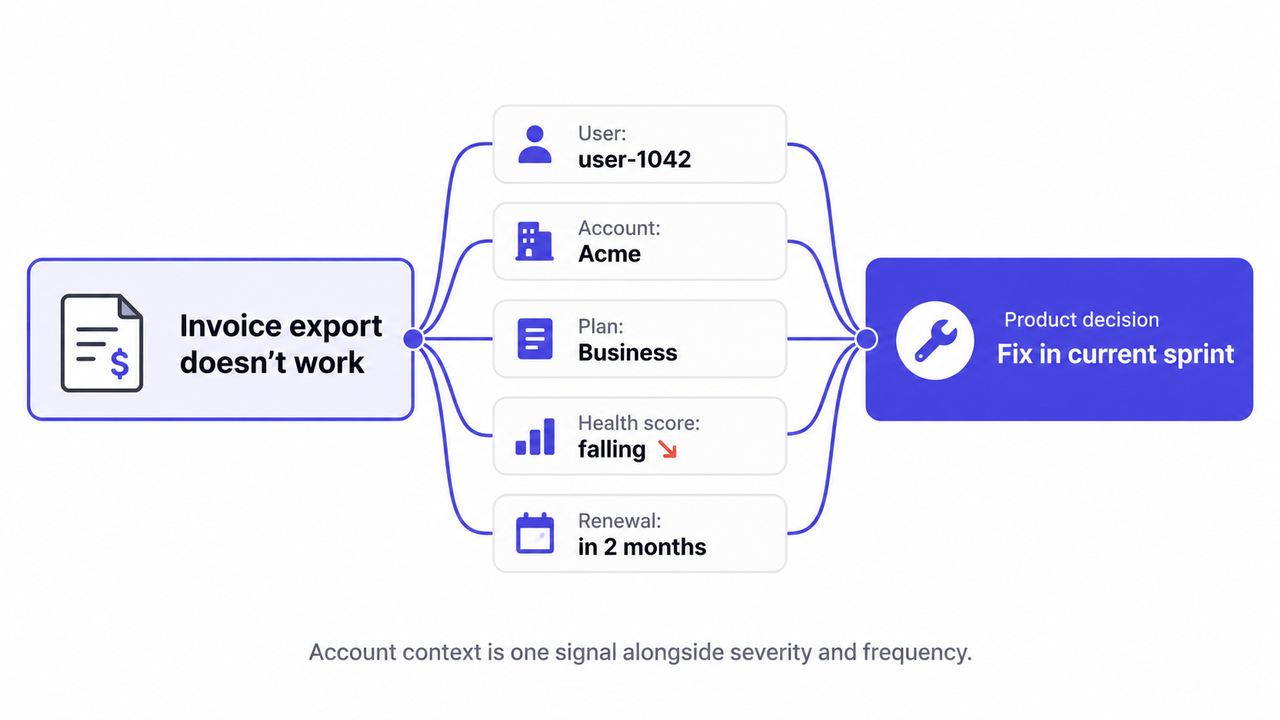
Here’s how that looks in practice. A user at a mid-size customer reports that invoices won’t export. The report arrives with a screenshot, browser details, and the account ID. The CSM sees the account’s health score dropped and the renewal is two months out, so product pulls the fix into the current sprint. When it ships, the reporter gets a resolution notice and the CSM follows up.
One caution: unchecked account weighting starves smaller customers. Keep part of your capacity for issues that affect many accounts.
Which customer feedback tools do you need for each step?
You don’t need one tool for everything. What matters is that the tools you use share enough context, like account IDs and statuses, to keep feedback connected from collection to resolution. Think in roles first, product names second.
| Tool role | What it needs to do | Example tools |
|---|---|---|
| In-context feedback | Visual feedback and bug reports from your website or app, with screenshot, URL, browser, OS, console logs, and user ID | Ybug |
| Customer sentiment | Periodic NPS or CSAT, short in-product surveys | A survey or NPS tool |
| Feedback inbox | One inbox with tags, statuses, custom fields, and duplicate handling | Ybug dashboard and Kanban board, or your helpdesk (Zendesk, Intercom, Freshdesk) |
| Account context (CS platform) | Health score, product usage, churn risk, tasks and playbooks for CSMs | Custify |
| Engineering execution (issue tracker) | Backlog and sprint planning | Jira, Linear |
| Customer updates | Confirmation, replies, and resolution updates to the reporter; release notes for broad changes | Ybug notifications, helpdesk macros, a public changelog |
For collection, a visual feedback tool like Ybug adds a widget to your website or app that people can use without logging in. Each report includes an annotated screenshot plus URL, browser, OS, and console logs, and your team works with it through tags, statuses, custom fields, a Kanban board, and integrations with tools like Jira, GitHub, Slack, Intercom, and Zendesk. There’s a FREE plan and flat pricing. The limitation: Ybug collects contextual feedback on your site or app, so for NPS or longer surveys you’ll need a separate survey tool. Our roundup of the best website feedback tools covers the collection side in more detail.
What are the most common customer feedback management mistakes?
A common mistake is treating customer feedback management as collection. Teams gather a lot of input and make few decisions with it. Watch for these six:
- Collecting without categorizing. Untagged feedback can’t be counted, merged, or routed.
- Filing feedback under the person, not the account. If a request is logged under the agent or sales rep who heard it, you can’t see which accounts want it.
- Never answering the “no.” A short, honest decline keeps people reporting. Silence doesn’t.
- Measuring only feedback volume. More feedback can simply mean more unanswered reporters.
- Letting the loudest customer set the roadmap. Weigh requests by frequency and account context, not by who emails most.
- Closing the ticket instead of answering the customer. The conversation ends once the request is passed on, and the customer never hears back.
If mistakes 1, 2, and 6 sound familiar, start by capturing reports with full context and an automatic update path.
See how Ybug keeps every reporter updated.
(no credit card needed)
Which metrics show your customer feedback management process works?
Track how fast feedback moves, how often reporters hear back, and whether accounts that report problems stay. Volume alone tells you nothing about whether the process works.
Speed matters. In their Harvard Business Review article Closing the Customer Feedback Loop, Bain’s Rob Markey, Fred Reichheld, and Andreas Dullweber describe how companies got the most out of feedback by relaying it quickly to the people who could act on it.
| Metric | What it tells you | How to measure it |
|---|---|---|
| Time to first response | Whether reporters feel heard | Submission to first human reply |
| Time from report to resolution | How fast the whole process moves | Submission to resolved status |
| Decision rate | Whether triage keeps up | Share of items with a recorded decision within your review cycle |
| Response rate | Whether the last step happens at all | Share of resolved or declined items where the reporter was notified |
| Retention of reporting accounts | Long-term signal of business impact | Renewal and churn of accounts that heard back vs. those that didn’t |
Set your own targets for first response and resolution, and confirm receipt right away, even if the real answer takes weeks. Treat retention as a longer-term signal, not proof that your process caused the outcome. Customers who report problems differ from those who don’t: they may use the product more heavily, have more issues, or be closer to renewal.
Capture reports with full context and an automatic update path.
(no credit card needed)