What is a feedback loop? How to close it with customers

What’s in this article
- Key takeaways
- What is a feedback loop?
- What are the stages of a customer feedback loop?
- Why is closing the feedback loop so important?
- What is the difference between an open and a closed feedback loop?
- How do you build a customer feedback loop?
- How do you close the feedback loop for website and web app issues?
- What does a closed feedback loop look like for different teams?
- FAQ
A feedback loop is the cycle of collecting customer input, acting on it, and telling customers what changed, and its main advantage is that it turns one-off complaints into lasting trust and a steady stream of useful feedback.
Key takeaways
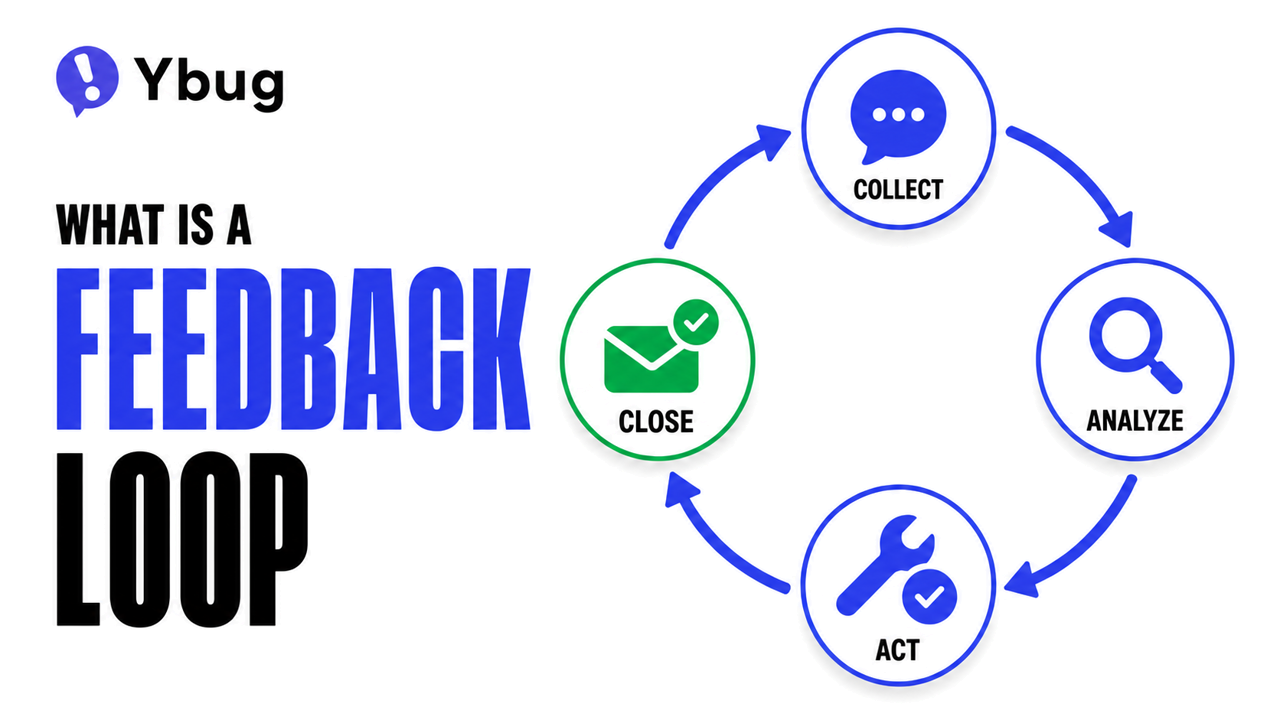
- Four stages, not two: a customer feedback loop is collect, analyze, act, and close. Most teams stop after act.
- Closing the loop means telling the person who gave feedback what happened to it, including when the answer is “not right now.”
- Open vs. closed: an open feedback loop gathers input; a closed feedback loop earns trust and keeps the feedback coming.
- Silence kills feedback programs. People who never hear back stop reporting, and you lose your early warning system.
- For websites and web apps, the easiest close is a tool that captures the report with full context and notifies the reporter automatically when it is resolved.
What is a feedback loop?
The feedback loop definition comes from systems theory: the output of a system is fed back in as input and shapes what the system does next. A thermostat is the classic example. It measures the room, compares it to the target, and adjusts the heating.
In a product context, the same idea applies to people. A customer says something, the team responds with a change, and the customer sees the result. When customer feedback flows around that circle repeatedly, the product gets better and the relationship gets stronger.
Two types matter for product teams:
- Positive (reinforcing) feedback loops amplify a signal. A well-loved feature drives more usage, which drives more requests to extend it, which drives more investment in it.
- Negative (balancing) feedback loops correct a signal. Complaints about a bug trigger a fix, the complaints stop, and satisfaction returns to baseline.
A healthy product feedback loop does both: it amplifies what works and corrects what does not, continuously, not just at annual survey time.
What are the stages of a customer feedback loop?
A customer feedback loop has 4 stages. The first three are familiar to every team; the fourth separates a program that lasts from one that quietly dies.
| Stage | What happens | Typical tools |
|---|---|---|
| 1. Collect | Gather input from multiple channels: in-app reports, support tickets, surveys, reviews, and sales calls. | Feedback widget, NPS or CSAT surveys, helpdesk, review platforms |
| 2. Analyze | Tag and group feedback by theme, product area, and severity. Prioritize by frequency and business impact. | Tags, spreadsheets, product analytics, CRM |
| 3. Act | Fix the bug, ship the feature, update the docs, or decide not to and record why. | Sprint backlog, roadmap, documentation, helpdesk |
| 4. Close | Tell the people who gave the feedback what happened as a result. | Email notification, in-app message, changelog, “you said, we did” post |
Most teams invest heavily in stage 1 (collection tools) and stage 3 (development). Stage 4 is almost always underbuilt, even though it determines whether customers trust the process enough to keep participating. Stage 2 is the usual bottleneck at volume: if manual tagging in a spreadsheet cannot keep up, AI-assisted clustering and sentiment tagging can do the first pass, as long as a human still checks the groupings before they drive decisions. When the feedback is in Ybug, an AI assistant connected to Ybug can do that first pass on the reports directly.
Why is closing the feedback loop so important?
When customers submit feedback and hear nothing, they assume one of two things: it was not received, or it was not valued. Either way, the result is the same. They stop submitting feedback, and you lose your cheapest source of product insight.
We researched how practitioners talk about this in product and SaaS communities, and one story repeats: a user requests a feature, the team ships it months later, and the user finds out from a newsletter. Nobody told them. Their next step is usually to stop using the feedback portal.
The other pattern: the “no” nobody sends. When a request will not be built, the default is silence. A short, honest “we are not doing this, and here is why” keeps people engaged far better than months of guessing.
This is not new. Bain & Company built follow-up directly into its Net Promoter System inner loop: feedback goes to the person who can act on it, and the loop closes by getting back to the customer. The principle is the same for an NPS score or a bug report on a staging site.
Collecting feedback is only half the job. When someone takes the time to report a problem, the least we can do is let them know what happened next. If customers never hear back, they eventually stop believing that their feedback matters.
What is the difference between an open and a closed feedback loop?
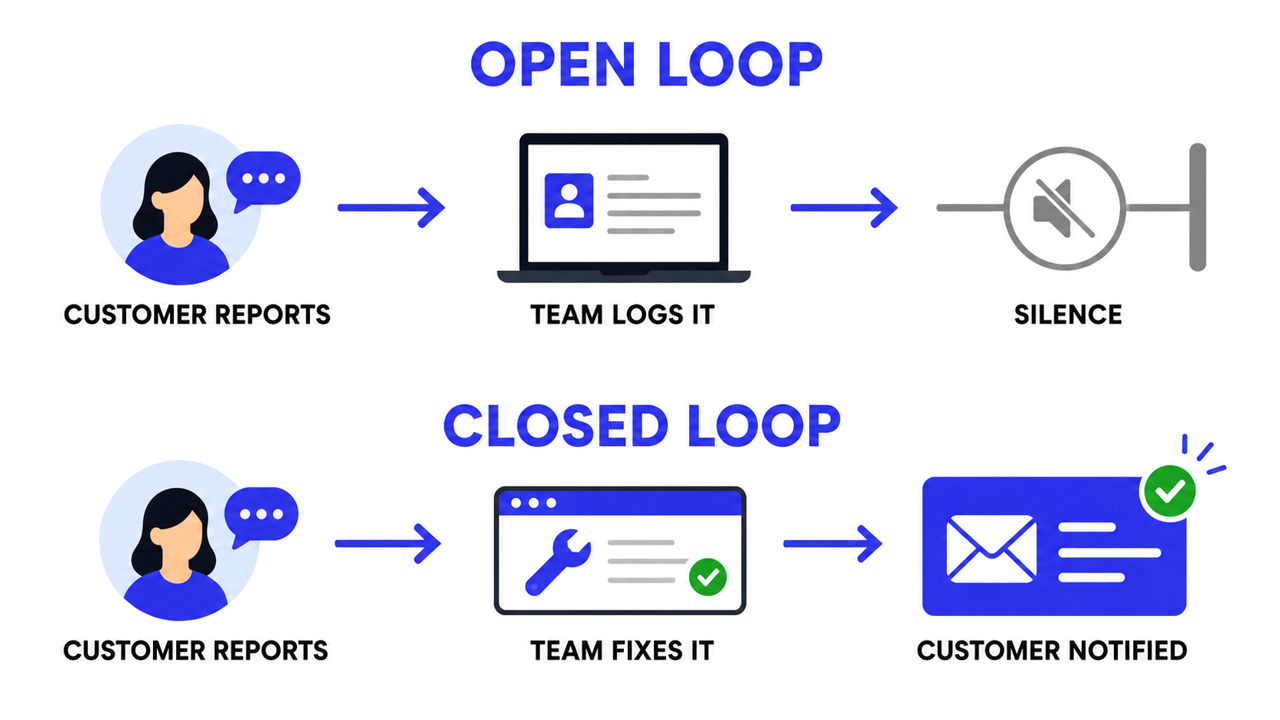
An open feedback loop collects input but has no defined process for acting on it or reporting back. It is common in early-stage companies and in teams that gather feedback reactively without a formal owner. From the customer side it looks like this:
Customer reports a bug → team logs it → nothing happens from the customer perspective.
A closed feedback loop adds a defined path from collection through analysis and action to communication. It is called closed because it goes full circle, from customer to team and back to customer:
Customer reports a bug → team fixes it → customer gets a notification that it is fixed.
Want to see an automatic close on a real bug report?
Capture each report with context and keep the reporter updated through resolution.
(no credit card needed)
How do you build a customer feedback loop?
The 5-step version we recommend. The discipline is in step 5.
Step 1: What do you actually want to learn?
Before you collect anything, write down the questions you need answered. “What do customers think?” is too broad. “Why are paid customers churning before month six?” is specific enough to design a collection method around.
Step 2: Which collection method fits the moment?
Match the method to the question and the moment. Nielsen Norman Group’s guidelines for user-feedback requests put it simply: task, then ask. Interrupting people mid-task produces low-quality feedback.
- In-context, real-time feedback: a visual feedback tool on your website or app lets users report an issue the moment they hit it, without leaving the page. Each report carries a screenshot, URL, browser and OS details, and console logs, so nobody has to ask “which page?”
- Post-interaction surveys: a short survey after a key action such as checkout, feature activation, or a support resolution. Specific to a moment, easy to answer.
- Periodic NPS or CSAT: a one-question sentiment check on a fixed cadence. Good for trends, weak at pinpointing issues.
- Support ticket analysis: tag existing tickets by theme and review volume monthly to surface patterns surveys miss.
For a deeper look at choosing channels, see how to collect user feedback.
Step 3: How do you turn raw feedback into priorities?
Raw feedback is noise; categorized feedback is signal. Group items by theme, product area, and severity, then weight them by frequency and business impact, not by who shouted loudest.
Step 4: How do you act on it?
Fix the bug. Ship the feature. Update the docs. Or decide not to, and write down why. The action does not have to be big, it has to be real and traceable to the feedback that prompted it. Our guide on data-driven product development covers how to make those calls.
Step 5: How do you close the loop?
Closing the feedback loop with customers is the step most teams skip, usually because nobody owns it. When a fix ships or a decision is made, notify the people who raised it:
- Bug reports: a direct email or in-app notification to the reporter, naming what was fixed.
- Feature requests: a note to everyone who asked when it ships, and a short “not planned, here is why” when it will not.
- Broader patterns: a monthly “you said, we did” post that ties visible improvements to customer input.
Set expectations up front. Customers start treating a loop as open after a few days of silence, so publish a simple response standard, for example: automatic confirmation immediately, first human reply within 2 business days, decision within 2 weeks. Any numbers you choose are fine, as long as you keep them.
Scale from 1-to-1 to 1-to-many. A personal email works for a staging bug or the first 10 people who asked for a feature. Once hundreds have asked, switch to a public changelog or public roadmap where each request can be linked to its status, and reserve personal notes for the people who gave the most detail.
Close the internal loop too. Support, sales, and account managers should learn about a fix or a release before customers do, or they will be the last to know when a customer asks. A short internal “shipped this week” note is enough.
One caution from Forrester on closing the loop without being creepy: only close loops the customer knowingly opened. Their example is a company that fixed a bug found in a private gift message, then emailed the sender to say thanks. Good intent, wrong channel.
How do you close the feedback loop for website and web app issues?
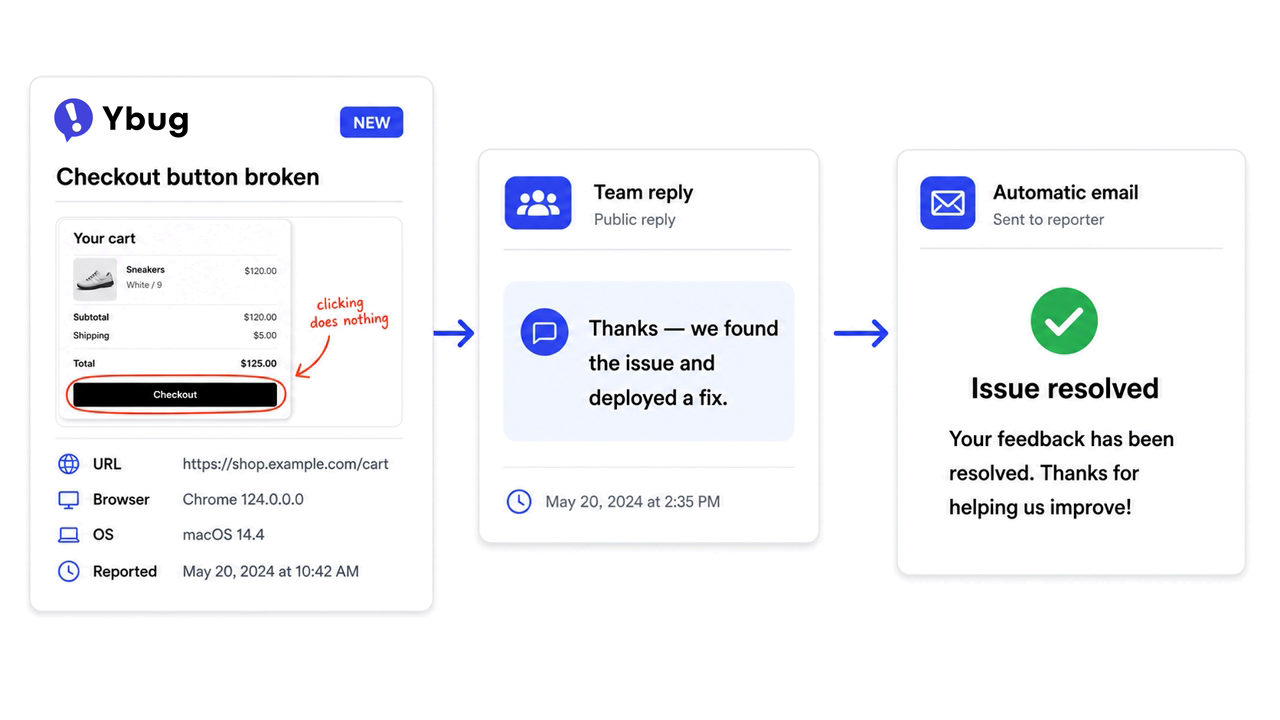
For product teams and web agencies, the close is easiest when the tool that collects the report is also the tool that tracks its resolution. That is exactly what Ybug’s feedback loop feature does: when someone submits a report through the feedback widget, Ybug can send an automatic confirmation right away, let your team reply from the report detail if a question comes up, and notify the reporter again when the issue is updated, resolved, or closed. You choose which emails go out and edit their wording.
If your developers live in Jira, the report flows there through the Jira integration while the reporter keeps getting updates from Ybug. Nobody has to remember to send a manual email.
No dedicated tool yet? The minimum viable close:
- A spreadsheet with every piece of feedback, a status column, and a “customer notified” checkbox.
- A weekly review of resolved items followed by a batch email or in-app message to the people affected.
- A monthly “what changed based on your feedback” post to the wider customer base.
Loops stay open because nobody is assigned to close them. Fix the ownership problem first, and the process follows.
What does a closed feedback loop look like for different teams?
How does a SaaS product team close the loop?
Feedback arrives through in-app reports, NPS follow-ups, and sales call notes. Product tags it weekly, and sprint planning reviews the top themes by frequency and impact. Fixed bug: the reporter gets an email. Shipped feature: everyone who asked in the last 90 days gets a note. If you are setting up a feedback tool for SaaS workflow from scratch, copy this pattern.
How does a web agency close the loop with clients?
Client feedback comes in through a widget on the staging site and routes straight to the project management tool. After each revision round, the project manager sends a summary of what was addressed and what was deferred. After go-live, the client receives an “all items resolved” document.
How does an e-commerce brand close the loop with customers?
Feedback arrives through post-purchase surveys, support tickets, and product reviews. Support tags tickets weekly; product and operations review the top themes monthly. When a complaint pattern leads to a change, such as a clearer sizing guide, the customers who raised it get an email explaining what changed.
Every report your users send is a chance to show them you are listening.
Collect feedback with context, act on it, and keep every reporter informed.
(no credit card needed)