All-in-one customer feedback tool: a guide for retail brands

What’s in this article
- Key takeaways
- Why is retail customer feedback harder to manage?
- What channels does retail customer feedback come from?
- Why do customers stop giving feedback?
- What should customer feedback management software do for retail?
- Which customer feedback collection tools fit each channel?
- How do you unify in-store and online feedback?
- What are the most common customer feedback management mistakes?
- How do you turn retail feedback into decisions?
- Where does a visual feedback tool fit among other feedback tools?
- How does Ybug fit into your retail stack?
- FAQ
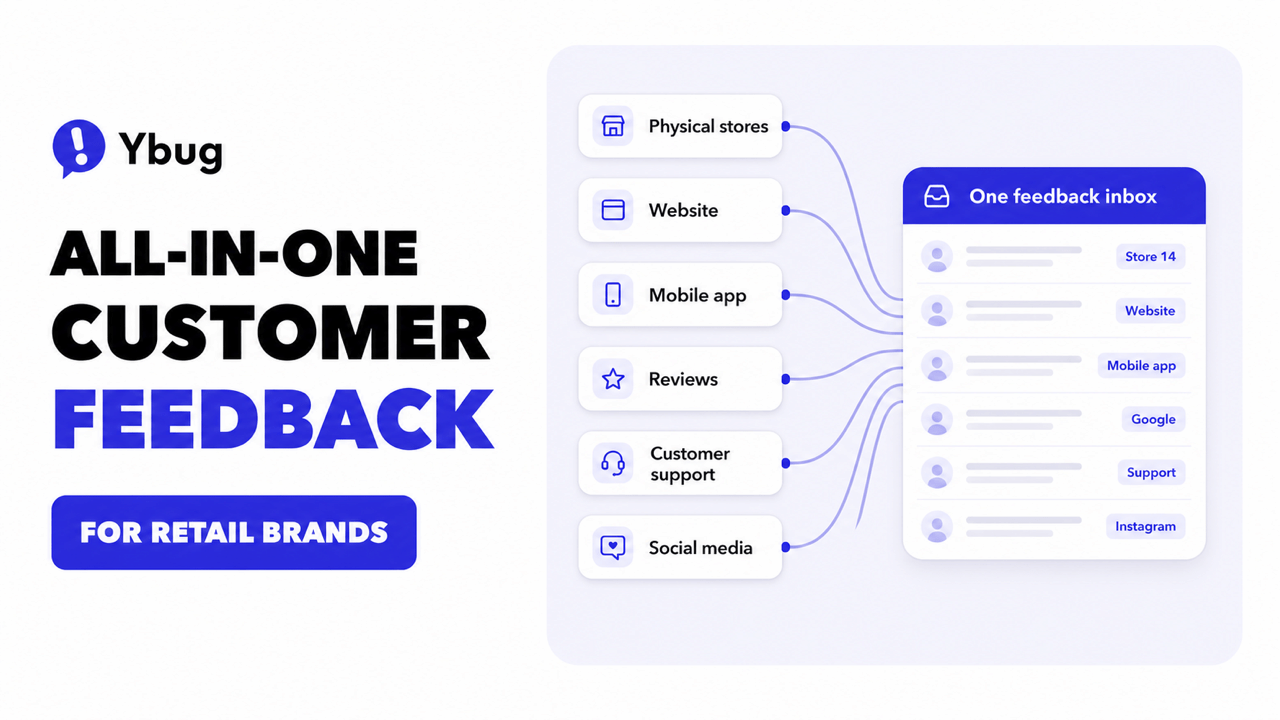
An all-in-one customer feedback tool is a platform that collects, organizes, and routes customer feedback from every retail channel into one place, and its main advantage is that no signal gets lost between the store, the website, and the app.
Key takeaways
- Retail feedback is fragmented by default: stores, websites, apps, reviews, and support each produce feedback in a different format, owned by a different team.
- An all-in-one tool solves the routing problem: one shared inbox, tagging by location and channel, and automatic delivery to the team that can act.
- More surveys do not mean more insight: response rates drop when customers are over-surveyed. Short, well-timed asks beat long questionnaires.
- Passive channels catch what surveys miss: a feedback widget on your website captures issues customers would never fill out a survey about.
- Closing the loop keeps feedback coming: customers keep contributing when they see that something changed because of what they said.
A retail customer might mention a sizing issue to a store associate on Monday, hit a broken filter on your website on Wednesday, and leave a three-star app review on Friday. Those are three signals about one customer relationship, and in most retail organizations they land in three disconnected places.
Why is retail customer feedback harder to manage?
More channels than almost any other industry. A software company hears from users mostly through the product and support. A retail brand hears from customers in physical stores, on the website, in the mobile app, on marketplaces, in public reviews, on social media, and through support tickets, each with its own format and its own owner.
Different teams own different channels. Store operations owns in-store comments, e-commerce owns the website, marketing owns social and reviews, support owns tickets. Feedback about the same product or policy scatters across four inboxes, and nobody sees the full picture.
Feedback arrives in incompatible formats. A verbal comment at the register, a starred review, an NPS number, a support email, and a bug report about the checkout cannot be compared side by side without a common structure: tagging, categories, and severity.
What channels does retail customer feedback come from?
Retail feedback arrives through six main channels, and each one carries a different kind of signal.
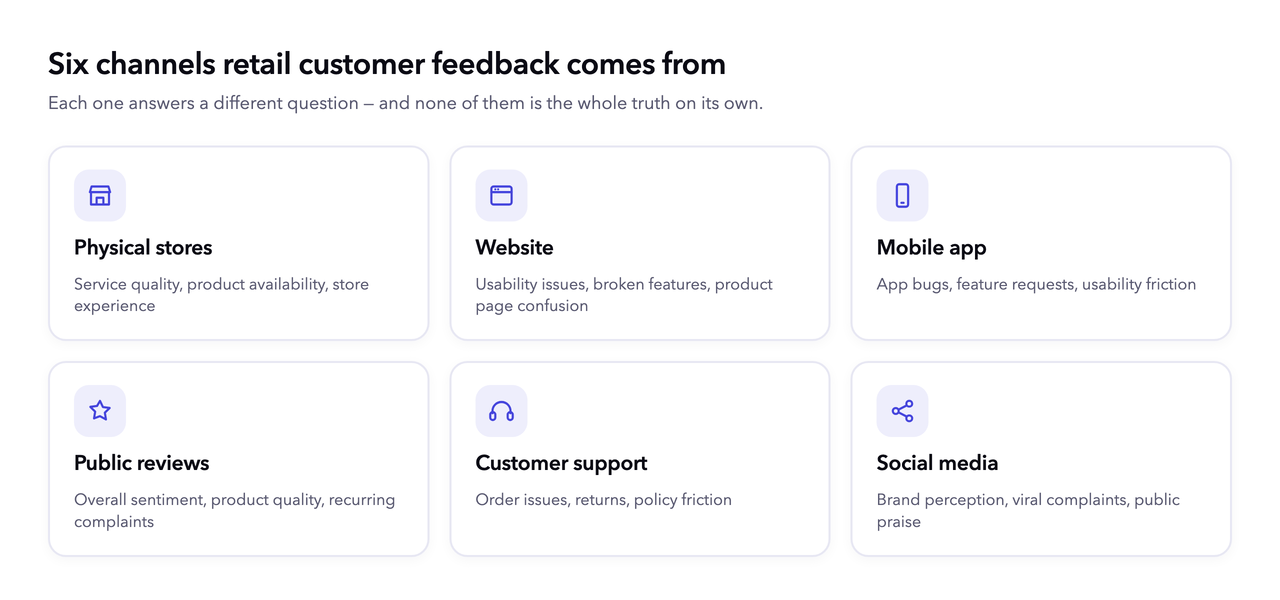
| Channel | What it tells you | Typical format |
|---|---|---|
| Physical stores | Service quality, product availability, store experience | Verbal comments, comment cards, post-visit surveys |
| Website | Usability issues, broken features, product page confusion | Feedback widget reports, session feedback, cart abandonment |
| Mobile app | App bugs, feature requests, usability friction | App store reviews, in-app feedback prompts |
| Public reviews | Overall sentiment, product quality, recurring complaints | Google, Trustpilot, marketplace reviews |
| Customer support | Order issues, returns, policy friction | Tickets, chats, emails |
| Social media | Brand perception, viral complaints, praise | Mentions, comments, DMs |
Each channel answers a different question. The mistake is treating any single one as the whole truth: public reviews skew loud, support tickets skew broken, and in-store comments mostly never get written down.
Why do customers stop giving feedback?
Survey fatigue is real, and it is getting worse. Customers today are asked for feedback after nearly every purchase, visit, and delivery, often several times for one interaction. Fortune reported in December 2025 that US firms would spend $36.4 billion that year on market research (per IBISWorld), an expense rising almost 4% annually, yet marketing experts say the flood of survey emails rarely produces meaningful insight. Retail industry commentary puts survey response rates for some retail brands as low as 2%.
The responses you do get are biased toward extremes. Surveys over-index on rants and raves: very angry and very delighted customers answer, while the quiet middle, the customers deciding whether to come back, stays silent. A dashboard built only on survey scores systematically misses them.
What works instead:
- Keep surveys short. One to three questions at the moment of the interaction beat a 15-question email a week later.
- Do not ask after every purchase. Cap how often any one customer sees a feedback request.
- Be careful with incentives. Gift-card rewards attract people who want gift cards, not people who want to help you improve.
- Show what changed. Customers keep giving feedback when they see evidence it is acted on: a fixed issue, a restocked size, a reply to their review.
- Add passive channels. A feedback widget that is simply there when a customer hits a problem captures signals no survey ever will, especially from customers who would otherwise leave silently.
What should customer feedback management software do for retail?
Good customer feedback management software does four things for a retail brand: it collects from every channel, structures what it collects, routes each item to an owner, and separates loyalty scores from the underlying signals. Here is what that looks like in practice.
Collect from every channel into one inbox. Store-level input, website reports, app feedback, and reviews should end up in one system with a shared structure, not four spreadsheets.
Tag by location, channel, and category. “Sizing complaint, Store 14” and “checkout bug, website” need different owners. Tagging is what turns a pile of comments into routable work.
Route to the team that can act. A broken product filter should reach the e-commerce developers, not sit in a marketing inbox. Automatic routing into tools like Slack, Jira, or Trello removes the manual forwarding step.
Separate scores from signals. Metrics like NPS, CSAT, and CES track how customers feel over time. NPS measures loyalty (would you recommend us), CSAT measures satisfaction with a specific interaction, and CES measures how easy something was, which matters a lot for e-commerce checkout. Bain’s methodology is the reference for measuring NPS properly. But every score tells you that something changed, not what. You need the underlying comments and reports, the raw voice of the customer, to know what to fix.
Report at store and channel level. Brand-wide averages hide local problems. A tool should answer “what are customers saying about Store 14 this month” as easily as “what is our overall trend.”
Retail teams sometimes ask me which feedback channel matters most. My answer is: the one where a customer just told you something and nobody wrote it down. Every tool we build exists so that sentence has somewhere to go.
Which customer feedback collection tools fit each channel?
The best customer feedback collection tools match the channel they are collecting from: what works on a receipt does not work on a checkout page. A practical retail setup usually combines a few.
In stores: short post-visit surveys via QR codes on receipts, and a simple internal way for associates to log verbal comments, the most valuable and most-lost feedback in retail.
On the website: a visual feedback tool lets customers and internal testers report exactly what they see, a broken filter, a confusing product page, a checkout error, through a feedback widget that attaches a screenshot, browser data, and console logs automatically. We have seen this repeatedly with retail and e-commerce teams using Ybug: the reports that get fixed fastest are the ones that arrive with technical context, because “the page does not work” alone is undebuggable.
In the app: prompt for in-app feedback at natural moments (after a completed order, not mid-checkout), and monitor app store reviews as a separate stream.
Reviews and social: monitor and reply publicly, then route recurring product complaints into the same tagged system as everything else so they count toward the same picture.
How do you unify in-store and online feedback?
Give every piece of feedback the same three labels: location (store number, website, app), category (product, service, technical, policy), and severity. That is the entire trick. Once a verbal comment from Store 14 and a website bug report share a structure, they can be compared, counted, and prioritized together.
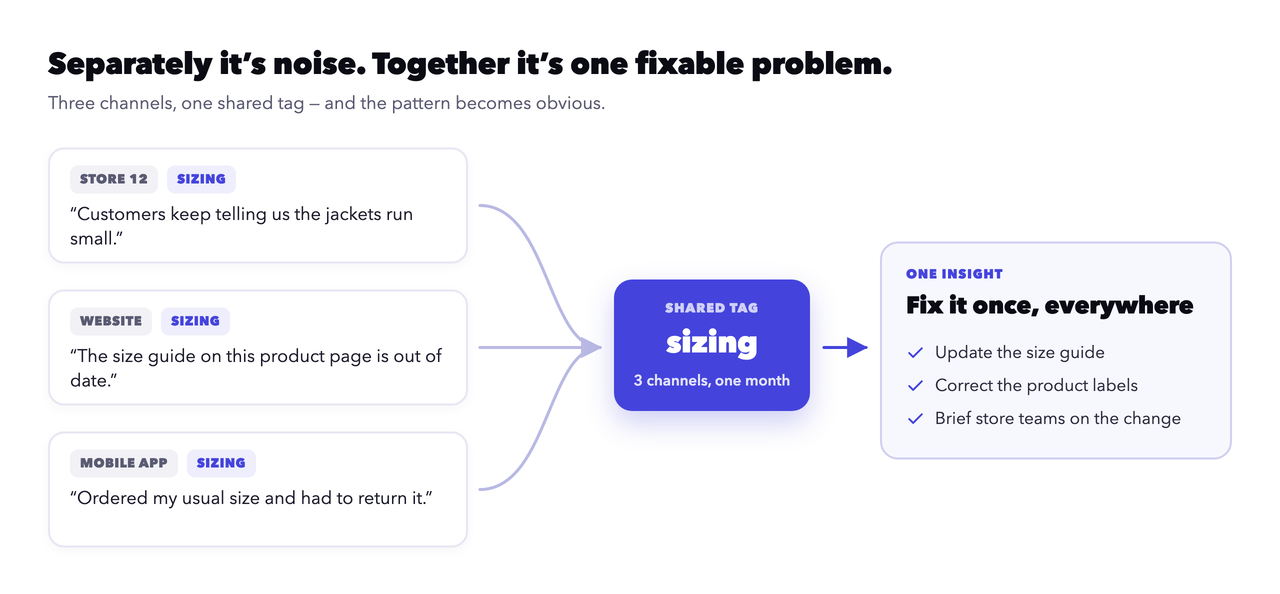
A practical example: a fashion brand notices “sizing” tagged complaints rising across three store locations and the website in the same month. In-store, customers say jackets run small. On the website, a feedback tool for e-commerce would show reports about the size guide being outdated. Separately, each channel looks like noise. Together, they are one fixable problem: update the size guide and the product labels.
For teams that want role-specific setup, a dedicated feedback tool for retail covers the store-plus-website combination that most brands run today.
What are the most common customer feedback management mistakes?
- Collecting without routing: feedback that lands in an inbox nobody owns is worse than not collecting it. The customer made the effort and nothing happened.
- Treating every channel separately: per-channel tools with no shared tagging mean the sizing problem above never becomes visible.
- Chasing the score instead of the signal: optimizing NPS by begging for 10s produces a nicer number and zero insight.
- Over-surveying loyal customers: your best customers interact most, so naive automation surveys them most, and burns them out first.
- Never closing the loop: if customers cannot see that feedback changed anything, participation quietly dies.
Most of these failures share one root cause: feedback with no structure and no owner. That is the problem an all-in-one tool exists to remove.
Ybug gives every website and app report a screenshot, browser data, and console logs, then routes it straight to the team that can fix it.
(no credit card needed)
How do you turn retail feedback into decisions?
Review tagged feedback on a fixed cadence, cross-functionally. Once a month, store ops, e-commerce, and product sit down with the same tagged dataset. The agenda writes itself: top categories by volume, by severity, and by trend.
Weight recurring signals over loud ones. One viral complaint is a PR task. Forty quiet reports about the same checkout step are a roadmap item. Because survey responses skew toward extremes, recurrence across channels is a more honest priority signal than intensity.
Close the loop visibly. Reply to reviews, post “you said, we did” updates, tell the store team what changed. For a deeper look at analyzing what you have gathered, see how to collect user feedback and turn it into analysis.
Where does a visual feedback tool fit among other feedback tools?
Retail feedback tooling roughly splits into three groups, and most brands end up using more than one.
Enterprise VoC platforms (such as Qualtrics or Medallia) run large-scale surveys and statistical modeling. They are powerful for big organizations but heavy and expensive to implement.
Lightweight survey builders (such as Typeform or Google Forms) are quick to set up for one-off research, but they do not capture the technical context behind a website problem.
Visual website and app feedback tools (such as Ybug) capture what a customer sees on your site, with a screenshot and technical data attached, and route it to the team that fixes it.
These are not competitors so much as different jobs. A survey tells you customers are unhappy with checkout. A visual feedback report tells your developers exactly which button fails, in which browser.
How does Ybug fit into your retail stack?
To be clear about what Ybug does and does not do: Ybug is a native visual feedback tool for your website and app, not a replacement for in-store surveys. It works as the central hub the rest of your feedback flows into.
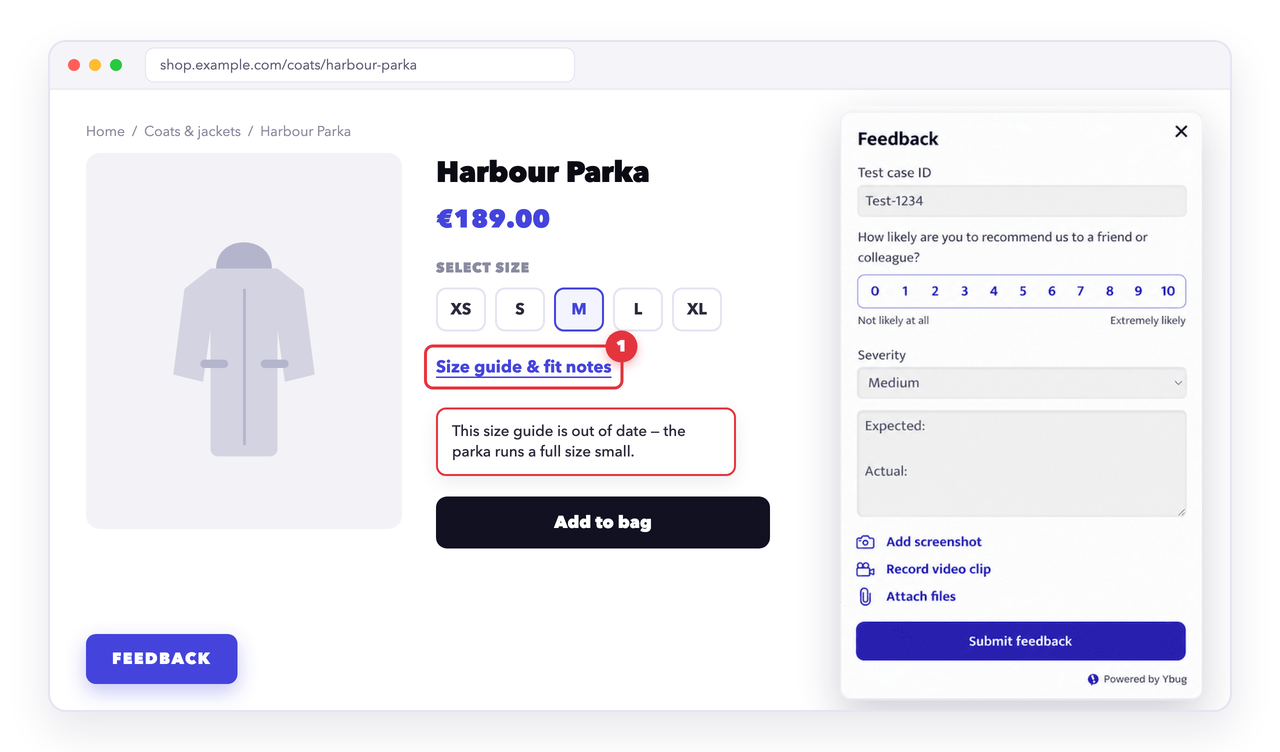
- On the website and in the app, Ybug natively collects visual feedback with full technical context: an annotated screenshot plus browser, OS, and console logs.
- From stores and review sites, data flows in through the REST API, webhooks, or email, so store-level and review feedback lands in the same place.
- Everything gets tagged by location, category, and severity, then routes automatically into the tools your team already uses, such as Jira, Slack, Trello, or email, via integrations.
That is the practical meaning of “all-in-one” here: not that one widget stands in every store, but that every channel’s feedback ends up in one tagged, routable system instead of four disconnected inboxes.
Put your website and app feedback in one tagged inbox, and route it to the people who can act on it.
(no credit card needed)