From pin to Story: Ybug now talks to Shortcut

What’s in this article
The new Ybug + Shortcut integration turns visual website feedback into fully contextualized Shortcut Stories automatically — no copy-pasting screenshots, no chasing browser details, no manual ticket creation.
If your team plans and ships in Shortcut, this one closes the last gap between “a user noticed something” and “a developer is fixing it.”

Bug reporting is still mostly copy-paste
Be honest about how a bug usually reaches your backlog. Someone spots a problem — a client, a tester, a teammate — and fires off a Slack message or an email. Maybe there is a screenshot. Almost never is there a browser version, an OS, a screen size, or a console error. So someone on your team plays detective: reproducing the issue, gathering the technical context, writing it up, and finally creating a Story in Shortcut by hand.
Multiply that by every report, every week. It is slow, it is error-prone, and the most useful details — the ones that make a bug reproducible — are exactly the ones that go missing.
Meet the Ybug + Shortcut integration
Today we are connecting Ybug directly to Shortcut. Ybug is the visual feedback widget that lives on your website or web app; Shortcut is where your team plans and ships. The Shortcut integration is the bridge between the two: feedback captured in Ybug becomes a Story in Shortcut, automatically, with all the context your developers actually need already attached.
No more retyping. No more “what browser were you on?” The report and the ticket are now the same thing.
How it works
The flow takes seconds for the reporter and zero effort for your team:
- Someone reports an issue. A user, client, or tester clicks the Ybug feedback button, draws on the screen to point at the problem, and adds a quick note.
- Ybug captures the context. In the background, Ybug grabs an annotated screenshot plus the technical metadata — browser, operating system, screen resolution, current URL, and JavaScript console errors.
- A Shortcut Story appears. Ybug instantly creates a Story in your Shortcut workspace, with the description, the screenshot, the environment details, and a link back to the original report. It lands in the Workflow State, Team, and Epic you chose.
By the time a developer opens the Story, everything is already there. The detective work is done.
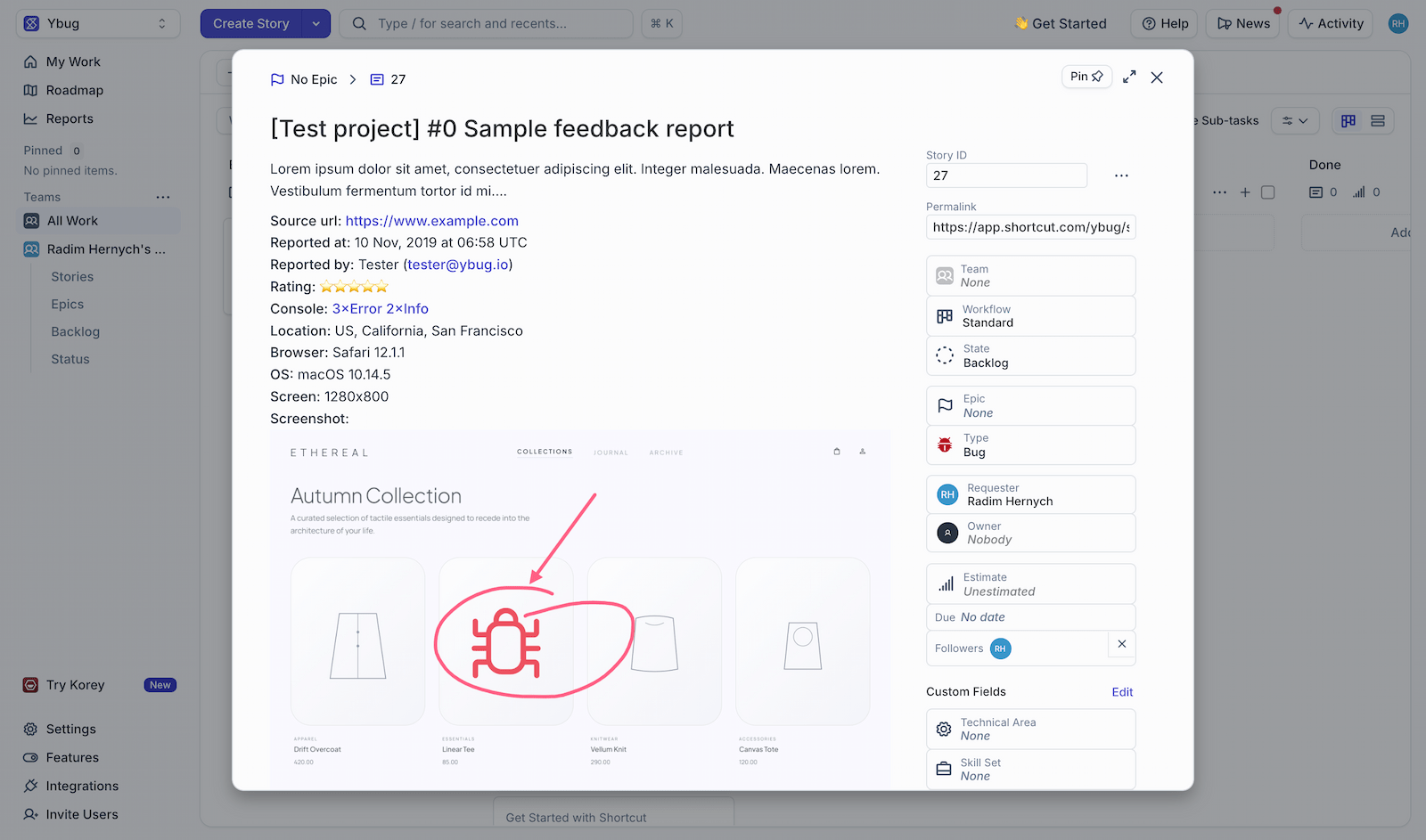
The best bug report is the one nobody had to write. With the Ybug + Shortcut integration, the reporter just points at what is wrong, and the developer gets a Shortcut Story with the screenshot, the browser, and the console errors already attached. That is the entire point of Ybug — remove the friction, keep the context.
Why your team will care
This is not just one less copy-paste. It changes how fast feedback turns into shipped fixes.
- Visual context for developers. Every Story includes an annotated screenshot and the exact environment, so “can’t reproduce” stops being the default reply.
- Faster triage for product managers. Stories arrive pre-labelled and routed to the right Team and Epic, so your backlog stays organized without manual sorting.
- Happier clients and testers. Non-technical reporters submit feedback in seconds and never touch Shortcut — perfect for agencies and UAT cycles.
- One source of truth. Feedback stops living in scattered emails and Slack threads. It becomes tracked, assignable work where your team already plans.
- A link back to the source. Every Story carries a link to the original Ybug report, so the full thread of context is always one click away.
Connect Ybug to Shortcut and turn every piece of website feedback into a ready-to-ship Story — with the screenshot and technical context captured automatically.
(no credit card needed)
How to turn it on
If you already run Ybug, you are about three clicks away:
- 1. Open your project’s integrations. In the Ybug dashboard, go to your project, open Integrations, and find Shortcut.
- 2. Connect your Shortcut workspace. Authorize the connection so Ybug can create Stories on your behalf.
- 3. Pick where Stories go. Choose the Workflow State, Team, Epic, owners, and labels for new Stories, then save. That is it — your next report becomes a Shortcut Story.
Stop transcribing bugs. Start shipping fixes.
Your team’s time is better spent fixing issues than transcribing them. The Ybug + Shortcut integration removes the manual middle step entirely, so feedback flows straight from the people who notice problems to the developers who solve them — context intact.


