Ybug + Linear: turn visual feedback into ready-to-triage issues

What’s in this article
Today we’re shipping a new integration: Ybug now connects to Linear. Every piece of visual feedback you collect can now land in your Linear workspace as a proper issue — with the screenshot, the technical context, and the reporter’s description already attached.
If your team runs on Linear, you know the appeal: it’s fast, keyboard-driven, and refreshingly free of clutter. The last thing you want is to break that flow by pasting screenshots, browser versions, and console errors into issues by hand — or worse, chasing a tester to ask “which browser were you on again?” Connect Ybug to Linear once, and that busywork is gone. No copy-paste. No back-and-forth.
What the Ybug + Linear integration does
Ybug is a visual feedback tool. You drop a small widget on your website or app, and anyone — a developer, a client, a non-technical tester — can click it, mark up the page, and describe what’s wrong. Ybug captures the messy technical details automatically in the background.
The Linear integration takes that report and forwards it straight into Linear as a new issue. You connect it once per project, pick the Linear team that should receive the issues, and you’re done. From then on, feedback shows up where your developers already work — ready to pick up, assign, and move across the board.
What lands in every Linear issue
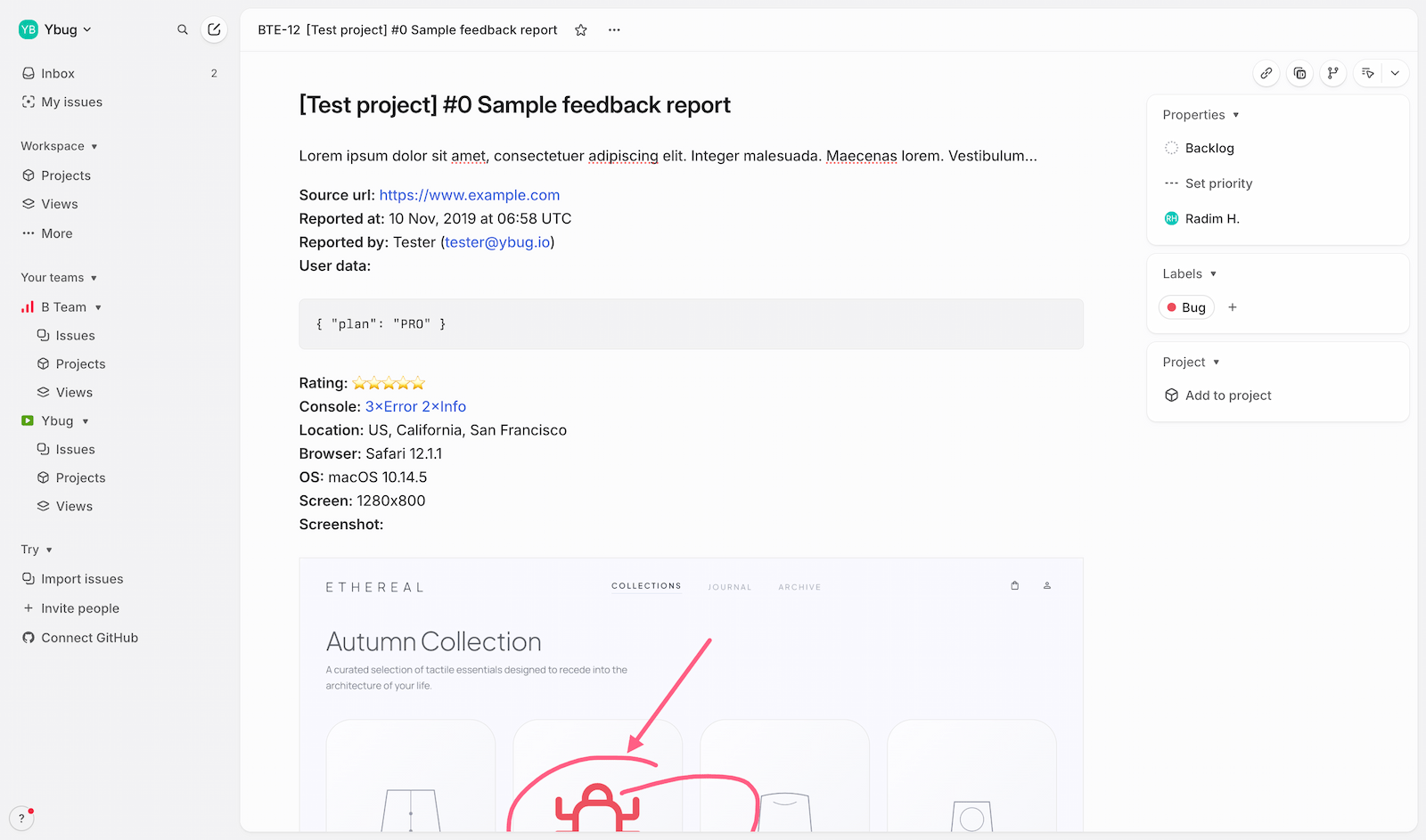
The whole point of Ybug is that nobody has to remember what to include in a bug report — the tool does it for them. Every issue created in Linear arrives with the receipts:
- An annotated screenshot or screen recording — the reporter draws on the page or records the exact flow, so you see precisely what they saw.
- The technical context — browser and version, operating system, screen size, and the exact page URL.
- JavaScript console logs — the errors that usually point a developer straight at the root cause.
- The reporter’s description — in their own words, mapped cleanly into the issue.
That means a developer opening the issue in Linear has everything they need to reproduce and fix — without a single follow-up question.
How to connect Ybug to Linear
Setup is per-project and takes about a minute. From your Ybug dashboard:
1. Open the Integrations tab in your project settings.
2. Flip the On/Off switch in the Linear row.
3. Authorize Ybug to create issues in Linear (a standard OAuth connect — no API keys to copy around).
4. Choose the Linear team where new issues should be created. Optionally pick a project, labels, and a default assignee, then save.
From that point on, your feedback flows into the right team, tagged the way you want it. If you manage several Ybug projects, you can point each one at a different Linear team.
Push automatically, or triage first
Not every team works the same way, so the integration runs in two modes.
Auto-push sends every new report to Linear the moment it arrives. It’s the right call for small, fast-moving teams who’d rather triage inside Linear than juggle a second dashboard.
Manual push keeps reports in Ybug first. A project manager or QA lead reviews each one, weeds out duplicates and noise, and pushes only the valid bugs — so your Linear backlog stays clean.
You can also turn on autoclose on push: once a report is sent to Linear, Ybug marks it closed automatically. Ybug becomes a quiet capture engine, and Linear stays your single source of truth.
Who it’s for
This one’s for the teams who picked Linear precisely because they hate friction. If you’re running user acceptance testing, collecting feedback from clients, or letting beta users report bugs, Ybug turns vague “it’s broken” messages into structured Linear issues your developers can actually act on.
It pairs especially well with how Linear-based teams think: capture fast, keep the board tidy, and spend your time fixing things instead of administering them.
The best integration is the one you forget is running. You set it up once, and feedback just shows up in Linear with everything a developer needs — the screenshot, the console log, the URL. That’s the whole job.
The Linear integration is available now. If you already use Ybug, head to your project’s Integrations tab to switch it on. If you’re new here, start a free trial — setup takes under five minutes, and you can have visual feedback flowing into Linear the same afternoon.