Voice of the customer template for SaaS teams

What’s in this article
- Key takeaways
- What is the voice of the customer?
- Why does VoC matter more for SaaS than other business types?
- What does a voice of the customer template look like?
- How do you collect user feedback for SaaS?
- What is the best voice of customer format for analyzing VoC data?
- What are the most common voice of the customer mistakes?
- How do you close the loop with customers?
- How do you build a VoC system that drives decisions?
- FAQ
Voice of the customer (VoC) is a structured approach to capturing what customers actually say about a product, in their own words, and turning that into evidence for product, pricing, and roadmap decisions. For SaaS teams specifically, it’s the difference between building what a small group of stakeholders thinks users want and building what users have actually told you, repeatedly.
Key takeaways
- Voice of the customer (VoC) turns scattered customer feedback into structured insights that support product, pricing, and roadmap decisions.
- The most effective SaaS VoC programs combine multiple feedback sources, including in-app feedback, support tickets, surveys, customer calls, and reviews.
- A standardized voice of the customer template makes it easier to identify recurring themes, prioritize issues, and track actions over time.
- Customer feedback should be analyzed by segment and business impact, not just by the number of requests or comments received.
- Closing the feedback loop by telling customers what changed because of their input increases trust, engagement, and future participation.
Without a VoC system, feedback lives in five different places: scattered Slack messages, a support ticket queue, an abandoned spreadsheet, an NPS survey nobody analyzed past the average score, and the memory of whoever was in the last customer call. None of that scales, and none of it settles a roadmap debate. That’s usually when teams start searching for a voice of customer template, but most generic voice of the customer templates online aren’t built for SaaS-specific concerns like renewal risk, expansion revenue, or segmented feedback by account size and role.
What is the voice of the customer?
In practice, a VoC program systematically captures customer feedback across surveys, interviews, support interactions, reviews, and in-app prompts, then converts it into structured insights that inform business and product decisions.
The “voice” part matters: VoC isn’t about quantitative metrics alone (NPS score, churn rate). It’s about preserving the customer’s actual language and context, so decisions are grounded in real input rather than a number stripped of its story.
A mature VoC program has three components: collection (gathering feedback across multiple channels), structure (organizing it into a consistent voice of customer format so patterns are visible), and action (feeding insights back into roadmap, support, and marketing decisions).
Why does VoC matter more for SaaS than other business types?
SaaS businesses live on retention and expansion revenue, not one-time transactions. That changes what’s at stake in customer feedback.
Churn is silent until it isn’t. A SaaS customer who’s frustrated doesn’t usually complain loudly. They quietly stop logging in, then cancel at renewal. VoC data, especially feedback gathered close to usage moments, surfaces frustration before it becomes a churn statistic.
Feature decisions compound. Every feature shipped either reinforces why customers stay or adds clutter that makes the product harder to use. Without VoC discipline, feature prioritization defaults to whoever argues loudest in a planning meeting, usually not a reliable proxy for customer need.
Segmented feedback matters more. A B2B SaaS company serving both administrators and end users, across SMB and enterprise accounts, hears fundamentally different things from each segment. A single aggregated NPS number flattens that signal into uselessness. VoC structured by account size, role, and use case keeps the nuance intact.
The teams that win roadmap debates aren’t the ones with the loudest opinions, they’re the ones with a system that turns customer evidence into a shared reference point everyone trusts. That’s what a real voice of the customer program does.
What does a voice of the customer template look like?
A simple, repeatable voice of customer format that works for most SaaS teams:
Voice of the customer entry
- Date:
- Source: [Survey / Support ticket / Sales call / In-app feedback / Review / Interview]
- Customer segment: [Account size / Role / Plan tier / Use case]
- Account value (ARR/MRR): [Annual or monthly recurring revenue for this account]
- Verbatim quote: [The customer’s exact words, don’t paraphrase]
- Theme / category: [e.g., Onboarding friction, Missing integration, Pricing confusion, Performance issue]
- Sentiment: [Positive / Neutral / Negative]
- Business impact: [What’s at stake: churn risk, expansion opportunity, support cost, etc.]
- Suggested action: [What this could inform: roadmap item, support doc, pricing page copy, etc.]
- Status: [New / Under review / Actioned / Archived]
Run this template consistently across every feedback channel (support tickets, sales call notes, NPS comments, in-app feedback) and you build a searchable record that reveals patterns no single conversation could show.
Example voice of the customer template entry
Here’s what a completed entry might look like in practice:
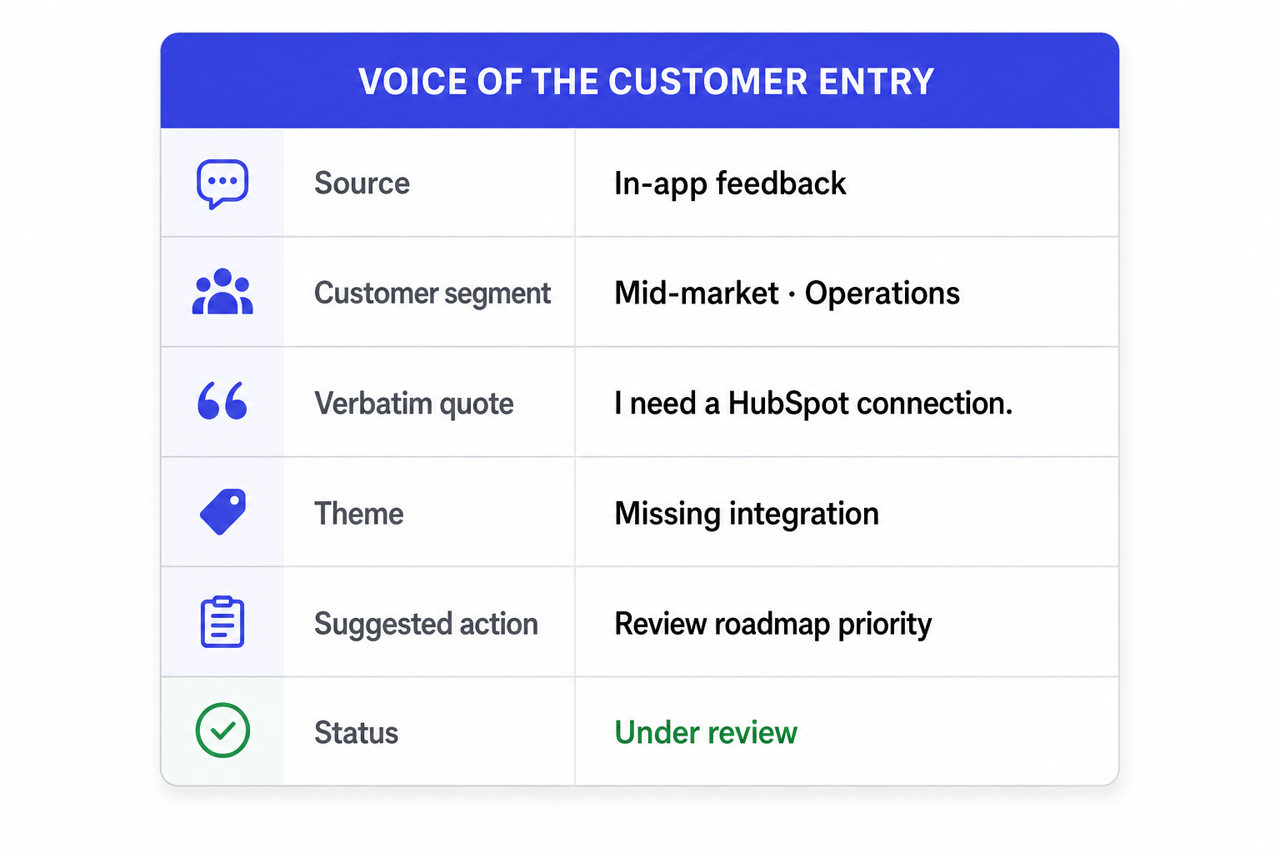
| Date | 2026-05-14 |
|---|---|
| Source | In-app feedback |
| Customer segment | Mid-market, Operations Manager, Pro Plan |
| Account value (ARR/MRR) | $18,000 ARR |
| Verbatim quote | “I keep exporting data to CSV because I can’t connect the product to HubSpot.” |
| Theme / category | Missing integration |
| Sentiment | Negative |
| Business impact | Expansion risk. The customer relies on manual workarounds and is evaluating alternatives. |
| Suggested action | Review HubSpot integration demand across similar segments and assess roadmap priority. |
| Status | Under review |
Download the voice of the customer template: choose the Excel version (.xlsx), CSV version, or Markdown version.
This type of voice of customer format preserves the customer’s actual language while giving product teams enough structure to identify recurring patterns across hundreds of feedback entries.
Pro tip: once your format is consistent, you can speed up tagging with an LLM. Feed a batch of verbatim quotes to a tool like ChatGPT or Claude and ask it to suggest a theme, a sentiment, and a likely business impact for each, following your own category list. A human still reviews the output, but the first pass takes minutes instead of hours. If the feedback already lives in Ybug, you can connect Claude or ChatGPT to Ybug and let it read the reports directly instead of pasting them in.
How do you collect user feedback for SaaS?
Collecting user feedback for SaaS products means meeting customers in the channels where they already are, not just the ones that are easiest to report on. Each channel below captures a different slice of the picture, and the most reliable programs pull from all of them rather than leaning on a single source. Usability research backs this up: Nielsen Norman Group’s work on collecting user feedback from real users shows how testing in context surfaces problems teams would otherwise miss.
A visual feedback tool installed directly in the app captures the richest signal, because users flag issues in the moment with screenshots and technical context attached. Here’s how the main SaaS feedback channels compare:
| Channel | What it captures | Best for |
|---|---|---|
| In-app feedback | Specific, in-the-moment reactions, with screenshots and technical context captured automatically | Catching UI confusion and friction while users are mid-task |
| Support tickets | Recurring problems, tagged by theme as they’re resolved | High-signal, low-effort theme tracking most teams underuse |
| NPS and CSAT surveys | Sentiment trends over time, plus the open-text “why” behind each score | Spotting shifts in overall satisfaction |
| Sales and CS calls | Unfiltered, verbatim feedback from accounts | Capturing context the product team rarely hears directly |
| Churn / cancellation surveys | What finally tipped a customer into leaving | Understanding the real drivers of churn |
| Public reviews (G2, Capterra, Trustpilot) | Structured, already-public feedback themes | Comparing outside perception against your internal VoC log |
Centralizing user feedback for SaaS
Many SaaS teams collect feedback from multiple channels but struggle to bring it together. Centralizing user feedback for SaaS products makes it easier to spot recurring issues, flag churn risks, and prioritize improvements based on real evidence rather than assumptions. We’ve seen teams using Ybug turn scattered in-app comments into a single, searchable VoC record, which makes recurring themes far easier to find.
A practical flow: capture feedback in-app with a visual feedback widget, route it automatically through an integration like Zapier, and land it in one central VoC document such as Notion, Airtable, or Productboard. Feedback and its technical context then flow into the same place your team already reviews, instead of living in five disconnected tools.
Capture contextual feedback inside your SaaS product and route it into the workflow your team already uses.
(no credit card needed)
What is the best voice of customer format for analyzing VoC data?
Tag consistently. Use a fixed taxonomy of themes, not freeform tags that multiply endlessly. “Onboarding,” “Pricing,” “Performance,” “Integrations,” “Missing feature”: a focused list of 8 to 12 categories is more useful than 80 inconsistent ones.
Segment before you aggregate. Look at feedback by account size, plan tier, and role before drawing conclusions. A pattern that’s true for enterprise admins might be irrelevant, or actively wrong, for SMB end users.
Weight by business impact, not just volume. Ten complaints from trial users matter less than two complaints from your top-spending accounts about to renew. An account-value (ARR/MRR) field makes this concrete: a few requests worth $50,000 in combined ARR can outrank dozens from free users. Build impact into your prioritization, not just frequency counts.
Review on a fixed cadence. Monthly VoC review meetings, with the same stakeholders attending consistently, turn this from a one-off exercise into an operating habit that actually changes roadmap decisions.
Look for what’s missing, not just what’s said. If a segment of customers never gives feedback through any channel, that silence is itself a signal, often correlated with disengagement and churn risk. Don’t only analyze the feedback you have; notice where you have none.
What are the most common voice of the customer mistakes?
Even teams that actively collect feedback often fail to get the full value from their voice of the customer program. The most common mistakes include:
- Collecting feedback without organizing it: Feedback spread across emails, support tools, Slack messages, and spreadsheets quickly becomes impossible to analyze. A consistent voice of customer template prevents important signals from getting lost.
- Focusing only on NPS scores: Metrics show what happened, but they rarely explain why. The comments attached to survey responses often contain far more actionable insights than the score itself.
- Treating all customers the same: Enterprise administrators, SMB users, and end users often experience the same product differently. An effective voice of customer format keeps feedback segmented by role, account size, and use case.
- Prioritizing volume over impact: Ten feature requests from free-trial users may be less important than two complaints from strategic customers approaching renewal.
- Failing to close the feedback loop: When customers never hear back about the feedback they’ve provided, participation declines and trust erodes over time.
Most of these mistakes trace back to feedback scattered across too many places. Capturing input, and the technical context behind it, in one spot removes the biggest source of mess.
See how Ybug captures in-app feedback with screenshots and technical context attached.
(no credit card needed)
How do you close the loop with customers?
The fastest way to kill a VoC program is to collect feedback and visibly do nothing with it. Customers notice when their input disappears into a void, and they stop giving it.
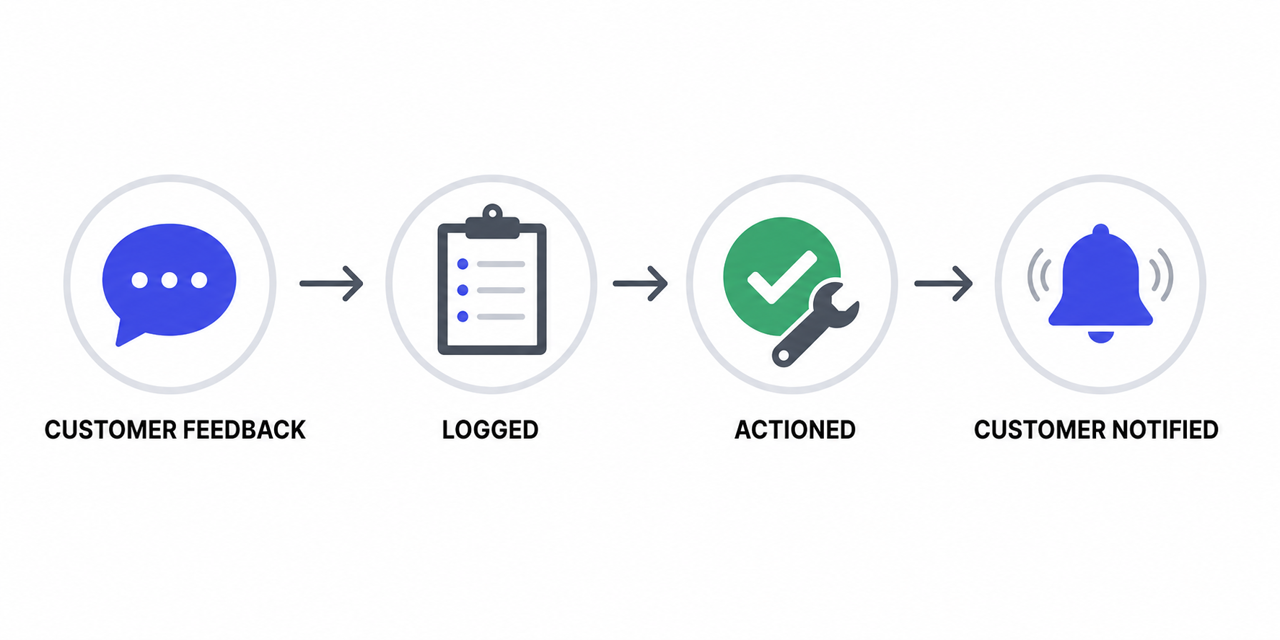
Acknowledge feedback immediately, even before you’ve decided what to do about it. A quick “thanks, we’ve logged this,” automated or manual, keeps the channel feeling worthwhile.
Tell customers when their feedback shaped something. When a requested feature ships, or a friction point gets fixed, notify the customers who specifically raised it. This is the single highest-leverage action in any VoC program, and the one most consistently skipped.
Make closing the loop visible internally too. Share a monthly “what we changed because of customer feedback” update with your whole team. It reinforces that VoC data is actually used, which keeps sales, support, and success teams contributing.
For SaaS teams already running structured QA testing or user acceptance testing cycles, the same feedback infrastructure can capture VoC signals during beta releases and feature rollouts, not just post-launch surveys. A single feedback channel, used consistently across QA, UAT, and live product feedback, gives you both bug reports and VoC data from the same pipeline.
How do you build a VoC system that drives decisions?
The best voice of the customer programs don’t rely on occasional surveys. They create a repeatable process for collecting, organizing, analyzing, and acting on feedback across the whole user journey.
Consistency matters more than complexity. A simple voice of customer template used across every channel will almost always outperform a sophisticated system nobody maintains.
For SaaS teams, the goal isn’t collecting more feedback, it’s building a trusted source of customer evidence that helps product, support, and leadership make confident decisions. If you want to capture that feedback directly inside your product, a feedback widget gathers contextual insights the moment users hit friction, making VoC data far more actionable.


