Jira Issue Collector alternatives: what to use in 2026

What’s in this article
The Jira Issue Collector is a free embeddable form that turns website feedback into Jira issues. It still works, but it hasn’t seen meaningful updates in years, and teams that rely on it keep hitting the same walls: no screenshots, no console logs, no support for team-managed projects. Here’s what to look for in a replacement, and five tools that do the same job better.

Key takeaways
- The Issue Collector isn’t officially deprecated, but it’s effectively unmaintained: the docs still reference Jira 5.1, custom triggers require jQuery, and team-managed projects aren’t supported at all.
- The biggest gap is context. The collector sends whatever the reporter typed. Modern tools attach an annotated screenshot, console logs, and environment info automatically.
- A replacement doesn’t mean leaving Jira. Every tool in this list creates Jira issues; the difference is what arrives on the issue.
- Check where Jira integration sits in the pricing. Some tools gate it behind their most expensive plans; others include it from the cheapest tier.
- Migration is a snippet swap. These tools embed the same way the collector does, so switching usually takes minutes, not a project.
What is the Jira Issue Collector, and who uses it?
The Issue Collector is Atlassian’s free, built-in way to collect bug reports into Jira from a website. You configure a form in Jira, embed a JavaScript snippet on your site, and visitors can submit feedback without a Jira account. Each submission becomes a Jira issue.
For years it was the obvious choice for exactly the teams reading this: agencies gathering client feedback on staging sites, product teams collecting bug reports from testers, and support teams giving users a way to report problems without email. It was free, it was already in Jira, and it did the one thing it promised.
That promise hasn’t changed since roughly 2012. The problem is that everything around it has.
Why is the Jira Issue Collector not working for teams anymore?
To be precise: Atlassian has not discontinued or deprecated the Issue Collector. It still functions. But it’s effectively abandoned, and it shows in specific, verifiable ways:
- No meaningful updates in years. Atlassian’s own documentation still references Jira 5.1 (released 2012) and recommends inspecting pages with Firebug, a developer tool discontinued in 2017.
- No team-managed project support. The collector only works in company-managed projects. If your team uses team-managed projects (the default for many newer Jira sites), the collector simply isn’t available, which is the most common reason behind “issue collector not working” searches.
- No screenshots or annotation. Reporters describe what they see in words. Attachments are manual. There’s no way to draw an arrow at the broken button.
- No technical context. At most, the collector records basic browser statistics. No console logs, no JavaScript errors, no viewport size, none of the details a developer needs to reproduce a bug.
- A dated reporter experience. Custom triggers require jQuery, styling the form is fiddly, and the widget predates the way modern sites are built.
None of this means Jira is the wrong destination for bug reports. It means the intake end of the pipeline is where the collector falls short. That’s the part worth replacing.
What should a replacement do?
Whatever you pick should clear four bars the collector can’t:
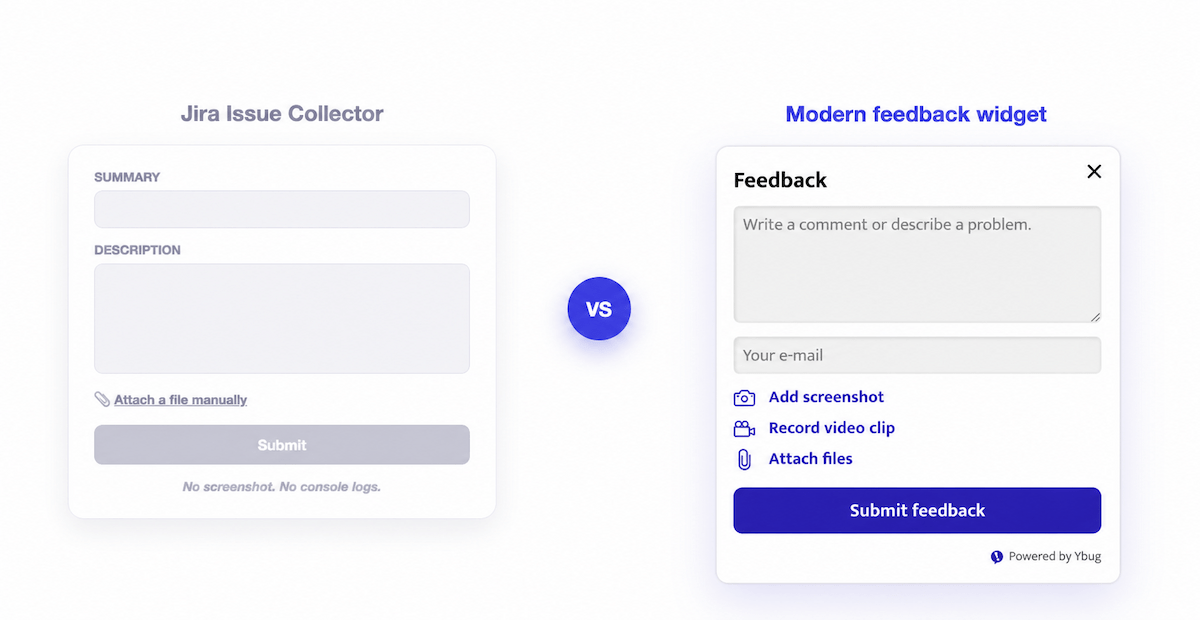
- Capture evidence, not just prose. An annotated screenshot of the page, taken at the moment of reporting, removes most of the “can you describe what you saw?” back-and-forth.
- Attach the technical trail automatically. Console logs, JavaScript errors, browser, OS, viewport, and URL should arrive with the report, without the reporter doing anything.
- Keep the frictionless intake. The collector got one thing right: reporters don’t need a Jira account. A replacement shouldn’t reintroduce logins, and it shouldn’t charge you per reporter either.
- Create real Jira issues. Reports should land in the Jira project and issue type you choose, so triage, sprints, and workflows stay exactly where they are.
With that lens, here are five alternatives worth considering.
The 5 best Jira Issue Collector alternatives in 2026
1. Ybug — the closest drop-in upgrade
Ybug works the way the Issue Collector does: one JavaScript snippet on your site, a feedback button on the page, no account needed to report. The difference is what each report carries. Reporters annotate a screenshot of the page (draw, highlight, comment), and Ybug automatically attaches JS console logs, JavaScript errors, browser, OS, viewport, and the exact URL.
The Jira integration creates issues in the project and issue type you choose, either automatically or after you review reports in Ybug first. It works with Jira Cloud and Jira Server/Data Center, and the setup guide covers it in a few minutes. When intake outgrows Jira-only, the same widget feeds Slack, Trello, GitHub, ClickUp, and 25+ other tools, plus webhooks and a REST API.
Pricing: a Free Forever plan for small projects; paid plans are flat, not per seat. BASIC (€13/month) covers 3 team members and includes all integrations; STARTUP (€29/month) covers 7 and adds screen recording. Reporters are always unlimited and free. There’s a 10-day free trial of the paid features.
Best for: teams that want the collector’s simplicity with screenshots, console logs, and integrations added, at a price that doesn’t scale with headcount. See the full Ybug vs Jira Issue Collector comparison.
2. Marker.io — deep Jira sync for larger teams
Marker.io is a website feedback widget with a polished reporter experience and strong project-management-tool integrations. Reports include annotated screenshots and technical metadata, and its Jira integration supports 2-way sync, so status changes in Jira reflect back.
The catch is where Jira sits in the pricing: it’s not included on the Starter plan ($39/month billed annually, 3 users). Jira with issue sync starts on the Team plan at $149/month billed annually (15 users). If you’re replacing a free collector for a three-person team, that’s a significant jump.
Best for: larger teams and agencies that want 2-way Jira sync and will use enough seats to justify the Team plan.
3. Usersnap — feedback platform with surveys on top
Usersnap started as a screenshot-feedback tool and has grown into a broader feedback platform: bug reports, feature requests, surveys, and ratings in one place. Reports can include screen captures and environment data, and it integrates with Jira alongside 50+ other tools, with 2-way Jira sync available on its Professional tier and up.
Plans are tiered by seats and active projects (Starter covers 5 seats and 5 projects; higher tiers raise both), and the trial ends after 20 collected feedback items. It’s more product than most collector replacements need, which is either a bonus or overhead depending on your roadmap.
Best for: product teams that want bug reporting and structured user research (surveys, NPS, feature voting) in a single tool.
4. BugHerd — visual feedback pinned to page elements
BugHerd takes a different approach: feedback is pinned to live page elements, and tasks are managed on a kanban board inside BugHerd itself. Reporters can comment directly on the part of the page they mean, and each task records technical details like browser and OS.
Pricing starts at $42/month billed annually (Standard, 5 members) with unlimited client users and projects. Note the Jira integration is gated to the Premium plan at $125/month billed annually (25 members), so if Jira is the center of your workflow, the entry plans won’t connect to it.
Best for: agencies that want a self-contained visual feedback board for client review, and don’t mind Jira being a premium-tier add-on.
5. Jam.dev — browser extension for internal teams
Jam is a Chrome extension rather than an embedded widget. Team members install it, and one click captures a screenshot or recording with console logs, network requests, and device info bundled in. Its Jira integration is available even on the free plan (30 captures/month), and the paid Team plan is $14 per creator/month billed yearly.
The extension model is Jam’s strength and its limit: it’s excellent for developers and QA who install it once, but you can’t ask a client or an end user to install a browser extension just to report a bug. There’s no on-page widget for visitors, which is the exact use case the Issue Collector served.
Best for: internal dev and QA teams reporting bugs to each other. Less suited for collecting feedback from clients or end users.
How the alternatives compare
| Tool | Reporter experience | Console logs | Jira integration | Starting price |
|---|---|---|---|---|
| Ybug | On-page widget, no account | Yes, automatic | All paid plans, from €13/mo flat | Free plan; €13/mo |
| Marker.io | On-page widget, no account | Yes, automatic | Team plan ($149/mo annual) | $39/mo annual |
| Usersnap | On-page widget | Yes | Included; 2-way sync on Professional+ | Seat-tiered plans |
| BugHerd | Pinned to page elements | Browser/OS details | Premium plan ($125/mo annual) | $42/mo annual |
| Jam.dev | Chrome extension (installed users only) | Yes, automatic | Free plan and up | Free; $14/creator/mo |
| Jira Issue Collector | Embedded form | No | Native (Jira only) | Free with Jira |
Prices checked in July 2026; check each vendor’s pricing page for current numbers.
How to migrate from the Issue Collector to Ybug + Jira
The migration is smaller than the word suggests. There’s no data to move: your existing Jira issues stay exactly where they are. You’re only changing what happens at the intake end.
- Create a Ybug account and a project for your site. The free trial doesn’t need a credit card.
- Swap the snippet. Remove the Issue Collector script from your site and add Ybug’s snippet in the same place. If you deploy via a tag manager or CMS plugin, it’s the same one-line change.
- Connect Jira. In Ybug’s integration settings, authenticate with Jira Cloud (API token) or Server/Data Center credentials, then pick the destination project, issue type, and an optional default assignee. The Jira integration docs walk through each step.
- Choose the handoff. Send every report to Jira automatically (collector-style), or keep auto-forwarding off and push only triaged reports from the Ybug dashboard.
- Test it. Open your site, click the feedback button, annotate the screenshot, and submit. The issue should appear in Jira with the screenshot attached and console logs, browser, OS, and URL included.
From the reporter’s side nothing gets harder: still no account, still reporting from the page. From your side, issues start arriving with the context the collector never captured.
Swap the snippet, connect Jira, and get bug reports with the evidence attached.
(no credit card needed)

![Best bug tracking software & tools [2026 comparison]](https://ybug.io/images/blog/featured/best-bug-tracking-software.avif)