

Installs with one prompt
Copy your Ybug snippet and ask Macaly’s agent to add it, the same way it adds Google Analytics or Hotjar. No code to edit by hand.
Add a feedback button to your Macaly site or app with one prompt. Clients and testers mark up a screenshot right on the page, and each report arrives with the URL, browser, viewport, and JS console logs. Then Macaly’s agent can read the report and fix it.
Start free trialNo credit card required













Your client opens the site, spots a pricing table that breaks on mobile, clicks the widget, circles it, and hits send. No Macaly account, no screen-share, no “see attached screenshot” email. You get an annotated screenshot of exactly what they saw.
“The form doesn’t work” gives Macaly’s agent nothing to go on. Ybug stamps each report with the URL, browser, OS, viewport, and screen size, plus the JS console errors from the moment it was sent. That’s the context a fix starts from.

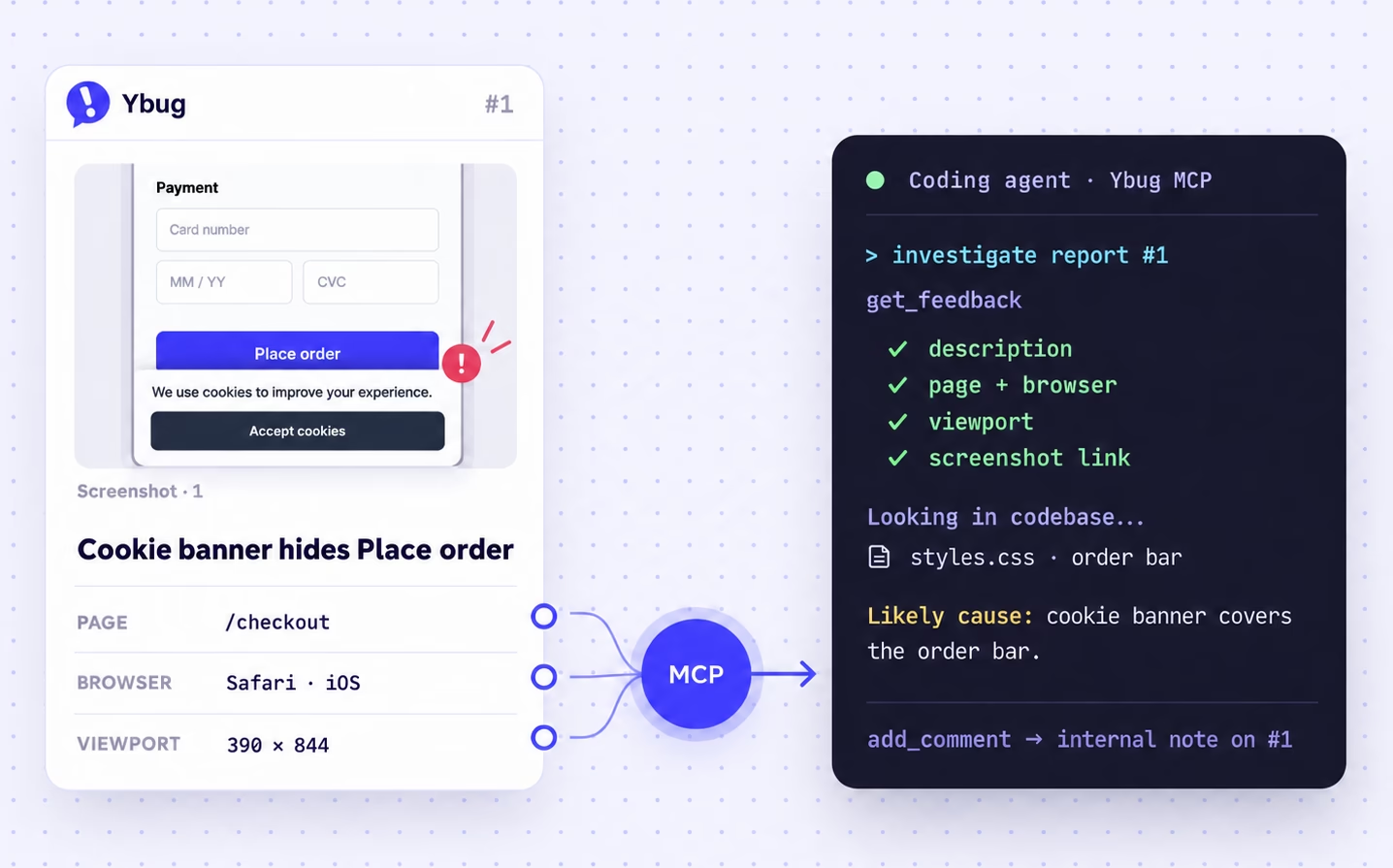
Add Ybug to Macaly as an MCP server, and its agent can read your reports: the description, page URL, browser, and console errors. Ask it to fix the form bug your client sent this morning, and it changes the project in the same chat. See the setup guide.
Need to know which device they used or what they expected to happen? Reply from the Ybug report and your message lands in their inbox. Their answer comes back to the same report, next to the screenshot.

The feedback button shouldn’t look bolted on. Match colors, fonts, copy, position, dark mode, and language, or hide the default button and ask Macaly to open Ybug from your own button via the JS API.

For agencies and small teams shipping client sites and web apps in Macaly, and reviewing them with clients who never open the editor.
Copy your Ybug snippet and ask Macaly’s agent to add it, the same way it adds Google Analytics or Hotjar. No code to edit by hand.
A report with a screenshot, URL, and console errors is something Macaly’s agent can work with. “It’s broken” is not.
Give each client site its own Ybug project, so feedback never mixes. It pairs well with Macaly’s separate workspace per client on its agency plans.
Clients and testers don’t need a Macaly or Ybug account. Anyone on the page can report, and reporters are always free and unlimited.
One prompt adds the widget. Publish, share the link, and start collecting visual feedback.
Start a free 10-day trial, no credit card needed. Create one project for the Macaly site or client you want to test.
Copy your Ybug snippet and send it in the Macaly chat: “Add this snippet so it loads on every page, before the closing </body> tag.”
Click Publish, then share your macaly.app address or custom domain with clients or testers. Reports land in Ybug with the screenshot and context attached.
Ybug is intuitive and easy to use for someone who by nature is not technical. It is quite flexible - where some tools are limited to bug reporting, we use Ybug not only to report bugs, but to also solicit feedback on specific pages and products. Ybug also provides an invaluable screenshot that enables a customer to show us the exact issue. On top of this, service is excellent.

Founder & President at TrophyCentral

There are 3 main features that I like the most: 1. Unlike other feedback software that we used before, Ybug is easier to launch for each project. It typically takes 2-3 minutes to add a project to Ybug and start sending feedback. 2. It has a nice Chrome extension, which allows to capture screenshots on any website and tag to any project that we are currently working on. 3. Ybug integrates nicely with Teamwork (our PM tool), so each feedback that is submitted on the development websites - is automatically created as a task for our development team.

Project manager

</body> tag. Publish the site and the feedback button appears on your live pages.Settings > MCP Servers, add Ybug as a server with OAuth sign-in, and sign in with your Ybug account. Macaly’s agent can then read your reports, including the page URL, browser, device, and console errors, and change your project to fix them. Reading reports needs the BASIC plan; adding notes and changing the status needs STARTUP.Add the snippet with one prompt, share the site, and turn vague notes into reports Macaly can fix.
Start free trialNo credit card required


 Ask Macaly to add the snippet