Custom statuses and a new Kanban board for your feedback

What’s in this article
- Four statuses were never going to fit everyone
- Build the workflow your team already uses
- Backlog: a place for “yes, but not yet”
- The board makes the workflow visible
- Triage without opening a single report
- A board also has to handle the untidy cases
- The API follows the same workflow
- What hasn’t changed
- Beta, and what comes next
- FAQ
Feedback rarely moves from Open to In progress to Resolved in a neat line. An agency waits for a client. A QA team sends work back for retesting. A product team accepts an idea months before it is ready to build.
Ybug used to flatten all of that into four fixed statuses. Now you can build those stages into Ybug, decide how they behave, and see the resulting workflow as a Kanban board. The statuses and the board arrived together because one defines the process and the other makes it visible.
Four statuses were never going to fit everyone
Open, In progress, Resolved and Closed cover the simplest path through a piece of feedback. They are a sensible default, but until now they were also the only path Ybug could describe.
Teams worked around that limit with tags. A “waiting-for-client” tag could explain why a report had stopped moving, but the report still sat in In progress beside everything being actively worked on. Tags add context; they don’t create a stage, carry the meaning behind it, or become a column you can plan from. Once the number of reports grows, that distinction becomes hard to ignore.
Build the workflow your team already uses
Most teams already have names for the stages that were missing from Ybug. The new Statuses page in your team settings brings that language into the product instead of making you translate it during every triage.
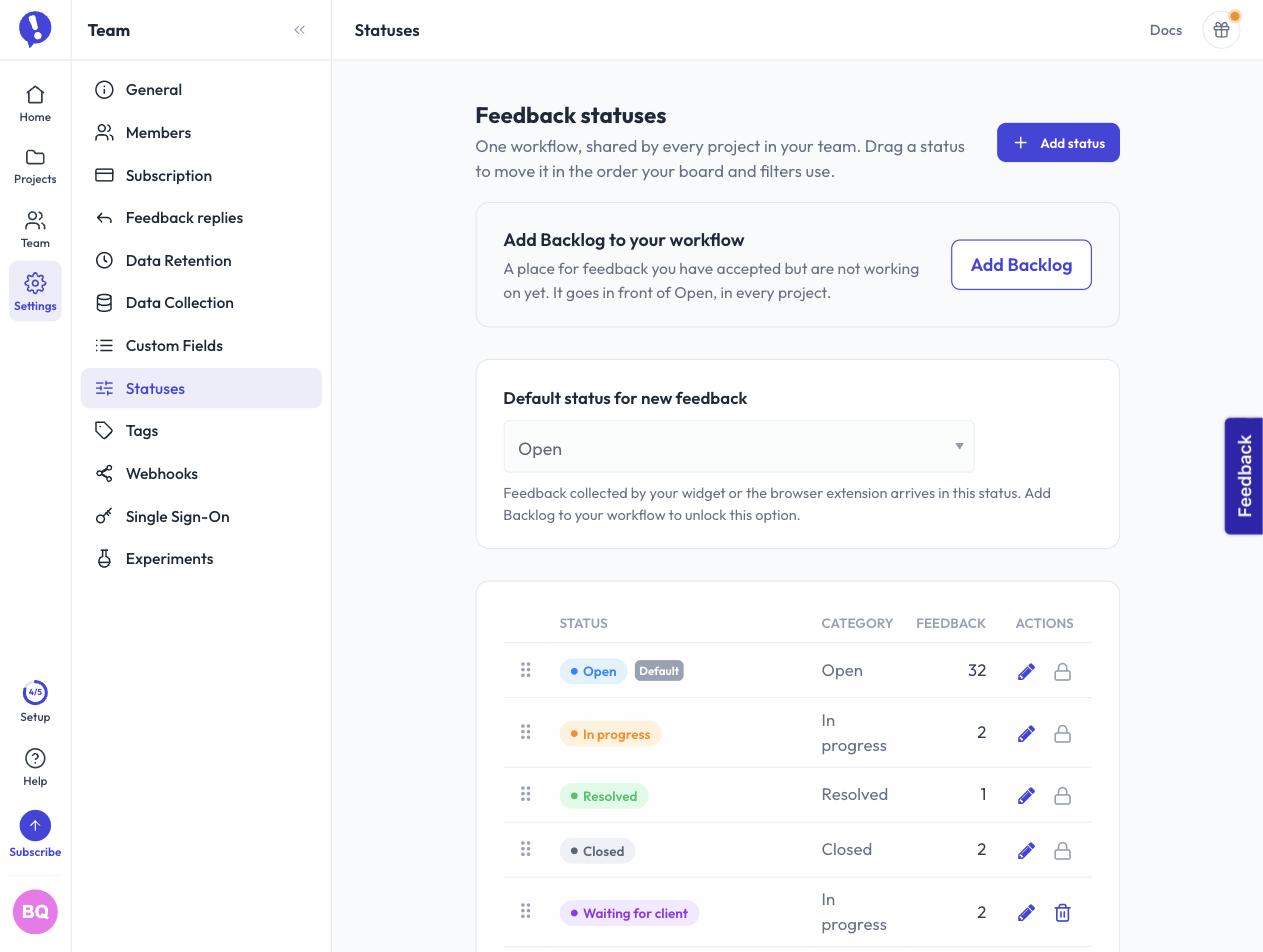
You can rename and recolor built-in statuses, add your own, and drag the workflow into order. That order is then used by filters, dropdowns and board columns. If your team says “Triage” instead of “Open”, Ybug can now say the same thing.
The workflow belongs to your team rather than a single project. Set it up once and every project uses the same stages. That consistency is useful for an agency running many client projects, but it also means a change affects everybody, so workflow management stays with team administrators.
A name explains a status to people; its category explains it to Ybug. Choose whether a new status behaves like Open, In progress, Resolved, Closed or Backlog, and Ybug uses that meaning for open counts and automatic replies. A custom “Waiting for client” status can behave as an in-progress stage without another set of automation rules.
Backlog: a place for “yes, but not yet”
Making the workflow editable exposed an ambiguity in Open. It can mean feedback nobody has reviewed yet, or feedback you have accepted but don’t intend to work on now. When both live in the same place, a long Open list tells you very little about how much triage is left.
Backlog gives the second group somewhere to go. New accounts start with it in front of Open. Existing accounts keep the four statuses they already had and can add Backlog from status settings when it fits their process.
You can also choose whether feedback from the widget and browser extension arrives in Open or Backlog. Sending it to Backlog creates a holding area for everything new, while Open becomes a shorter list of work you have reviewed and accepted. Leaving Open as the default works just as well for teams that prefer to triage there.
The board makes the workflow visible
Once statuses describe the real steps in your process, a flat list starts hiding the shape of the work. You can filter for “Waiting for client” or “Ready to retest”, but you still have to assemble the whole project in your head to see where work is piling up.
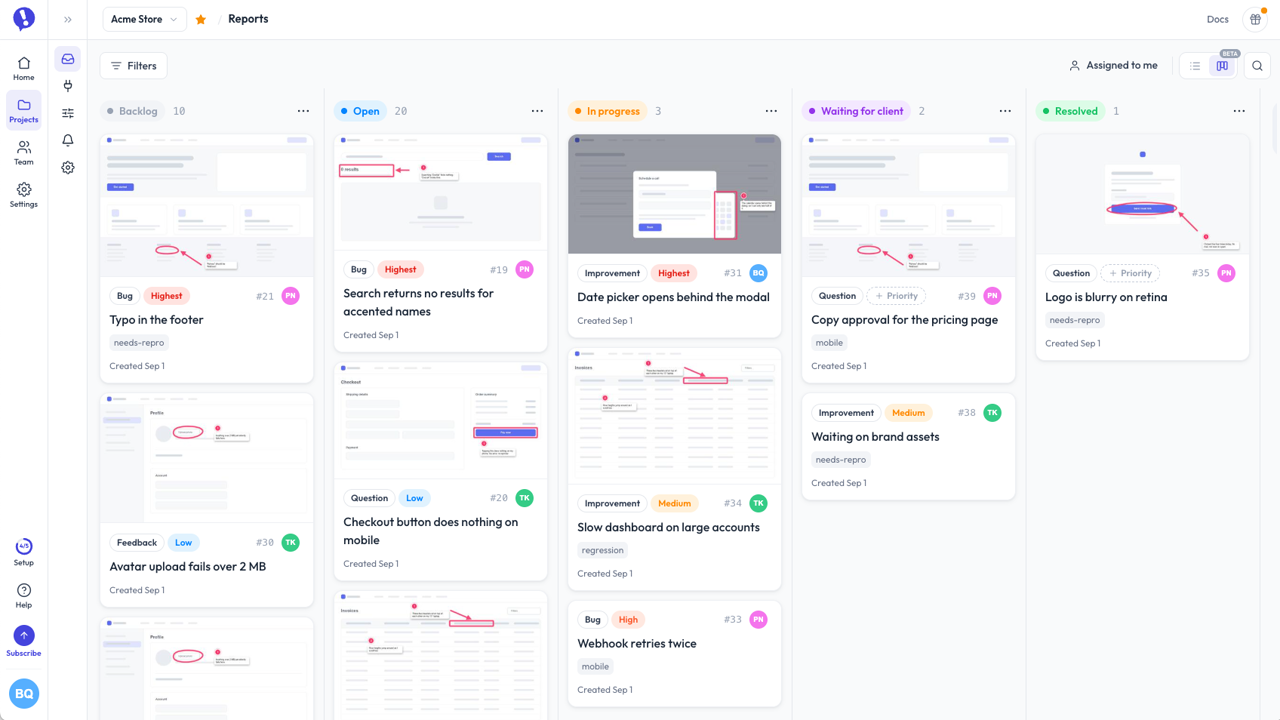
The new board view makes that shape visible. Switch views from the top right and Ybug lays out your statuses as columns, in the order you chose in team settings. Feedback becomes cards with screenshots on top, so you can recognize both the stage and the issue without opening every report.
Drag a card into another column to change its status, or move it within a column to decide what should come first. It is still the same status change as anywhere else in Ybug: the history is recorded, and automatic replies still go out when feedback reaches a resolved status.
We decided that the order inside a column should belong to you. The board could have sorted everything by priority or the last update, but then a card placed at the top might move when you returned. Drag it up or down and it stays there. A board is a plan, and a plan that quietly rearranges itself isn’t much of a plan.
The screenshot stays on the card for the same reason. The capture is often enough to recognize a report before you read its title. The board should help you decide what needs attention, not send you through five detail pages to find it.
Triage without opening a single report
Seeing the work is only half the job. Triage also means deciding what each report is, how urgent it is and who should handle it. Opening every report for those decisions would turn the board into a slower version of the list.
Type, priority and assignee are therefore editable right on the card, the same dropdowns the list already puts next to a report. This is the part I use most: after a busy week, I can drag a card into the right status, set its priority and hand it to someone, then do the same for the next card, without losing the shape of the column I’m working through.
A board also has to handle the untidy cases
A real board eventually becomes wider than the screen, grows a long column, or includes a stage you need only occasionally. The less obvious behavior is there for those conditions:
- Your filters come with you. Filter by tag or assignee, switch views, and the filter remains applied. Status filters disappear because statuses are already the columns.
- Quiet columns can fold away. Collapse column turns one into a narrow strip that keeps its count and accepts dropped cards. Your browser remembers the choice for that project.
- Long columns load a page at a time. Thousands of reports don’t have to download before the board becomes useful.
- Wide boards pan by dragging. Click and drag any empty spot on the board, not just the scrollbar, to slide it sideways.
- Each project remembers its view. Return to a project and it opens as the list or board you last used.
Shape your feedback workflow with custom statuses and manage it from the new board view.
(no credit card needed)
The API follows the same workflow
Custom names make hard-coded labels unreliable, so the REST API now exposes the workflow itself. GET /v1/teams/{teamId}/statuses and GET /v1/projects/{projectId}/statuses return ordered statuses with their names, categories, colors and positions. Existing feedback fields haven’t moved, built-in IDs keep their established meaning, and custom IDs start at 100 within each team.
What hasn’t changed
The list view isn’t going anywhere. Search, filters, sorting, bulk actions and exports still belong there, while the board gives you another way to understand and move the same feedback.
Existing accounts also keep the exact four statuses they had before this release, with the same names and colors. Backlog appears only if you add it, and new feedback continues to arrive in Open until you choose another default. The new workflow is available without rewriting the one you already use.
Beta, and what comes next
The board carries a Beta label because this first version has a clear boundary: statuses become columns, cards move between them, and the main triage fields are editable in place. Dragging is a mouse gesture today. On a phone or tablet, the board is readable and the card menus work, while a swipe moves the board rather than picking up a card.
What we improve next should come from the workflows that meet this version in the real world. If yours exposes an awkward corner, open Help in the dashboard and choose Submit feedback. You’ll be sending feedback about Ybug through Ybug, with a screenshot of the exact screen you are looking at. We couldn’t really pass up that opportunity.